
1. Увод
This manual provides detailed instructions for the setup, operation, and maintenance of your Koss HG857 Portable CD System. The HG857 is a versatile audio system featuring a CD player, digital AM/FM tuner, and dual cassette decks, designed for both portable use and as a compact stereo system. Please read this manual thoroughly before using your unit to ensure proper operation and to maximize its performance.

Слика 1: Предња страна view of the Koss HG857 Portable CD System with the CD compartment open, showing the main unit and detachable speakers.
2. Подешавање
2.1 Распакивање
Carefully remove all components from the packaging. Ensure you have the main unit, two detachable speakers, the remote control, and this instruction manual. Retain the packaging for future transport or storage.
2.2 Повезивање звучника
The Koss HG857 features detachable speakers. Connect the speaker wires from each speaker to the corresponding speaker terminals on the rear of the main unit. Ensure correct polarity (red to red, black to black) for optimal sound.

Слика 2: Задња страна view of the Koss HG857 system, showing the main unit with detachable speakers connected, highlighting the speaker terminals and power input.
2.3 Напајање јединице
АЦ Повер
Connect the AC power cord to the AC inlet on the rear of the unit and then plug it into a standard AC 120V, 60Hz wall outlet.
Снага батерије
For portable use, the unit requires 8 D-size batteries. Open the battery compartment on the bottom of the unit and insert the batteries, observing the correct polarity (+/-) as indicated.
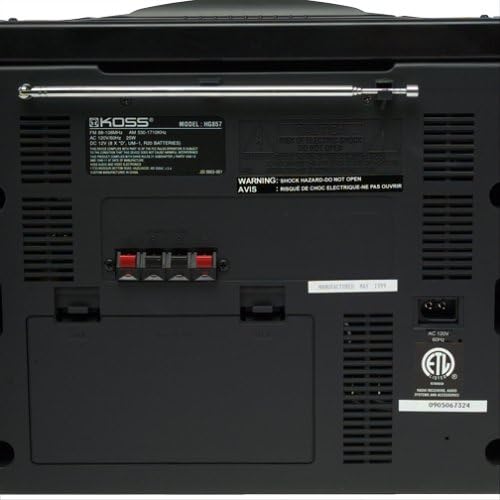
Слика 3: Детаљно view of the Koss HG857 rear panel, showing the AC power input, speaker terminals, and the extendable FM antenna.
2.4 Подешавање антене
For FM reception, extend the telescopic antenna fully. For AM reception, the unit uses a built-in ferrite bar antenna; rotate the unit for best reception.
3. Операција
3.1 Основне контроле
- Дугме за укључивање: Притисните да укључите или искључите јединицу.
- Контрола ВОЛУМЕ: Окрените да бисте подесили укупни ниво звука.
- Контрола БАЛАНЦЕ: Adjusts the balance between the left and right speakers.
- DYNAMIC BASS BOOST (DBB): Activates or deactivates enhanced bass response.
3.2 Рад CD плејера
- Отворите поклопац одељка за ЦД.
- Поставите CD са страном са етикетом окренутом нагоре.
- Затворите поклопац одељка за ЦД.
- Притисните тастер ЦД/АУКС дугме за избор ЦД режима.
- Притисните тастер ПЛАИ/ПАУСЕ дугме за почетак репродукције.
- Користите СКИП / ТРАЖИ buttons to navigate tracks or fast forward/rewind.
- ПРОГРАМ: Allows programming up to 20 tracks in a desired order.
3.3 Radio Tuner Operation
- Притисните тастер ТЈУНЕР button to select AM or FM band.
- Користите ТУНИНГ дугмад за ручно подешавање станице.
- Притисните и држите ТУНИНГ дугмад за аутоматско претраживање станица.
- ПРЕСЕТ: Store and recall up to 20 AM/FM stations.
3.4 Cassette Deck Operation
The unit features dual cassette decks (Deck A and Deck B).
Репродукција
- Open the cassette door and insert a cassette tape.
- Притисните тастер ТАПЕ button to select tape mode.
- Притисните ПЛАИ on either Deck A or Deck B to start playback.
- Користите РЕВИНД, БРЗО ПРЕМОТЕ, и СТОП/ЕЈЕЦТ дугмад по потреби.
Снимање
You can record from CD, Radio, or Tape A to Tape B.
- Insert a blank, recordable cassette into Deck B.
- Select the desired source (CD, TUNER, or TAPE A).
- Притисните тастер РЕЦОРД button on Deck B. Playback from the source will begin automatically.
- Притисните СТОП on Deck B to end recording.
3.5 Даљински управљач
The included remote control allows convenient operation of most functions from a distance. Ensure the remote has working batteries and is pointed towards the main unit's sensor.
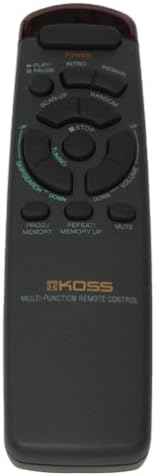
Figure 4: The multi-function remote control for the Koss HG857, showing various buttons for CD, tuner, and tape operations.
3.6 Утичница за слушалице
A stereo headphone jack is provided for private listening. Plugging in headphones will mute the speakers.
4. Одржавање
4.1 Чишћење
Wipe the unit with a soft, dry cloth. Do not use abrasive cleaners or solvents. For the CD lens, use a specialized CD lens cleaner.
4.2 Замена батерије
If using battery power, replace all 8 D-size batteries when the unit's performance degrades. Ensure proper polarity.
4.3 CD and Cassette Care
- Handle CDs by their edges to avoid fingerprints and scratches.
- Store cassettes away from direct sunlight and heat.
- Periodically clean cassette heads with a head cleaner.
КСНУМКС. Решавање проблема
| Проблем | Могући узрок | Решење |
|---|---|---|
| Нема струје | AC cord not plugged in; Batteries depleted or incorrectly inserted. | Check AC connection; Replace batteries, ensuring correct polarity. |
| Нема звука | Volume too low; Headphones connected; Speakers not connected properly. | Increase volume; Disconnect headphones; Check speaker connections. |
| CD прескаче или се не репродукује | CD dirty or scratched; CD inserted incorrectly; Unit in wrong mode. | Clean CD; Reinsert CD label side up; Select CD mode. |
| Лош радио пријем | Антена није извучена/позиционирана; Слаб сигнал. | Extend and adjust FM antenna; Rotate unit for AM; Try a different location. |
| Проблеми са репродукцијом касета | Tape tangled or damaged; Heads dirty. | Check tape condition; Clean cassette heads. |
| Даљински управљач не ради | Батерије су испражњене или неправилно уметнуте; Препрека између даљинског управљача и уређаја. | Replace remote batteries; Ensure clear line of sight to unit's sensor. |
6. Спецификације
- Модел: ХГ857
- Извор напајања: AC 120V, 60Hz; 8 x D-size batteries
- ЦД плејер: Top-loading, 20-track programmable
- Радио тјунер: Digital AM/FM, 20 station presets
- Cassette Decks: Dual cassette, recordable
- говорници: Detachable 3-way speakers with Dynamic Bass Boost
- Повезивање: Стерео прикључак за слушалице
- Димензије (приближно): 27.8 к 12.5 к 11.6 инча (димензије паковања)
- Тежина (приближно): 16.7 фунте (тежина предмета)
- Произвођач: Koss Audio & Video
- Прво доступно: 4. септембра 1999. године
7. Гаранција и подршка
For warranty information and customer support, please refer to the warranty card included with your product or visit the official Koss webсајт. Сачувајте рачун као доказ о куповини.
Koss Official Webсајт: ввв.косс.цом


