
Важне информације о безбедности
Please read all safety and operating instructions carefully before using this VCR. Retain this manual for future reference.
- Извор напајања: Connect the VCR only to the power supply indicated on the label.
- вентилација: Обезбедите одговарајућу вентилацију. Не блокирајте вентилационе отворе.
- Вода и влага: Do not expose the VCR to rain or moisture. Do not place objects filled with liquids on the VCR.
- Чишћење: Unplug the VCR from the wall outlet before cleaning. Use a dry cloth.
- Сервисирање: Не покушавајте сами да сервисирате овај производ. Све сервисирање препустите квалификованом сервисном особљу.
Производ је завршенview
The Sharp VC-A422 is a 4-head VCR designed for reliable playback and recording of VHS tapes. It features a user-friendly interface for easy operation.
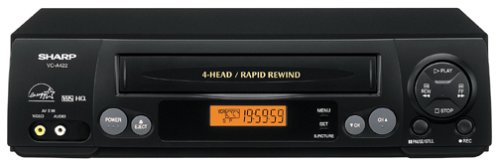
Слика: Фронт view of the Sharp VC-A422 4-Head VCR, showing the tape slot, display, and control buttons.
Сетуп
1. Распакивање и постављање
- Carefully remove the VCR from its packaging.
- Place the VCR on a stable, level surface. Ensure there is adequate space around the unit for ventilation.
- Avoid placing the VCR near heat sources, direct sunlight, or areas with high humidity.
2. Повезивање са телевизором
To connect your VCR to a television, you will typically use RCA audio/video cables (red, white, yellow) or a coaxial cable.
- RCA Connection (Recommended for best quality):
- Повежите жути видео излазни прикључак на видео рекордеру са жутим видео улазним прикључком на вашем телевизору.
- Повежите бели аудио излазни прикључак на видео рекордеру са белим аудио улазним прикључком на вашем телевизору.
- Повежите црвени аудио излазни прикључак на видео рекордеру са црвеним аудио улазним прикључком на вашем телевизору.
- Select the corresponding AV input on your television (e.g., Video 1, AV1, Input 1).
- Коаксијална веза:
- Connect a coaxial cable from the "RF Out" or "Antenna Out" jack on the VCR to the "Antenna In" or "RF In" jack on your TV.
- Connect your antenna or cable TV signal to the "RF In" or "Antenna In" jack on the VCR.
- Tune your television to channel 3 or 4 (depending on the VCR's output setting) to receive the VCR signal.
3. Прикључак за напајање
- Plug the VCR's power cord into a standard electrical outlet.
- The VCR should enter standby mode, indicated by a clock display or power light.
Упутство за употребу
1. Основна репродукција
- Ensure the VCR is powered on and your TV is set to the correct input.
- Убаците VHS касету у отвор за касету. Видеорекордер ће аутоматски учитати касету.
- Притисните тастер ПЛАИ дугме на видеорекордеру или даљинском управљачу.
- Да бисте зауставили репродукцију, притисните СТОП дугме.
- Да бисте паузирали репродукцију, притисните ПАУСЕ дугме. Притисните поново да бисте наставили.
- Да бисте премотали унапред или уназад, притисните FF (Премотавање унапред) или РЕВ (Rewind) button. Press ПЛАИ да бисте наставили нормалну репродукцију.
- Да бисте избацили траку, притисните дугме ЕЈЕЦТ дугме.
2. Снимање програма
The Sharp VC-A422 allows for recording television programs. Ensure a blank or recordable VHS tape is inserted and its safety tab is intact.
- Tune the VCR to the desired channel using the VCR's tuner.
- Притисните тастер РЕЦОРД button. The VCR will begin recording.
- Da biste zaustavili snimanje, pritisnite СТОП дугме.
- For timed recordings, refer to the VCR's on-screen programming guide (if available) or consult the full manual for detailed timer recording instructions.
Одржавање
Правилно одржавање осигурава дуготрајност и оптималне перформансе вашег видео рекордера.
- Спољно чишћење: Обришите спољашњост видео рекордера меком, сувом крпом. Не користите течна средства за чишћење или абразивне материјале.
- Чишћење главе: If picture quality degrades (e.g., snowy picture, lines), the video heads may be dirty. Use a dry-type VCR head cleaning cassette sparingly. Excessive use can wear down the heads.
- Нега траке: Store VHS tapes in their cases, away from dust, direct sunlight, and strong magnetic fields. Avoid exposing tapes to extreme temperatures.
- вентилација: Keep the VCR's ventilation slots clear of obstructions to prevent overheating.
Решавање проблема
If you encounter issues with your Sharp VC-A422 VCR, refer to the following common problems and solutions:
| Проблем | Могући узрок | Решење |
|---|---|---|
| Нема струје | Кабл за напајање је искључен; утичница није активна. | Проверите везу кабла за напајање. Тестирајте утичницу са другим уређајем. |
| Нема слике или звука | Incorrect TV input selected; A/V cables loose or incorrectly connected. | Select correct TV input (e.g., AV1, Video 1). Ensure A/V cables are securely connected to matching color ports. |
| Snowy or distorted picture | Dirty video heads; poor tape quality; incorrect channel for coaxial connection. | Use a VCR head cleaning cassette. Try a different tape. If using coaxial, ensure TV is on channel 3 or 4. |
| Tape will not eject | Power failure; mechanical issue. | Ensure VCR is powered on. If problem persists, seek professional service. |
| Није могуће снимити | Tape's safety tab removed; VCR not tuned to a channel. | Check if the safety tab on the VHS tape is intact (cover the notch with tape if removed). Ensure VCR tuner is set to the desired channel. |
Спецификације
- Бренд: Схарп
- Модел: ВЦ-А422
- главе: 4-Head (Video)
- Тежина артикла: 6 фунти
- Димензије пакета: 15.55 к 11.02 к 5.24 инча
- ASIN: B00005LABU
- Датум прве доступности: 4. септембра 1999. године
Напомена: Спецификације се могу променити без најаве.
Информације о гаранцији
This Sharp product is covered by a limited warranty. For specific details regarding warranty coverage, duration, and terms, please refer to the warranty card included with your purchase or visit the official Sharp webсајт. Сачувајте доказ о куповини за потребе гаранције.
Корисничка подршка
For further assistance, technical support, or service inquiries, please contact Sharp customer support. You can find contact information on the official Sharp webсајту или у документацији која се испоручује уз ваш производ.
Visit the official Sharp store for more information: Sharp Official Store
Правно одрицање одговорности
УПОЗОРЕЊЕ ЗА ПОТРОШАЧЕ: This television receiver has only an analog broadcast tuner and will require a converter box after February 17, 2009 to receive over-the-air broadcasts with an antenna because of the U.S.'s transition to digital broadcasting. Analog-only TVs should continue to work as before with cable and satellite TV services, gaming consoles, VCRs, DVD players, and similar products. For more information, call the Federal Communications Commission at 1-888-225-5322 (TTY: 1-888-835-5322), or visit the commission s digital-television Web сајт на: ввв.дтв.гов.