
1. Увод
This manual provides instructions for the setup, operation, and maintenance of your Bose MediaMate Computer Speakers. These speakers are designed to enhance the audio experience for your computer, whether for music, movies, or gaming. The compact design and upward-angled sound projection optimize audio delivery for desktop use, occupying minimal desk space.
2. Безбедносне информације
Please read and follow all safety instructions before using this product to prevent electric shock, fire, or injury. Keep this manual for future reference.
- Не излажите звучнике води или влази.
- Не постављајте звучнике близу извора топлоте као што су радијатори, грејне јединице, шпорети или други уређаји (укључујући ampлифиерс) који производе топлоту.
- Користите само додатке/прибор које је навео произвођач.
- Искључите овај апарат из струје током олуја са грмљавином или када га не користите дуже време.
- Све сервисирање препустите квалификованом сервисном особљу. Сервисирање је потребно када је уређај оштећен на било који начин, као што је оштећен кабл за напајање или утикач, ако је течност проливена или су предмети упали у апарат, ако је апарат био изложен киши или влази, не ради нормално , или је одбачено.
3. Садржај пакета
Проверите да ли су све ставке присутне у вашем пакету:
- Bose MediaMate Computer Speakers (2 units)
- Повер Адаптер
- Audio Cable (3.5mm stereo jack)
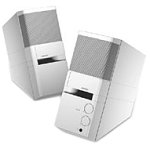
Image: The Bose MediaMate Computer Speakers in Gray. The image shows two compact speakers, one with visible volume and mix controls, and a headphone jack.
4. Подешавање
Follow these steps to set up your Bose MediaMate Computer Speakers:
- Пласман: Place the speakers on a flat, stable surface on either side of your computer monitor. Ensure they are angled slightly upward towards your listening position for optimal sound.
- Повежите аудио кабл: Connect the 3.5mm audio cable from the back of the primary speaker (the one with controls) to the audio output jack on your computer.
- Прикључите напајање: Plug the power adapter into the power input on the primary speaker, then plug the adapter into a wall outlet.
- Укључено: Turn on the speakers using the volume knob. The power indicator light should illuminate.
5. Упутство за употребу
Once set up, operating your MediaMate speakers is straightforward:
- Контрола јачине звука: Use the large knob labeled "VOLUME" on the front of the primary speaker to adjust the overall sound level.
- Контрола микса: The "MIX" knob allows you to blend audio from two different sources if you have a second device connected to the auxiliary input.
- Слушалице: For private listening, plug your headphones into the headphone jack located on the front of the primary speaker. This will mute the speakers.
- Двоструки улази: The speakers feature dual inputs, allowing you to connect and mix two audio sources simultaneously. For example, you can connect your computer and a portable music player.
6. Одржавање
To ensure the longevity and optimal performance of your speakers:
- Чишћење: Use a soft, dry cloth to clean the exterior surfaces of the speakers. Do not use liquid cleaners or aerosols.
- прашина: Редовно бришите прашину са решетки звучника како бисте спречили накупљање прашине које би могло утицати на квалитет звука.
- Складиштење: Ако складиштите звучнике дуже време, искључите их из напајања и чувајте их на хладном и сувом месту.
КСНУМКС. Решавање проблема
If you encounter issues with your Bose MediaMate speakers, refer to the following common problems and solutions:
| Проблем | Могући узрок | Решење |
|---|---|---|
| Нема звука |
|
|
| Изобличен звук |
|
|
| Само један звучник ради |
|
|
8. Спецификације
- Бренд: Босе
- Модел: MediaMate
- Повезивање: 3.5mm Audio Input, AC Power
- Аудио излаз: Стерео
- Тип звучника: Мултимедија
- Материјал: Метал
- Величина звучника: 6 Centimeters (Audio Driver)
- Тежина артикла: 3 фунти
- Боја: Греи
9. Гаранција и подршка
Bose MediaMate Computer Speakers come with a limited warranty. For specific warranty details and duration, please refer to the warranty card included with your product or visit the official Bose webсајту.
For technical support, product registration, or service inquiries, please contact Bose customer service:
- Телефон: 800-444-2673
- Webсајт: ввв.босе.цом
Please have your product model number (MediaMate) and purchase date available when contacting support.