
1. Увод
This manual provides detailed instructions for the installation, operation, and maintenance of your Creative Inspire T5400 5.1 Speaker System. Please read this manual thoroughly before using the product to ensure proper setup and optimal performance. Retain this manual for future reference.
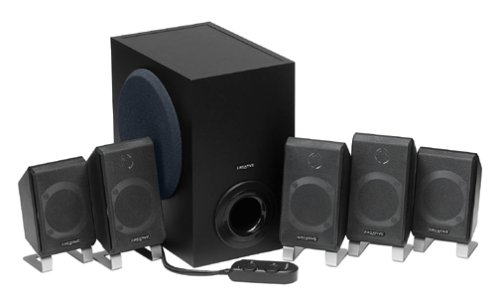
Слика 1.1: Готовоview of the Creative Inspire T5400 5.1 Speaker System, showing the subwoofer and satellite speakers.
2. Садржај пакета
Проверите да ли су све компоненте наведене у наставку присутне у вашем пакету:
- Creative Inspire T5400 Subwoofer
- Five (5) Satellite Speakers (Front Left, Front Right, Center, Rear Left, Rear Right)
- Жичани даљински управљач
- Повер Адаптер
- Audio Cables (3.5mm stereo to 3.5mm stereo cables for 5.1 connection)
- Кратки водич (није укључен у овај дигитални приручник)
If any items are missing or damaged, please contact Creative customer support.
3. Упутства за подешавање
Follow these steps to set up your Creative Inspire T5400 5.1 Speaker System:
3.1 Постављање звучника
Proper speaker placement is crucial for optimal 5.1 surround sound experience.
- Предњи леви и десни звучници: Place these speakers on either side of your monitor or television, equidistant from your listening position.
- Централни звучник: Position the center speaker directly above or below your monitor/television, centered with your listening position.
- Rear Left and Right Speakers: Place these speakers behind your listening position, ideally slightly to the sides and angled towards you.
- Субвоофер: The subwoofer can be placed on the floor, typically near the front speakers. Experiment with placement to find the best bass response for your room.
Image 3.1: Diagram illustrating optimal 5.1 speaker placement around a listening position. (Image not provided, conceptual description)
3.2 Connecting the Speakers to the Subwoofer
Each satellite speaker connects to the subwoofer using its integrated cable. Match the speaker to the corresponding port on the subwoofer:
- Identify the cables from each satellite speaker (Front Left, Front Right, Center, Rear Left, Rear Right).
- Locate the corresponding input jacks on the rear panel of the subwoofer. These are typically color-coded or labeled.
- Firmly insert each speaker cable into its designated jack.
Image 3.2: Close-up of the subwoofer's rear panel showing speaker input jacks. (Image not provided, conceptual description)
3.3 Connecting to an Audio Source (Computer/Television)
The Creative Inspire T5400 requires a 5.1 channel audio output from your source device. This typically involves three 3.5mm stereo jacks (Front, Rear, Center/Subwoofer).
- Locate the three 3.5mm audio input jacks on the rear panel of the subwoofer. These are usually color-coded (e.g., Green for Front, Black for Rear, Orange for Center/Subwoofer).
- Connect the provided audio cables from these jacks to the corresponding 5.1 audio output jacks on your computer's sound card or television.
- Ensure your computer's sound card drivers are installed and configured for 5.1 surround sound output.
Image 3.3: Illustration of connecting audio cables from the subwoofer to a computer sound card. (Image not provided, conceptual description)
3.4 Повезивање жичаног даљинског управљача
The wired remote control connects to a dedicated port on the subwoofer.
- Locate the multi-pin connector for the wired remote on the subwoofer.
- Align the connector from the wired remote with the port and gently push until it clicks into place.
Image 3.4: Close-up of the wired remote control connector and the corresponding port on the subwoofer. (Image not provided, conceptual description)
3.5 Прикључак за напајање
Connect the power adapter to the subwoofer and then to a power outlet.
- Insert the DC plug of the power adapter into the "DC IN" port on the subwoofer.
- Plug the power adapter into a standard electrical wall outlet.
Систем је сада спреман за рад.
4. Упутство за употребу
The wired remote control provides convenient access to the main functions of your speaker system.
4.1 Укључивање/искључивање
- Притисните тастер Дугме за напајање on the wired remote control to turn the speaker system on or off. An indicator light on the remote will illuminate when the system is powered on.
4.2 Контрола јачине звука
- Окрените велики Дугме за јачину звука on the wired remote control clockwise to increase volume and counter-clockwise to decrease volume.
4.3 Bass Level Adjustment
- Користите Дугме за контролу баса on the wired remote control to adjust the subwoofer's bass output. Rotate clockwise for more bass, counter-clockwise for less bass.
4.4 Утичница за слушалице
- A Прикључак за слушалице is located on the wired remote control. Plugging in headphones will automatically mute the speakers, allowing for private listening. Unplugging headphones will restore audio to the speakers.
Image 4.1: Close-up of the wired remote control showing power, volume, bass, and headphone jack. (Image not provided, conceptual description)
5. Одржавање
Правилна нега осигурава дуготрајност и перформансе вашег система звучника.
5.1 Чишћење
- Искључите напајање пре чишћења.
- Use a soft, dry, lint-free cloth to wipe the surfaces of the speakers and subwoofer.
- Do not use liquid cleaners, aerosols, or abrasive cleaning agents, as these can damage the finish or internal components.
5.2 Складиштење
- Store the speaker system in a cool, dry place away from direct sunlight and extreme temperatures.
- If storing for an extended period, it is recommended to pack the components in their original packaging to protect them from dust and physical damage.
КСНУМКС. Решавање проблема
If you encounter issues with your Creative Inspire T5400, refer to the following common problems and solutions:
| Проблем | Могући узрок | Решење |
|---|---|---|
| Нема звука ни из једног звучника. |
|
|
| Sound from only some speakers (e.g., only front). |
|
|
| Изобличен или нејасан звук. |
|
|
If the problem persists after trying these solutions, please contact Creative customer support.
7. Спецификације
Key technical specifications for the Creative Inspire T5400 5.1 Speaker System:
- Бренд: Креативно
- Број модела: 51МФ4025АА002
- Режим аудио излаза: 5.1 Сурроунд
- Број аудио канала: 5.1
- Укупна снага система: 115 Ваттс
- Speaker Maximum Output Power (per satellite): 25 Ваттс
- Технологија повезивања: Виред
- Протокол повезивања: RCA, USB, aux (Note: Primary 5.1 audio input uses 3.5mm stereo jacks.)
- Метод контроле: Даљински управљач (жични)
- Компатибилни уређаји: Desktop, Laptop, Television
- Извор напајања: Цордед Елецтриц
- УПЦ: 054651062153
8. Гаранција и подршка
8.1 Информације о гаранцији
The Creative Inspire T5400 5.1 Speaker System comes with a Ограничена гаранција. Specific terms and conditions of the warranty may vary by region and retailer. Please refer to the warranty card included with your product or visit the official Creative webза детаљне информације о гаранцији.
8.2 Корисничка подршка
For technical assistance, troubleshooting beyond this manual, or warranty claims, please contact Creative customer support:
- Подршка на мрежи: Посетите званични Creative webсајт (us.creative.com/support) for FAQs, driver downloads, and contact options.
- Телефонска подршка: Refer to your product packaging or the Creative webсајт за регионалне бројеве телефонске подршке.
When contacting support, please have your product model number (T5400 or 51MF4025AA002) and proof of purchase readily available.