
Важне информације о безбедности
Please read all instructions carefully before operating this device. Keep this manual for future reference.
- Не излажите јединицу киши или влази да бисте спречили опасност од пожара или удара.
- Do not block ventilation openings. Ensure proper airflow around the unit.
- Use only the power adapters supplied with the unit. Using unauthorized adapters may damage the device and void the warranty.
- Избегавајте постављање уређаја на нестабилне површине.
- Не покушавајте сами да сервисирате уређај. Сва сервисирања препустите квалификованом особљу.
- Батерије одложите на одговарајући начин у складу са локалним прописима.
Садржај пакета
Проверите да ли су све ставке присутне у пакету:
- Coby TFDVD-7700 Portable DVD Player
- Пунофункционални даљински управљач
- Батерија за даљински управљач
- Литијум-јонска пуњива батерија
- Кабл за напајање наизменичном струјом
- 100-240V UL Adapter
- DC Car/Boat Charger
- Car/Boat AC/DC Adapter and Cassette Audio Adapter
- 2 Sets of Stereo Headphones
- Headphone Jack Splitter
- Торбица за ношење
- Headrest Mounting Pouch
- Упутство за употребу (овај документ)
Производ је завршенview
The Coby TFDVD-7700 is a 7-inch side-loading portable DVD player designed for entertainment on the go. It features a widescreen TFT LCD display and built-in stereo speakers.
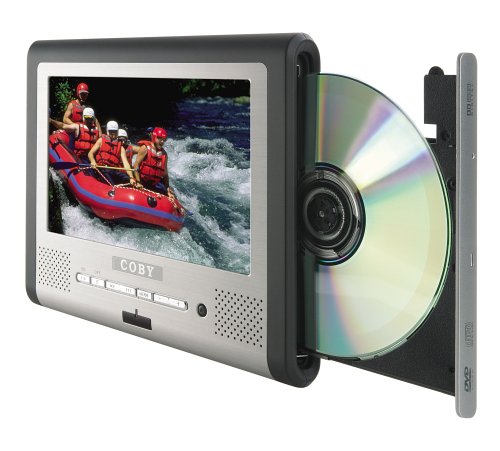
Слика 1: Coby TFDVD-7700 Portable DVD Player and its remote control. The player features a 7-inch screen, control buttons below the screen, and a side-loading DVD slot. The remote control has numerous buttons for full functionality.
Кључне карактеристике:
- 7-inch Widescreen TFT LCD Display
- Side-loading DVD Mechanism
- Multi-format Playback (DVD, MP3 CD, JPEG CD)
- Уграђени стерео звучници
- Composite Video Output for external display connection
- Пунофункционални даљински управљач
- Пуњива литијум-јонска батерија
- Picture Zoom and Parental Controls
Сетуп
1. Пуњење батерије
- Connect the 100-240V UL adapter to the DC IN port on the DVD player.
- Прикључите адаптер у стандардну зидну утичницу.
- Allow the unit to charge fully before first use (approximately 3-4 hours). The charging indicator light will typically change color or turn off when charging is complete.
- For in-car use, connect the DC car charger to the DC IN port and plug it into your vehicle's cigarette lighter socket.
2. Inserting the Remote Control Battery
- Отворите одељак за батерије на задњој страни даљинског управљача.
- Insert the supplied battery, ensuring correct polarity (+/-).
- Добро затворите одељак за батерије.
3. Connecting to an External Display (Optional)
- Locate the composite video output port on the DVD player.
- Connect a composite video cable (not always included, may need to be purchased separately) from the player's video output to the video input of your TV or monitor.
- Ensure your TV/monitor is set to the correct input source.
Упутство за употребу
1. Укључивање/искључивање
- To power on, slide the POWER switch to the ON position or press the POWER button on the remote.
- To power off, slide the POWER switch to the OFF position or press the POWER button on the remote.
2. Inserting a Disc
- With the unit powered on, gently insert a DVD, MP3 CD, or JPEG CD into the side-loading disc slot with the label side facing up.
- Плејер ће аутоматски детектовати диск и започети репродукцију или приказати мени диска.
3. Basic Playback Controls
Use the buttons on the unit or the remote control:
- ПЛАИ/ПАУСЕ: Притисните да бисте покренули или паузирали репродукцију.
- СТОП: Притисните да зауставите репродукцију.
- ПРЕСКОЧИ (<< / >>): Press to skip to the previous or next chapter/track.
- БРЗО ПРЕМОТАЈ НАПРЕТ/НАЗАД: Притисните и држите за премотавање унапред или уназад.
- ЈАЧИНА ЗВУКА (+/-): Подесите јачину звука.
4. Коришћење слушалица
- Plug one or both sets of stereo headphones into the headphone jack(s).
- Use the headphone splitter to connect both sets of headphones to a single jack if needed.
- Adjust volume to a comfortable level to prevent hearing damage.
5. Напредне функције
- МЕНИ: Access the disc's main menu.
- ПОДЕСИТИ: Access the player's system settings (e.g., language, display settings, parental controls).
- ЗООМ: Enlarge a portion of the screen during video playback.
- УГАО: Промените viewing angle on discs that support multiple angles.
- СУБТИТЛЕ: Select different subtitle tracks.
- SLOW/FAST MOTION: Control playback speed.
Одржавање
1. Чишћење јединице
- Обришите спољашњост уређаја меком, сувом крпом.
- За тврдокорне трагове, дampen the cloth slightly with water, then wipe dry immediately.
- Не користите абразивна средства за чишћење, воскове или раствараче.
- To clean the screen, use a soft, lint-free cloth specifically designed for LCD screens.
2. Нега диска
- Држите дискове за ивице како бисте избегли отиске прстију.
- Keep discs in their cases when not in use.
- Очистите прљаве дискове меком крпом која не оставља влакна, бришући од средине ка споља.
3. Брига о батерији
- Recharge the battery regularly, even if the unit is not used frequently, to maintain battery life.
- Избегавајте вишеструко потпуно пражњење батерије.
- Чувајте уређај на хладном и сувом месту када се не користи дуже време.
Решавање проблема
If you encounter issues with your Coby TFDVD-7700, refer to the following common problems and solutions:
| Проблем | Могући узрок | Решење |
|---|---|---|
| Јединица се не укључује. | Battery is discharged; Power adapter not connected; Power switch is OFF. | Charge the battery; Connect the power adapter; Slide the POWER switch to ON. |
| No disc detected / Disc error. | Disc is dirty or scratched; Disc inserted incorrectly; Unsupported disc format. | Clean the disc; Reinsert disc with label side up; Ensure disc is DVD, MP3 CD, or JPEG CD. |
| Нема звука. | Volume is too low; Headphones not connected properly; Mute function is active. | Increase volume; Reconnect headphones; Deactivate mute. |
| Picture is distorted or black. | External display connection issue; Disc problem. | Check composite video cable connection and TV input; Try a different disc. |
| Даљински управљач не ради. | Battery is dead or inserted incorrectly; Obstruction between remote and player. | Replace or reinsert battery; Ensure clear line of sight to the player's IR sensor. |
Спецификације
- Модел: TFDVD-7700
- Величина екрана: 7 Inches (Widescreen TFT LCD)
- Подржани типови медија: DVD, CD-R, CD-RW, SVCD, MP3 CD, JPEG CD
- Аудио излаз: Built-in Stereo Speakers, Headphone Jack
- Видео излаз: Композитни видео
- Извор напајања: AC Adapter (100-240V), DC Car Charger, Rechargeable Lithium-ion Battery
- Произвођач: Цоби
Информације о гаранцији
This product is covered by a limited warranty. Please refer to the warranty card included in your original packaging for specific terms and conditions, including coverage period and service procedures. Typically, Coby products come with a 90-day warranty on parts and labor from the date of purchase.
Сачувајте рачун као доказ о куповини за потребе гаранције.
Корисничка подршка
For technical assistance, troubleshooting beyond this manual, or warranty inquiries, please contact Coby customer support.
Please have your model number (TFDVD-7700) and proof of purchase ready when contacting support.
Contact information (phone number, website) would typically be provided on the manufacturer's official webсајту или у гарантној документацији.