
Увод
This manual provides instructions for setting up, operating, and maintaining your Logitech Cordless Desktop EX110. This wireless keyboard and mouse combination offers reliable performance and convenience for your desktop or notebook computer. Please read this manual thoroughly before using your new device.
Садржај пакета
- Logitech Cordless Keyboard EX110
- Logitech Cordless Mouse EX110
- USB/PS/2 Wireless Receiver
- АА батерије (за миш)
- ААА батерије (за тастатуру)
Сетуп
1. Инсталација батерије
The Logitech Cordless Desktop EX110 requires batteries for both the keyboard and mouse.
- За тастатуру: Locate the battery compartment on the underside of the keyboard. Insert two (2) AAA alkaline batteries, ensuring correct polarity (+/-). Close the battery compartment cover.
- За миша: Locate the battery compartment on the underside of the mouse. Insert two (2) AA alkaline batteries, ensuring correct polarity (+/-). Close the battery compartment cover.
Напомена: For optimal performance and longevity, use high-quality alkaline batteries. Rechargeable NiMH batteries can also be used.
2. Повезивање бежичног пријемника
The wireless receiver connects both your keyboard and mouse to your computer.
- УСБ веза: Plug the USB connector of the wireless receiver into an available USB port on your computer.
- PS/2 Connection: If your computer has PS/2 ports and you prefer to use them, connect the appropriate PS/2 adapters (if included) to the receiver's connectors, then plug them into the corresponding PS/2 keyboard and mouse ports on your computer.
The system should automatically detect the devices. No additional drivers are typically required for basic functionality.
3. Успостављање везе
After connecting the receiver and installing batteries, press the 'Connect' button on the wireless receiver, then press the 'Connect' button on the underside of the keyboard and the mouse. The devices should establish a connection within a few seconds.
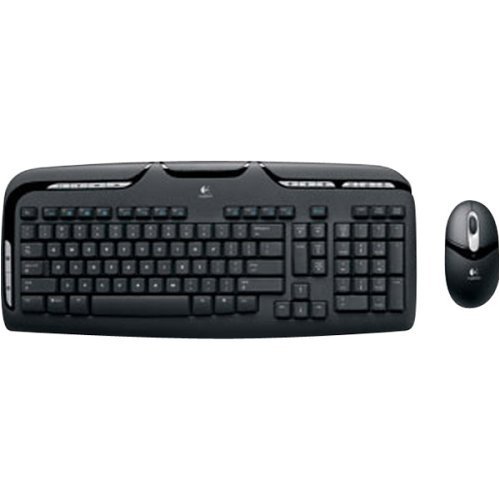
Image: Logitech Cordless Desktop EX110, showing the wireless keyboard, mouse, and USB receiver.
Упутство за употребу
Карактеристике тастатуре
- Контроле медија: Dedicated one-touch buttons allow for quick control of audio and video playback, including volume adjustment and mute functions.
- Програмабилни Ф-тастери: Enhanced F-keys provide direct access to common tasks such as launching your internet home page, email client, or the onscreen calculator.
- Дизајн отпоран на проливање: The keyboard is designed to withstand minor liquid spills, protecting internal components.
Карактеристике миша
- 800-dpi Optical Tracking: Provides precise and responsive cursor control on various surfaces.
- Точак за померање: Facilitates easy navigation through web страница и докумената.
- Left-Hand Buttons: Conveniently located buttons on the left side of the mouse allow for quick web navigation (e.g., back/forward) or closing browser windows.
Одржавање
Чишћење
Да бисте очистили тастатуру и миш, користите меку,amp cloth. Avoid using harsh chemicals or abrasive cleaners. For the keyboard, you may use compressed air to remove debris from between the keys.
Замена батерије
When the keyboard or mouse performance degrades, or if an indicator light (if present) signals low battery, replace the batteries as described in the 'Battery Installation' section. Dispose of used batteries according to local regulations.
Решавање проблема
- No response from keyboard or mouse:
- Уверите се да су батерије правилно инсталиране и да нису истрошене. Замените их ако је потребно.
- Verify the wireless receiver is securely plugged into a functional USB or PS/2 port.
- Press the 'Connect' buttons on the receiver, keyboard, and mouse to re-establish the connection.
- Ensure the devices are within the operational range (approximately 6 feet) of the receiver.
- Lag or intermittent response:
- Wireless interference can affect performance. Avoid placing cordless phones, cell phones, or wireless network antennas too close to the receiver.
- Уверите се да између уређаја и пријемника нема великих металних предмета који би могли блокирати сигнал.
- Курсор миша је неправилан или се не прати:
- Очистите оптички сензор на доњој страни миша.
- Use the mouse on a suitable surface; highly reflective or transparent surfaces may cause issues.
Спецификације
| Бранд | Логитецх |
| Број модела | 967561-0403 |
| Технологија повезивања | USB / PS/2 |
| Откривање покрета | Optical (Mouse) |
| Распоред тастатуре | КВЕРТИ |
| Број кључева | 110 |
| Тип батерије за тастатуру | 2 к ААА батерије |
| Тип батерије за миш | 2 к АА батерије |
| Компатибилни оперативни системи | Виндовс, мацОС, Линук |
| Посебне карактеристике | One-touch media controls, Convenient left-hand mouse buttons, Spill-resistant keyboard |
Гаранција и подршка
The Logitech Cordless Desktop EX110 is covered by a 5-годишња ограничена гаранција. For detailed warranty information, technical support, or to download additional software (if available), please visit the official Logitech support webсајт. Сачувајте рачун као доказ о куповини за потребе гаранције.