
Coby CT-P9040 SVR
Coby CT-P9040 5.8 GHz Analog Cordless Phone User Manual
Model: CT-P9040 SVR
Увод
This manual provides comprehensive instructions for the setup, operation, and maintenance of your Coby CT-P9040 5.8 GHz Analog Cordless Phone. Please read this manual thoroughly before using your phone to ensure proper functionality and to prevent damage.
Садржај и компоненте пакета
Пре него што почнете, уверите се да су све компоненте присутне у пакету:
- Бежична слушалица
- Основна јединица
- АЦ адаптер
- Кабл за телефонску линију
- Пуњива батерија
- Кориснички приручник (овај документ)
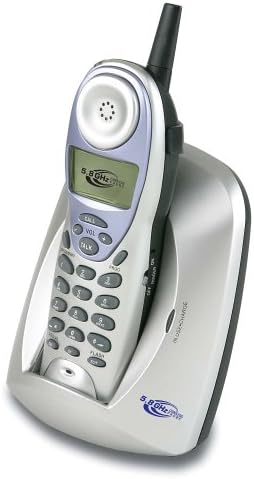
Image: The Coby CT-P9040 cordless phone, showing the handset docked in its silver base unit. The handset features a display screen, numeric keypad, and function buttons. The base unit has a charging cradle for the handset.
Водич за подешавање
1. Инсталација батерије
- Пронађите одељак за батерије на задњој страни слушалице.
- Отворите поклопац одељка за батерије.
- Connect the rechargeable battery pack connector to the jack inside the compartment.
- Place the battery pack into the compartment and close the cover securely.
2. Повезивање основне јединице
- Connect one end of the telephone line cord to the "LINE" jack on the back of the base unit.
- Прикључите други крај телефонског кабла на стандардну телефонску утичницу у зиду.
- Connect the AC power adapter to the "DC IN" jack on the back of the base unit.
- Укључите адаптер за наизменичну струју у стандардну електричну утичницу.
3. Почетно пуњење
Place the handset in the base unit's charging cradle. Ensure the "IN CHARGE" indicator light on the base unit illuminates, indicating proper charging. For optimal battery performance, charge the handset for at least 12-14 hours before initial use.
Упутство за употребу
Упућивање позива
- Pick up the handset from the base unit or press the ТАЛК дугме.
- Слушајте тон бирања.
- Позовите жељени број телефона.
- Да бисте прекинули позив, притисните ТАЛК поново притисните дугме или вратите слушалицу у базну јединицу.
Одговарање на позив
Када телефон зазвони, подигните слушалицу или притисните ТАЛК дугме да одговорите на позив.
Функција поновног бирања
Да бисте поново позвали последњи позвани број, притисните РЕДИАЛ дугме на слушалици.
Подешавање јачине звука
Током позива користите ВОЛ + и ЗВУЧИНА - buttons on the handset to adjust the earpiece volume.
Фласх Функција
Притисните тастер ФЛАСХ button to use call waiting or transfer calls if supported by your telephone service provider.
Storing Phone Numbers (Speed Dial)
Your phone can store up to 10 numbers for frequently called contacts. Refer to the detailed instructions in the full manual for programming speed dial entries.
Одржавање и њега
- Keep the phone away from heat sources, direct sunlight, and moisture.
- Очистите површине телефона меком,amp тканина. Немојте користити абразивна средства за чишћење или раствараче.
- Ensure the charging contacts on the handset and base unit are clean to maintain proper charging.
- If the phone will not be used for an extended period, remove the battery from the handset.
Решавање проблема
| Проблем | Могући узрок | Решење |
|---|---|---|
| Нема тона за бирање | Телефонски кабл је искључен. | Уверите се да је телефонски кабл безбедно повезан и са базном јединицом и са зидном утичницом. |
| Телефон се не пуни | Handset not properly seated in cradle or dirty charging contacts. | Reseat the handset in the base unit. Clean the charging contacts on both the handset and base unit with a dry cloth. |
| Лош квалитет звука / Статични шумови | Interference from other electronic devices or out of range. | Move the base unit away from other electronic devices (e.g., microwaves, Wi-Fi routers). Move closer to the base unit. |
| Не могу да упућујем/примам позиве | Power adapter disconnected or battery low. | Check if the AC power adapter is securely plugged in. Ensure the handset battery is fully charged. |
Спецификације
- Модел: CT-P9040 SVR
- учесталост: 5.8 GHz Analog
- Канали: 40 Channel Auto Scan
- Меморија: 10-number speed dial storage
- Функције: Flash, Redial, Pause, Tone/Pulse Switch
- Утичница за слушалице: Built-in 2.5mm
- Монтажа: Desk and Wall Mountable
- Димензије (Д к Ш к В): 5 к 8 к 4 инча
- Тежина: 1.8 фунти
- Боја: Сребро
- ИД позиваоца: Није подржано
- Вишелинијска операција: Једнолинијски рад
Гаранција и подршка
За информације о гаранцији и техничку подршку, погледајте гарантни лист који је приложен уз ваш производ или посетите званичну веб страницу Coby-ја. webсајт. Сачувајте рачун као доказ о куповини за потребе гаранције.
For further assistance, you may contact Coby customer service. Contact details are typically available on the manufacturer's webсајту или у паковању производа.
Ask a question about this manual
Ask about setup, troubleshooting, compatibility, parts, safety, or missing instructions. Manuals+ will review the question and use this page’s manual context to help answer it.