
1. Увод
Хвала вам на куповиниasing the Pentax Optio W10 Digital Camera. This manual provides essential information for the safe and effective use of your camera. The Optio W10 is a compact 6.0-megapixel digital camera featuring a 3x optical zoom lens, designed for capturing high-quality still images and video. Its robust design makes it suitable for various environments.
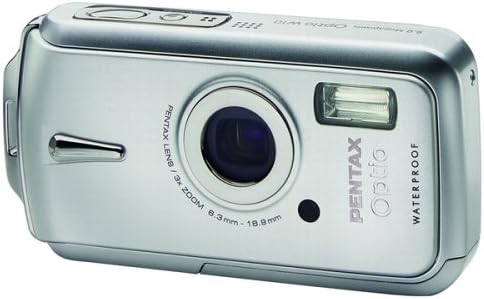
Слика 1.1: Предња страна view of the Pentax Optio W10 Digital Camera, showcasinобјектив, блиц и брендирање.
2. Безбедносне информације
Please read and understand all safety precautions before using the camera. Failure to do so may result in injury or damage to the product.
- Не покушавајте да растављате или модификујете камеру.
- Keep the camera away from extreme temperatures, direct sunlight, and high humidity.
- Ensure all compartment covers (battery, memory card) are securely closed and locked before exposing the camera to water or dust.
- Use only the specified battery type (Lithium-ion DL-I8) and charger.
- Чувати ван домашаја деце.
3. Садржај пакета
Проверите да ли се у паковању са камером налазе све ставке:
- Pentax Optio W10 Digital Camera
- Lithium-ion Battery DL-I8
- Пуњач батерија
- Кабл за напајање наизменичном струјом
- USB Cable (for computer connection)
- Страп
- ЦД-РОМ са софтвером
- Упутство за употребу (овај документ)
4. Подешавање
4.1. Инсталација батерије
- Пронађите поклопац одељка за батерију/меморијску картицу на дну фотоапарата.
- Slide the lock switch to the 'OPEN' position and open the cover.
- Insert the Lithium-ion battery DL-I8 into the compartment, ensuring the correct orientation as indicated inside the compartment.
- Close the cover and slide the lock switch to the 'LOCK' position until it clicks securely.

Слика 4.1: Дно view of the camera, illustrating the battery and SD card compartment with the lock switch.
4.2. Инсталација меморијске картице
The Pentax Optio W10 uses SD memory cards.
- Open the battery/memory card compartment cover as described in Section 4.1.
- Insert the SD memory card into the designated slot with the label facing the correct direction, pushing gently until it clicks into place.
- Close the cover and slide the lock switch to the 'LOCK' position.
4.3. Почетно укључивање и подешавање датума/времена
- Притисните тастер ОН/ОФФ дугме које се налази на врху камере.
- Upon first power-on, the camera will prompt you to set the date and time. Use the directional buttons on the back of the camera to navigate and the OK дугме за потврду.
- Пратите упутства на екрану да бисте довршили почетно подешавање.

Слика 4.2: Врх view of the camera, highlighting the ON/OFF button and 6.0 Megapixels branding.
5. Руковање камером
5.1. Основна фотографија
To take a still picture:
- Укључите камеру притиском на ОН/ОФФ дугме.
- Кадрирајте снимак помоћу ЛЦД монитора од 2.5 инча.
- Притисните дугме затварача до пола да бисте фокусирали. Оквир фокуса ће постати зелен када се постигне фокус.
- Притисните дугме затварача до краја да бисте снимили слику.

Слика 5.1: Задња страна view камере, приказујући ЛЦД екран и разна контролна дугмад за навигацију и подешавања.
5.2. Режими снимања
The Optio W10 offers various shooting modes accessible via the МОДЕ button. Refer to the on-screen menu for specific options such as Program Auto, Scene Modes, and Movie Mode.
5.3. Видео снимање
Да бисте снимили видео:
- Switch to Movie Mode using the МОДЕ дугме.
- Press the shutter button to start recording. The camera can capture QuickTime motion JPEG videos at 640 x 480 resolution at 30 frames per second.
- Притисните дугме затварача поново да бисте зауставили снимање.
5.4. Репродукција
То view captured images and videos:
- Притисните тастер Репродукција дугме (обично означено иконом троугла).
- Use the directional buttons to scroll through your photos and videos.
- Притисните тастер OK дугме за view a video or zoom into a photo.
5.5. Повезивање са рачунаром
To transfer images and videos to a computer:
- Уверите се да је камера искључена.
- Повежите камеру са рачунаром помоћу приложеног УСБ кабла.
- Turn on the camera. It should be recognized as a removable disk or a PTP device.
- Пратите упутства оперативног система рачунара да бисте приступили и пренели files.
6. Одржавање
6.1. Чишћење
- Тело камере: Обришите меком, сувом крпом. За тврдокорну прљавштину користите благоamp крпом, а затим добро осушите.
- Објектив: Use a lens brush or a soft, clean lens cloth. Avoid touching the lens surface with your fingers.
- ЛЦД: Нежно обришите меком, сувом крпом. Избегавајте јак притисак на екран.
- Водоотпорне заптивке: Regularly inspect the rubber seals around the battery/memory card compartment for dirt, sand, or damage. Clean gently with a soft cloth. Do not use sharp objects.
6.2. Складиштење
When not in use for extended periods, store the camera in a cool, dry, and well-ventilated place. Remove the battery to prevent leakage. Avoid storing in areas with high humidity or extreme temperature fluctuations.
КСНУМКС. Решавање проблема
If you encounter issues with your Pentax Optio W10, refer to the following common solutions:
| Проблем | Могући узрок / решење |
|---|---|
| Камера се не укључује | Battery is depleted or incorrectly inserted. Recharge the battery or reinsert it correctly. |
| Не могу да сликам | Memory card is full, locked, or not inserted. Delete unnecessary files, unlock the card, or insert it correctly. |
| Слике су мутне | Lens is dirty, camera shake, or incorrect focus. Clean the lens, hold the camera steady, or ensure proper focus. |
| Water inside compartment | Compartment cover not securely closed or seal is damaged. Ensure cover is locked. If seal is damaged, contact service. |
For further assistance, please refer to the official Pentax support webсајту или контактирајте корисничку подршку.
8. Спецификације
Key technical specifications for the Pentax Optio W10 Digital Camera:
- Ефективна резолуција мировања: 6.0 мегапиксела
- Технологија фото сензора: CCD (1/2.5 инча)
- Оптички зум: 3x
- Дигитални зум: 4x
- Максимална жижна даљина: 114 мм
- Минимална жижна даљина: 38 мм
- Величина ЛЦД екрана: 2.5 инча
- Стабилизација слике: Дигитални, оптички
- Видео резолуција: 640 x 480, 30/15 fps (QuickTime Motion JPEG)
- Подржано File Формат: JPEG (фотографије), MJPEG (видео)
- Медији за складиштење: SD/MMC card, Internal Memory
- Тип батерије: Lithium-ion (DL-I8)
- Посебна карактеристика: Waterproof (Note: Ensure all seals are properly closed before water exposure)
- Минимална брзина затварача: 4 секунди
- Максимална брзина затварача: 1/2000 секунди
- ИСО опсег: Ауто, КСНУМКС, КСНУМКС, КСНУМКС, КСНУМКС, КСНУМКС
- Тежина артикла: 5.6 унци
- Број модела: 19033
9. Гаранција и подршка
For information regarding warranty coverage, service, or technical support for your Pentax Optio W10 camera, please refer to the warranty card included with your product or visit the official Pentax webсајт. Сачувајте доказ о куповини за потребе гаранције.
Подршка на мрежи: Ricoh Imaging Global Support (Pentax is a brand of Ricoh Imaging)