
1. Увод
This manual provides comprehensive instructions for the safe and efficient use of your Logisys PS480D 480W ATX Power Supply. Please read this manual thoroughly before installation and operation to ensure proper functionality and to prevent damage to the unit or other components.

Figure 1: Logisys PS480D 480W ATX Power Supply, front view with cables bundled.
2. Безбедносне информације
УПОЗОРЕЊЕ: Напајања садрже високу волтажtagе компоненте. Не отварајте напајање цasinг. Унутра нема делова које корисник може сам да поправи.
- Уверите се да је напајање искључено из утичнице пре инсталације или одржавања.
- Always ground yourself to prevent electrostatic discharge (ESD) when handling internal computer components.
- Не користите напајање у влажном илиamp условима.
- Осигурајте одговарајућу вентилацију око извора напајања како бисте спречили прегревање.
- Use only the provided power cables and connectors.
3. Карактеристике производа
The Logisys PS480D is a 480W ATX power supply designed for personal computers. Key features include:
- Висока ефикасност
- Low Noise & Ripple
- Овер Волtagе Заштита
- Заштита од кратког споја
- Built-in EMI Filter
- Insulation Resistance 100MΩ min.
- Complies with FCC part 15J class B 115VAC operation and CISPR 22 230 VAC operation.
- Meets UL 1950, CSA 22.2 LEVEL 3 Requirement.
- 100% Burn-in test / Vibration test / Hi-pot test / Leakage current test.
- MTBF above 100,000 hours at 25 °C.

Figure 2: Rear panel of the power supply with fan, AC inlet, and power switch.
4. Подешавање и инсталација
Follow these steps to install the Logisys PS480D power supply into your computer system.
- Припрема: Ensure your computer is completely powered off and unplugged from the wall outlet. Open your computer case according to its manufacturer's instructions.
- Уклоните стари извор напајања (ако је применљиво): Disconnect all cables from the old power supply to the motherboard, drives, and other components. Unscrew and remove the old power supply from the case.
- Инсталирајте ново напајање: Carefully place the Logisys PS480D into the power supply bay of your computer case. Secure it with screws.
- Повежите главно напајање: Connect the 20+4 pin ATX mainboard connector to your motherboard. If your motherboard uses a 20-pin connector, detach the 4-pin section. If it uses a 24-pin connector, connect both sections.
- Повежите напајање процесора: Connect the 4-pin +12V power connector to the corresponding port on your motherboard.
- Повежите периферно напајање:
- Use the 4-pin standard drive connectors for HDDs and CD/DVD-ROM drives.
- Use the 4-pin 3.5" FDD or ZIP connectors for floppy disk drives or similar devices.
- Use the Serial ATA (SATA) connectors for SATA hard drives and SSDs.
- Управљање кабловима: Route cables neatly to ensure proper airflow within the case.
- Затвори случај: Када су све везе безбедне, затворите кућиште рачунара.
- Повежите наизменичну струју: Plug the AC power cord into the power supply's AC inlet and then into a wall outlet.
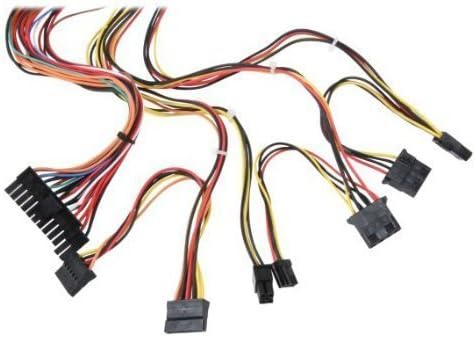
Слика 3: Завршеноview of power supply connectors.

Figure 4: Power supply dimensions and included AC power cord.
5. Упутство за употребу
After successful installation, you can power on your computer.
- Ensure the power switch on the rear of the power supply (Figure 2) is in the "ON" (I) position.
- Притисните дугме за напајање на кућишту рачунара.
- The power supply will provide stable power to your system components.
- To power off, shut down your operating system normally. For complete power disconnection, switch the power supply to the "OFF" (O) position and unplug the AC cord.
6. Одржавање
Regular maintenance helps ensure the longevity and optimal performance of your power supply.
- Чишћење: Периодично чистите прашину са вентилатора и отвора за вентилацију напајања помоћу компримованог ваздуха. Уверите се да је напајање искључено из струје пре чишћења.
- Проток ваздуха: Ensure that the computer case has adequate airflow and that the power supply's fan is not obstructed.
- Интегритет кабла: Periodically check all power cables for secure connections and signs of wear or damage.
КСНУМКС. Решавање проблема
Ако наиђете на проблеме са напајањем, погледајте следеће уобичајене кораке за решавање проблема:
- Нема напајања:
- Check if the AC power cord is securely plugged into both the power supply and the wall outlet.
- Ensure the power switch on the rear of the power supply is in the "ON" (I) position.
- Проверите да ли зидна утичница функционише тако што ћете укључити други уређај.
- Check all internal power connections (20/24-pin ATX, 4-pin +12V, peripheral connectors) are firmly seated.
- Нестабилност система/Случајна гашења:
- This could indicate an overloaded or failing power supply. Ensure your system's power requirements do not exceed the PS480D's 480W capacity.
- Check for proper ventilation and ensure the power supply fan is spinning. Overheating can cause instability.
- Необична бука:
- A loud fan noise might indicate dust buildup or a failing fan bearing. Clean the fan as described in the Maintenance section.
If problems persist after attempting these steps, contact Logisys customer support or a qualified technician.
8. Спецификације
| Феатуре | Спецификација |
|---|---|
| Бранд | Логисис |
| Број модела | ПС480Д |
| Оутпут Ватtage | 480 Ваттс |
| Форм Фацтор | АТКС |
| Димензије (ДкШкВ) | 6" Д x 5.5" Ш x 3.25" В (15.24 x 13.97 x 8.25 цм) |
| Тежина артикла | 2.06 фунте (0.93 кг) |
| Конектор матичне плоче | 1x 20+4 Pin ATX |
| ЦПУ конектор за напајање | 1x 4 Pin +12V |
| Standard Drive Connectors | 4x 4 Pin (Molex) |
| FDD/ZIP Connectors | 1x 4 Pin 3.5" |
| Сериал АТА конектори | 1к САТА |
| Метод хлађења | Ваздух |
| Заштите | Овер Волtagе Заштита, заштита од кратког споја |
| Цертификати | FCC part 15J class B, CISPR 22, UL 1950, CSA 22.2 LEVEL 3 |
9. Гаранција и подршка
For warranty information, technical support, or service inquiries, please refer to the official Logisys webсајт или контактирајте њихову службу за кориснике. Сачувајте рачун као доказ о куповини.