
1. Увод
Хвала вам на куповиниasing the GPX CDP6806DT Personal CD Player. This manual provides important safety instructions, operational guidelines, and maintenance procedures to ensure optimal performance and longevity of your device. Please read this manual thoroughly before using the product and retain it for future reference.
2. Безбедносне информације
Важна безбедносна упутства
- Не излажите јединицу води или влази.
- Избегавајте постављање уређаја у близини извора топлоте као што су радијатори, грејни уређаји, шпорети или други уређаји (укључујући ampлифиерс) који производе топлоту.
- Do not attempt to disassemble or modify the unit. Refer all servicing to qualified service personnel.
- Use only the specified batteries (2 x AA batteries). Ensure correct polarity when inserting batteries.
- Уклоните батерије ако се јединица неће користити дужи период.
- Avoid listening at high volume levels for prolonged periods to prevent hearing damage.
- Чистите јединицу само сувом крпом.
3. Садржај пакета
Carefully unpack your GPX CDP6806DT Personal CD Player and ensure all items are present:
- GPX CDP6806DT Personal CD Player
- Кориснички приручник (овај документ)
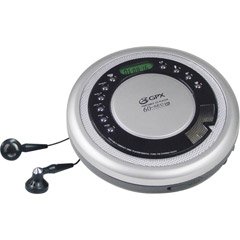
Figure 1: GPX CDP6806DT Personal CD Player. This image illustrates the compact design and general appearance of the device.
4. Контроле и карактеристике
Familiarize yourself with the controls and features of your GPX CDP6806DT for optimal use.
- ЛЦД екран: 6-digit display for track number, time, and FM frequency.
- PLAY/PAUSE (►/−): Press to start or pause CD playback.
- СТОП (■): Press to stop CD playback.
- SKIP/SEARCH (◀◀/▶▶): Press to skip tracks. Hold to search within a track.
- ЈАЧИНА ЗВУКА (+/-): Подешава ниво аудио излаза.
- MODE/PROG: Selects playback mode (Repeat, Random) or programs CD tracks.
- FM TUNER (ON/OFF/BAND): Switches to FM radio mode, turns FM on/off, or changes FM band.
- PRESET (+/-): Navigates saved FM radio presets.
- Преграда за CD-ове: Area for inserting audio CDs.
- Одељак за батерије: Located on the bottom, holds 2 AA batteries.
- Утичница за слушалице (3.5 мм): Повезује слушалице за приватно слушање.
Figure 2: GPX CDP6806DT Controls Layout. This image provides a visual reference for the location of various buttons and ports on the device.
5. Подешавање
5.1 Инсталација батерије
The GPX CDP6806DT requires two (2) AA batteries (not included) for portable operation.
- Пронађите одељак за батерију на дну уређаја.
- Отворите поклопац одељка за батерије.
- Уметните две АА батерије, водећи рачуна о исправном поларитету (+ и -) као што је назначено унутар одељка.
- Добро затворите поклопац одељка за батерије.
5.2 Повезивање слушалица
For private listening, connect your 3.5mm stereo headphones (not included) to the headphone jack located on the side of the unit.
6. Упутство за употребу
6.1 Репродукција ЦД-а
The unit supports CD and CD-R/RW disc formats.
- Open the CD compartment lid by gently pressing the OPEN button (if present, or lifting the lid).
- Поставите CD са страном са етикетом окренутом нагоре на средишње вретено.
- Close the CD compartment lid firmly until it clicks.
- Притисните тастер PLAY/PAUSE (►/−) button to begin playback. The track number and elapsed time will appear on the LCD display.
- Да бисте паузирали репродукцију, притисните PLAY/PAUSE (►/−). Притисните поново да бисте наставили.
- Да бисте зауставили репродукцију, притисните СТОП (■) дугме.
- Да бисте прешли на следећу нумеру, притисните SKIP/SEARCH (▶▶).
- To go back to the beginning of the current track, press SKIP/SEARCH (◀◀) once. Press twice to go to the previous track.
- To search rapidly forward or backward within a track, hold down SKIP/SEARCH (▶▶) or (◀◀) односно.
- Подесите јачину звука помоћу ВОЛУМЕ (+/-) контроле.
Рад са 6.2 FM радиом
The unit features a digital FM tuner with station presets.
- Померите ФМ ТУНЕР switch to the ON position or press the БАНД дугме за улазак у ФМ режим.
- Притисните тастер SKIP/SEARCH (▶▶) or (◀◀) дугмад за ручно подешавање жељене фреквенције.
- To auto-scan and save stations, hold down the PLAY/PAUSE (►/−) button (or refer to specific instructions for auto-scan if available on the device).
- To recall saved presets, use the PRESET (+/-) дугмад.
6.3 CD Programming (24-Track)
Можете програмирати до 24 нумера за репродукцију одређеним редоследом.
- Док је CD заустављен, притисните MODE/PROG button. "PROG" will flash on the display.
- Користите SKIP/SEARCH (▶▶) or (◀◀) buttons to select the first track you wish to program.
- Притисните MODE/PROG again to confirm the selection. The display will show the program number and the next available program slot.
- Repeat steps 2 and 3 to add up to 24 tracks to your program.
- After programming all desired tracks, press PLAY/PAUSE (►/−) да бисте започели програмирану репродукцију.
- Да бисте обрисали програм, притисните дугме СТОП (■) дугме двапут.
6.4 Anti-Skip Protection (ASP)
The GPX CDP6806DT features a 60-second Anti-Skip Protection system. This system buffers audio data to minimize interruptions caused by minor shocks or vibrations during CD playback. The ASP activates automatically when a CD is playing.
7. Одржавање
7.1 Чишћење јединице
- Обришите спољашњост уређаја меком, сувом крпом.
- Не користите абразивна средства за чишћење, воскове или раствараче.
- If the CD lens needs cleaning, use a specialized CD lens cleaner disc or a soft, lint-free cloth designed for optical lenses.
7.2 Одржавање батерије
- Remove batteries if the unit is not used for an extended period to prevent leakage.
- Немојте мешати старе и нове батерије или различите типове батерија.
- Истрошене батерије одлажите одговорно у складу са локалним прописима.
КСНУМКС. Решавање проблема
If you experience issues with your GPX CDP6806DT, please consult the following table for common problems and solutions.
| Проблем | Могући узрок / решење |
|---|---|
| Јединица се не укључује. | Check if batteries are inserted correctly with proper polarity. Ensure batteries are fresh and not depleted. |
| Нема звука из слушалица. | Ensure headphones are fully plugged into the headphone jack. Increase the volume level. Test with another pair of headphones. |
| CD skips or playback is interrupted. | Ensure the CD is clean and free of scratches or smudges. Clean the CD with a soft, lint-free cloth. Ensure the unit is on a stable surface or held steadily during use. |
| ЦД се не репродукује. | Ensure the CD is inserted correctly with the label side up. Close the CD compartment lid completely. Check if the CD is a supported format (CD, CD-R/RW). |
| Пријем ФМ радија је лош. | Extend the headphone cable as it acts as the antenna. Try moving to a different location. |
9. Спецификације
- Бренд: ГПКС
- Модел: CDP6806DT
- Подржани формати дискова: ЦД, ЦД-Р/РВ
- Заштита од прескакања: 60 секунди
- Приказ: ЛЦД са 6 цифара
- Радио: Digital FM Tuner with Presets
- CD Programming: 24-стаза
- Извор напајања: 2 к АА батерије (нису укључене)
- Повезивање: 3.5mm Headphone Jack (Auxiliary)
10. Гаранција и подршка
For detailed warranty information, please refer to the warranty card included with your original product packaging. For technical support, service inquiries, or to purchase replacement parts, please visit the official GPX webсајт или контактирајте њихову службу за кориснике користећи контакт информације наведене у документацији производа.
Сачувајте доказ о куповини за гаранцијске захтеве.