
1. Увод
Хвала вам на куповиниasing the Timex Nature Sounds CD Clock Radio T621T. This unit combines a digital alarm clock with an AM/FM radio and a front-loading CD player, offering multiple wake-up options including nature sounds. This manual provides detailed instructions for setup, operation, and maintenance to ensure optimal performance and longevity of your device.
2. Безбедносне информације
- Прочитајте сва упутства пре употребе уређаја.
- Сачувајте ово упутство за будућу употребу.
- Не излажите јединицу киши или влази.
- Не блокирајте вентилационе отворе.
- Користите само додатке/прибор које је навео произвођач.
- Искључите ову јединицу из струје током олуја са грмљавином или када се не користи дуже време.
- Све сервисирање препустите квалификованом сервисном особљу.
3. Садржај пакета
Молимо вас да проверите да ли су следеће ставке укључене у ваш пакет:
- Timex Nature Sounds CD Clock Radio T621T unit
- АЦ адаптер
- 3 AA Batteries (for Sure Alarm Battery Backup)
- Кориснички приручник (овај документ)
4. Производ је готовview
The Timex T621T features a large Amber-Glo display with brightness control, a front-loading CD player, and an AM/FM stereo radio. It includes a Triple Alarm System with 7-5-2 programming and four soothing nature sounds. The unit is equipped with Auto-Set time and a Sure Alarm Battery Backup system.
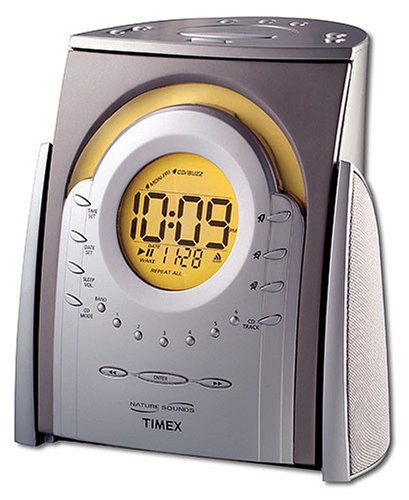
Слика 1: Фронт view of the Timex Nature Sounds CD Clock Radio T621T, showing the display, CD slot, and control buttons.
5. Подешавање
5.1 Прикључак за напајање
- Plug the AC power adapter into the DC input jack located on the back of the unit.
- Укључите други крај адаптера у стандардну зидну утичницу.
5.2 Инсталација резервне батерије
The Sure Alarm Battery Backup system maintains time and alarm settings during a power outage. It requires 3 AA batteries (included).
- Отворите поклопац одељка за батерије на дну уређаја.
- Insert 3 AA batteries, observing the polarity markings (+ and -).
- Добро затворите поклопац одељка за батерије.
5.3 Auto-Set Time
Upon initial power connection, the unit's Auto-Set feature will automatically set the correct time and date. It also adjusts for Daylight Saving Time automatically.
5.4 Setting Radio Presets
The unit allows for 18 preset radio stations (12 FM and 6 AM).
- Tune to your desired AM or FM station using the tuning controls.
- Притисните и држите Пресет дугме док број претходно подешене поставке не почне да трепери на екрану.
- Користите Туне дугмад да бисте изабрали жељени број предефинисане станице (1-18).
- Притисните тастер Пресет поново притисните дугме да бисте потврдили и сачували станицу.
6. Упутство за употребу
6.1 Рад CD плејера
The unit features a front-loading CD player.
- Insert a CD into the front-loading slot with the label side facing up.
- Притисните тастер CD дугме за пребацивање на ЦД режим.
- Користите Пусти/Паузирај, Скип, и Стани дугмад за контролу репродукције.
6.2 Setting Alarms (Triple Alarm System)
The T621T features three independent alarms with 7-5-2 programming (Daily, Weekdays, or Weekend).
- Притисните и држите Аларм 1, Аларм 2, или Аларм 3 дугме за улазак у режим подешавања аларма.
- Користите Тиме Сет buttons to adjust the wake time.
- Притисните тастер Аларм button again to select the wake source: CD, Радио, Природни звуци (Brook, Ocean, Wind Chimes, Song Bird), or Зујалица.
- Притисните тастер Аларм button a third time to select the alarm schedule: 7-дан, 5-дан (weekdays), or 2-дан (weekend).
- Притисните тастер Аларм button once more to confirm and exit.
6.3 звукова природе
The unit offers four soothing nature sounds: Brook, Ocean, Wind Chimes, and Song Bird. These can be used for waking up or for the sleep timer function.
- Притисните тастер Натуре Соунд button to cycle through the available sounds.
- Притисните тастер Волуме дугмад за подешавање нивоа звука.
6.4 Тајмер за спавање
You can fall asleep to the CD player, radio, or nature sounds with a programmable sleep timer.
- While playing CD, radio, or nature sounds, press the Спавај дугме.
- Више пута притискајте Спавај button to cycle through available sleep times (e.g., 90, 60, 30, 15 minutes).
- Јединица ће се аутоматски искључити након изабраног времена.
6.5 Контрола осветљености екрана
Adjust the brightness of the Amber-Glo display to your preference.
- Притисните тастер Диммер button to cycle through different brightness levels.
6.6 Утичница за слушалице
A stereo headphone jack is provided for private listening. Plug standard 3.5mm headphones into the jack located on the unit.
7. Одржавање
7.1 Чишћење јединице
- Обришите спољашњост уређаја меком, сувом крпом.
- Немојте користити абразивна средства за чишћење или раствараче.
- За CD сочиво користите специјализовани диск за чишћење CD сочива.
7.2 Замена батерије
Replace the 3 AA backup batteries annually or when the battery low indicator appears on the display to ensure continuous alarm functionality during power outagес.
КСНУМКС. Решавање проблема
- Нема напајања: Ensure the AC adapter is securely plugged into both the unit and a working wall outlet. Check household circuit breaker.
- Аларм се не оглашава: Verify that the alarm is activated and set to the correct time and day schedule. Check the alarm volume. Ensure backup batteries are fresh if power was interrupted.
- Слаб радио пријем: Extend and adjust the FM wire antenna for better reception. For AM, rotate the unit slightly to improve signal.
- ЦД се не репродукује: Ensure the CD is inserted correctly with the label side up. Check if the CD is scratched or dirty; clean if necessary. Try a different CD.
- Display Not Visible/Dim: Подесите осветљеност екрана помоћу Диммер дугме.
9. Спецификације
- Модел: ТКСНУМКСТ
- Бренд: Тимек
- Тип приказа: Digital, Amber-Glo
- Извор напајања: AC Powered, 3 AA batteries for backup (included)
- Радио: AM/FM Stereo, 18 Presets (12 FM/6 AM)
- ЦД плејер: Предњи утовар
- Алармни систем: Triple Alarm, 7-5-2 Programming
- Опције буђења: CD, Radio, Nature Sounds, Buzzer
- звуци природе: Brook, Ocean, Wind Chimes, Song Bird
- Посебне карактеристике: Auto-Set Time, Adjustable Brightness, Large Display, Stereo Headphone Jack
- Произвођач: СДИ Технолоџиз, Инк.
- УПЦ: 758859203782
10. Информације о гаранцији
This product is covered by a limited warranty from the manufacturer. Please refer to the warranty card included with your purchase for specific terms and conditions, including coverage period and service procedures. Keep your proof of purchase for warranty claims.
11. Корисничка подршка
For further assistance, technical support, or warranty inquiries, please contact Timex customer service. Contact information can typically be found on the manufacturer's webсајту или на гарантном листу који сте добили уз производ.