
1. Увод
The Sigma SD14 is a 14-megapixel Digital Single-Lens Reflex (DSLR) camera designed for advanced photographers. It features the Foveon X3 direct-image sensor, which captures full RGB color information at each pixel layer, aiming for high-definition images with rich gradation. This manual provides essential information for setting up, operating, and maintaining your SD14 camera.
Key features include a 2.5-inch LCD monitor, a durable shutter mechanism rated for over 100,000 cycles, a 5-point autofocus system, and continuous shooting capabilities. The camera supports both RAW and JPEG image recording formats and includes Sigma Photo Pro 3.0 software for RAW image processing.

Слика 1.1: Предња страна view of the Sigma SD14 Digital SLR Camera, showing the lens mount and body design.
2. Шта је у кутији
Verify that all the following items are included in your Sigma SD14 package:
- Sigma SD14 Digital SLR Camera Body
- Lithium-ion Power Battery BP-21
- Battery Charger BC-21
- УСБ кабл
- Видео Цабле
- Ремен за врат
- Eye Cap
- Боди Цап
- Еиепиеце Цап
- SIGMA Photo Pro 3.0 CD-ROM
- SD14 Instruction Manual (this document)
3. Подешавање
3.1. Пуњење и инсталирање батерије
- Insert the Lithium-ion Battery BP-21 into the Battery Charger BC-21.
- Прикључите пуњач у утичницу. Индикатор пуњења ће светлети.
- Charging typically takes approximately 120 minutes for a full charge.
- Када се батерија потпуно напуни, извадите батерију из пуњача.
- Open the battery compartment cover on the camera body.
- Insert the charged battery into the compartment, ensuring correct orientation.
- Добро затворите поклопац одељка за батерије.
A fully charged BP-21 battery can capture approximately 500 images.
3.2. Убацивање меморијске картице
The SD14 uses CompactFlash (CF) Type I/II cards. Ensure the card is formatted in the camera before first use.
- Отворите поклопац слота за CF картицу са стране фотоапарата.
- Уметните CF картицу са исправном оријентацијом док не кликне на своје место.
- Close the CF card slot cover securely.
3.3. Причвршћивање објектива
The Sigma SD14 uses the Sigma SA Bayonet mount. Only Sigma SA mount lenses are directly compatible.
- Уклоните поклопац тела са фотоапарата и задњи поклопац објектива са објектива.
- Align the red index mark on the lens with the red index mark on the camera body's lens mount.
- Attach the lens by rotating it clockwise until it locks into place with a click.
- Да бисте уклонили објектив, притисните дугме за отпуштање објектива на кућишту фотоапарата и окрените објектив у смеру супротном од казаљке на сату.
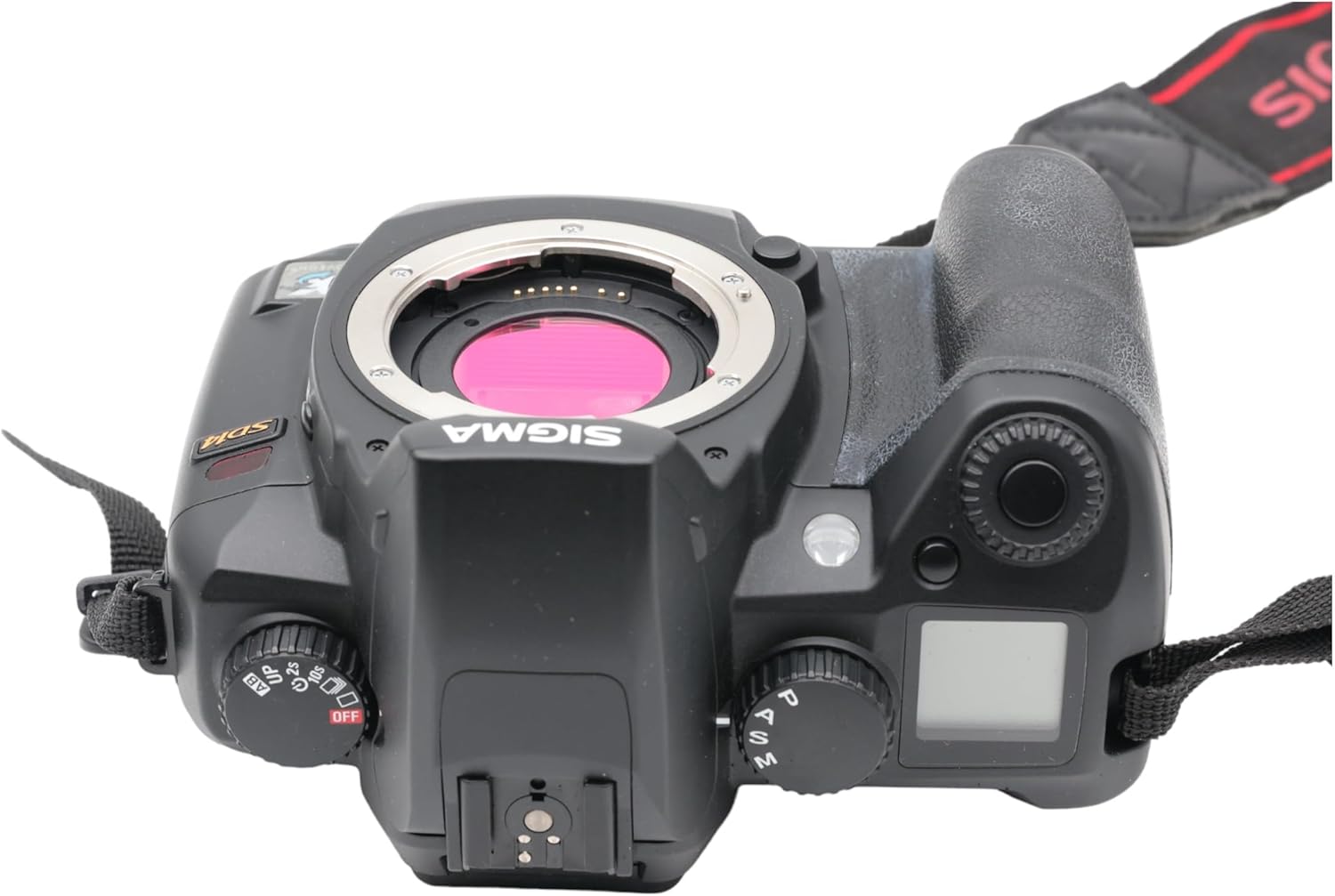
Слика 3.1: Врх view of the Sigma SD14, illustrating the lens mount and mode dials.
4. Операција
4.1. Укључивање/искључивање
Rotate the power switch to the ON position to turn on the camera. Rotate it to OFF to power down.
4.2. Основне контроле и приказ
The SD14 features a 2.5-inch LCD monitor for reviewing images and navigating menus, and a pentaprism viewfinder for composing shots. The top LCD panel displays key settings such as resolution, metering mode, battery status, and remaining shots.

Слика 4.1: Задња страна view of the Sigma SD14, showing the LCD monitor, viewпроналазач и контролна дугмад.
Key buttons include MENU, ISO, WB (White Balance), and a 4-way controller with an OK button for navigation. The INFO button displays shutter speed, aperture, and other settings on the LCD.
4.3. Фокусирање
The camera utilizes a 5-point autofocus (AF) system (center, left, right, up, and down). The center AF point features a cross-type sensor for enhanced precision. AF point selection can be automatic or manual.
4.4. Metering Modes
The SD14 offers three metering modes:
- 8-segment Evaluative Metering: Analyzes the entire scene for balanced exposure.
- Center Area Metering: Prioritizes the central area of the frame.
- Center Weighted Average Metering: Measures the entire frame but gives more weight to the central area.
Exposure compensation and auto bracketing functions are available for fine-tuning exposure.
4.5. Снимање слике
The camera supports both RAW (X3F) and JPEG formats. JPEG recording offers four sizes (Super High, High, Medium, Low) and three quality settings (Fine, Normal, Basic).
- Super High (4608 x 3072 pixels): Suitable for A3 or larger prints.
- High (2640 x 1760 pixels): Suitable for A4 prints.
- Medium (1776 x 1184 pixels): Suitable for regular size prints.
- Low (1296 x 864 pixels): Погодно за web pages and email.
4.6. Континуирано снимање
The SD14 can shoot continuously at 3 frames per second. The number of frames captured in a burst depends on the resolution setting:
- висока: 6 оквира
- средњи: 12 оквира
- ниско: 24 оквира
These figures apply to both RAW and JPEG modes.
4.7. Уграђени блиц
The built-in flash has a guide number of 11 (ISO 100) and covers a 17mm lens angle (28mm equivalent on 35mm format). It supports S-TTL automatic flash metering and can synchronize with shutter speeds up to 1/180 second.
4.8. Mirror Lock-up
Activate the mirror lock-up mechanism to prevent camera shake caused by mirror movement during exposure. This is particularly useful for macro photography, long telephoto shots, or scientific applications. For best results, use with a remote controller or cable release (sold separately).
4.9. Sigma Photo Pro 3.0 Software
The included Sigma Photo Pro 3.0 software is a RAW image developer. It allows for quick conversion of RAW data and offers three adjustment modes: X3F Mode (original settings), Auto Adjustment Mode, and Custom Mode for manual adjustments (exposure, contrast, shadow, highlight, saturation, sharpness, fill-light). The software supports 8-bit TIFF, 16-bit TIFF, and JPEG file formats, and sRGB, Apple RGB, Adobe RGB, and ColorMatch RGB color spaces.
5. Одржавање
5.1. Image Sensor Dust Protector
The SD14 features a dust protector positioned in front of the image sensor. This design prevents dust from adhering directly to the sensor, minimizing its impact on image quality. If dust accumulates on the protector, it will be out of focus and generally not visible in images.
5.2. Чишћење тела и објектива фотоапарата
- Користите меку крпу која не оставља влакна да обришете кућиште фотоапарата. За тврдокорну прљавштину, благо обришитеampи крпу са водом или благим раствором за чишћење.
- For lenses, use a lens brush to remove loose dust, then a lens cleaning solution and a microfiber cloth. Avoid touching the lens surface with your fingers.
- Never use organic solvents like paint thinner or benzene to clean the camera or lens.
5.3. Брига о батерији
- Чувајте батерије на хладном и сувом месту када нису у употреби.
- Избегавајте често потпуно пражњење батерије како бисте продужили њен век трајања.
- Ако се камера неће користити дуже време, извадите батерију.
КСНУМКС. Решавање проблема
| Проблем | Могући узрок | Решење |
|---|---|---|
| Камера се не укључује. | Батерија је испражњена или неправилно уметнута. | Потпуно напуните батерију и уверите се да је правилно уметнута. |
| Слике су мутне. | Неправилан фокус, подрхтавање камере или прљав објектив. | Обезбедите правилно фокусирање. Користите већу брзину затварача или статив. Очистите објектив. |
| Images are too dark or too bright. | Incorrect exposure settings or metering mode. | Adjust exposure compensation. Select an appropriate metering mode for the scene. |
| Color blotching in underexposed areas. | Characteristic of the Foveon sensor when severely underexposed. | Aim to slightly overexpose images (e.g., +.7 EV) to retain shadow detail and avoid this effect. |
| Не могу да снимам слике. | Memory card is full, locked, or not inserted correctly. | Insert an empty card, unlock the card, or reinsert it correctly. Format the card if necessary (this will erase all data). |
| Камера се замрзава или престаје да реагује. | Привремени софтверски квар. | Извадите и поново уметните батерију да бисте ресетовали камеру. |
For more detailed troubleshooting or error codes, please refer to the comprehensive instruction manual included with your camera or visit the Sigma support webсајту.
7. Спецификације
| Феатуре | Детаљ |
|---|---|
| Назив модела | СД14 |
| Резолуција фото сензора | 14 MP (Foveon X3 direct-image sensor) |
| Величина фото сензора | АПС-Ц |
| Компатибилни носачи | Sigma SA Bayonet |
| Подржано File Форматс | JPEG, RAW (X3F), TIFF |
| Величина екрана | 2.5 Inches (150,000 pixels) |
| Viewналазач | Optical Pentaprism (98% coverage, 0.9x magnification) |
| Тачке аутофокуса | 5-point (Phase Detection) |
| Непрекидна брзина снимања | 3 кадрова у секунди |
| Максимална брзина затварача | 1/4000 секунди |
| Минимална брзина затварача | 30 секунди |
| Проширени ISO опсег | 100 - 1600 |
| Режими мерења | 8-segment Evaluative, Center Area, Center Weighted Average |
| Built-in Flash Guide Number | 11 (ИСО 100) |
| Медији за складиштење | Compact Flash (CF) Type I/II |
| Извор напајања | Lithium-ion Battery BP-21 |
| Повезивање | USB, Video Out |
| Тежина артикла | 1.65 фунте (приближно 748 г) |
| Број модела | Ц23900 |
| УПЦ | 085126924416 |
7.1. Optional Accessories (Sold Separately)
- Sigma Lenses (over 40 compatible models)
- Flashguns: EF-500 DG SUPER, EF-500 DG ST, EM-140 DG
- Power Grip PG-21
- Cable Release CR-21
- Remote Controller RS-31
- AC Adapter SAC-21
8. Гаранција и подршка
8.1. Информације о гаранцији
For detailed warranty terms and conditions, please refer to the warranty card included with your product or visit the official Sigma webсајт. Гаранција обично покрива недостатке у материјалу и изради за одређени период од датума куповине.
8.2. Корисничка подршка
If you encounter any issues or have questions not covered in this manual, please contact Sigma customer support. Contact information can usually be found on the official Sigma webсајту или у гарантној документацији.
Онлине ресурси: Visit the official Sigma website for product registration, firmware updates, FAQs, and additional support resources.