
Увод
This manual provides detailed instructions for the installation, operation, and maintenance of the goobay 11307 RCA Jack. This component is designed for housing mounting and features a gold-plated structure with colored insulating washers, specifically red, for clear channel identification. It is intended for solder connections, ensuring a secure and reliable audio or video signal transmission.
The goobay 11307 RCA jack is a standard connector used in various audio and video applications, allowing for the transmission of analog electrical signals. Its robust design ensures durability and consistent performance when properly installed.
Производ је завршенview
The goobay 11307 RCA Jack is a panel-mount connector. Key features include:
- Тип: RCA Jack (female connector)
- Монтажа: Designed for housing or panel mounting.
- веза: Solder connection for secure wiring.
- Материјал: Gold-plated structure for optimal signal conductivity and corrosion resistance.
- изолација: Includes colored insulating washers, with this specific model featuring a red washer for channel identification (e.g., right audio channel).
- Димензије: Approximately 20 x 20 x 20 millimeters.
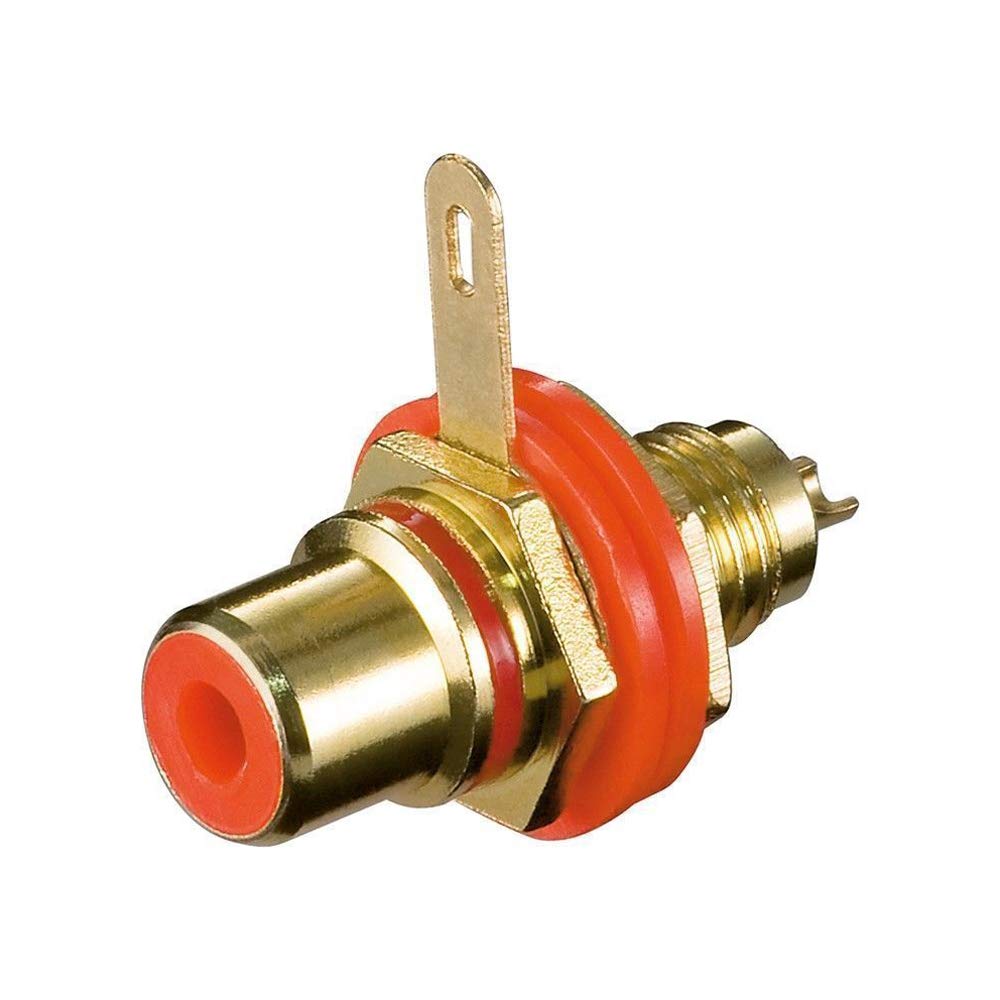
Слика 1: Предња страна view of the goobay 11307 RCA Jack, showing the gold-plated connector and red insulating washer.

Слика 2: Страна view of the goobay 11307 RCA Jack, illustrating the solder connection points for wiring.
Подешавање и инсталација
Proper installation is crucial for optimal performance and safety. This RCA jack requires panel mounting and soldering.
Потребни алати и материјали:
- Лемило и лемљење
- Жице стриптизета
- Drill with appropriate bit size for panel mounting hole
- Nut and washer (typically included with the jack, or ensure correct size)
- Audio/video cables for connection
Кораци инсталације:
- Припремите отвор за монтажу: Drill a hole of the appropriate diameter in the desired panel or housing. Ensure the hole is clean and free of burrs. The diameter should allow the threaded portion of the RCA jack to pass through snugly.
- Insert Jack: Insert the RCA jack through the prepared hole from the front of the panel.
- Secure Jack: Place the insulating washer (if separate from the main body) and then the metal washer and nut onto the threaded portion of the jack from the rear of the panel. Tighten the nut firmly but do not overtighten, as this could damage the jack or panel. The red insulating washer should be visible on the front of the panel.
- Припремите жице: Strip a small amount of insulation from the ends of the audio/video signal wires that will be connected to the jack.
- Прикључци за лемљење:
- Identify the center pin (signal) and the outer tab (ground) on the RCA jack.
- Carefully solder the signal wire to the center pin of the jack.
- Solder the ground wire (shield) to the outer tab of the jack.
- Ensure solder joints are clean, strong, and free of shorts. Avoid excessive heat to prevent damage to the jack's insulation.
- Тестна веза: Before final assembly, test the connection to ensure proper signal flow and absence of shorts.
Safety Note: Always disconnect power from any equipment before performing soldering or installation work. Use appropriate personal protective equipment (PPE) such as safety glasses.
Упутство за употребу
Once the goobay 11307 RCA Jack is correctly installed and wired, its operation is straightforward:
- Повежите RCA кабл: Insert a standard RCA plug from your audio or video source/destination into the installed goobay 11307 RCA jack. The plug should fit snugly.
- Ensure Secure Connection: Verify that the RCA plug is fully inserted into the jack to ensure proper signal transmission and to prevent intermittent connections.
- Пренос сигнала: The jack will now facilitate the transmission of the analog audio or video signal between the connected devices.
The red color of the insulating washer typically indicates the right audio channel in stereo applications or a specific video signal, depending on the system's convention. Always refer to your equipment's documentation for correct channel assignments.
Одржавање
The goobay 11307 RCA Jack is a passive component and requires minimal maintenance. However, following these guidelines can prolong its lifespan and ensure consistent performance:
- Одржавати уредним одржавати чистим: Periodically inspect the jack for dust, dirt, or debris. Use a soft, dry cloth or a cotton swab to gently clean the contact surfaces. Avoid using abrasive cleaners or solvents.
- Прегледајте везе: Occasionally check the soldered connections for any signs of corrosion or loosening. Re-solder if necessary.
- Избегавајте физички стрес: Do not apply excessive force when inserting or removing RCA plugs. Avoid bending or twisting the jack, which could damage the internal contacts or the solder joints.
- Услови животне средине: Store and operate the equipment containing the jack in a dry environment, away from extreme temperatures and humidity, to prevent corrosion.
Решавање проблема
If you experience issues with signal transmission, consider the following troubleshooting steps:
- No Signal / Intermittent Signal:
- Проверите кабл: Ensure the RCA cable connected to the jack is not damaged and is fully inserted into both the goobay jack and the connected device. Try a different cable if possible.
- Inspect Solder Joints: Verify that the solder connections on the back of the goobay 11307 jack are solid and free of cold joints or shorts. Re-solder if necessary.
- Check Source/Destination: Ensure the audio/video source and destination devices are powered on and functioning correctly.
- Poor Audio/Video Quality (Noise, Distortion):
- Проблем са уземљењем: Ensure the ground connection (outer tab) is properly soldered and making good contact. Poor grounding can introduce hum or noise.
- Квалитет кабла: Use high-quality, shielded RCA cables to minimize interference.
- Очистите контакте: Clean the contacts of both the jack and the RCA plug to remove any oxidation or dirt.
If problems persist after following these steps, consult a qualified technician.
Спецификације
| Бранд | гообаи |
| Број модела | 11307 |
| Сериес | CBGP R |
| Боја | Црвени |
| Димензије артикла (Д к Ш к В) | 20 к 20 к 20 милиметара |
| Тип конектора | РЦА |
| Врста везе | Лемљење |
| Структура | Позлаћени |
| Изолација | Colored insulating washers (Red) |
| Количина по паковању | 1 |
| ASIN | B000L0XHSQ |
| Први доступан датум | 21. јануара 2011. године |
Гаранција и подршка
Specific warranty information for the goobay 11307 RCA Jack is not provided in the product details. For warranty claims or technical support, please contact the manufacturer, goobay, or your point of purchase directly. Retain your proof of purchase for any warranty inquiries.
For general inquiries or further assistance, you may visit the official goobay webсајту или се обратите њиховом одељењу за корисничку подршку.