
Увод
Thank you for choosing the Gaiam Pedometer Plus Audio CD. This device is designed to help you track your daily steps, distance, and calories burned, supporting your fitness journey. The included audio CD provides guided intermediate-level exercises to complement your walking routine. Please read this manual carefully to ensure proper use and maintenance of your pedometer.
Производ је завршенview
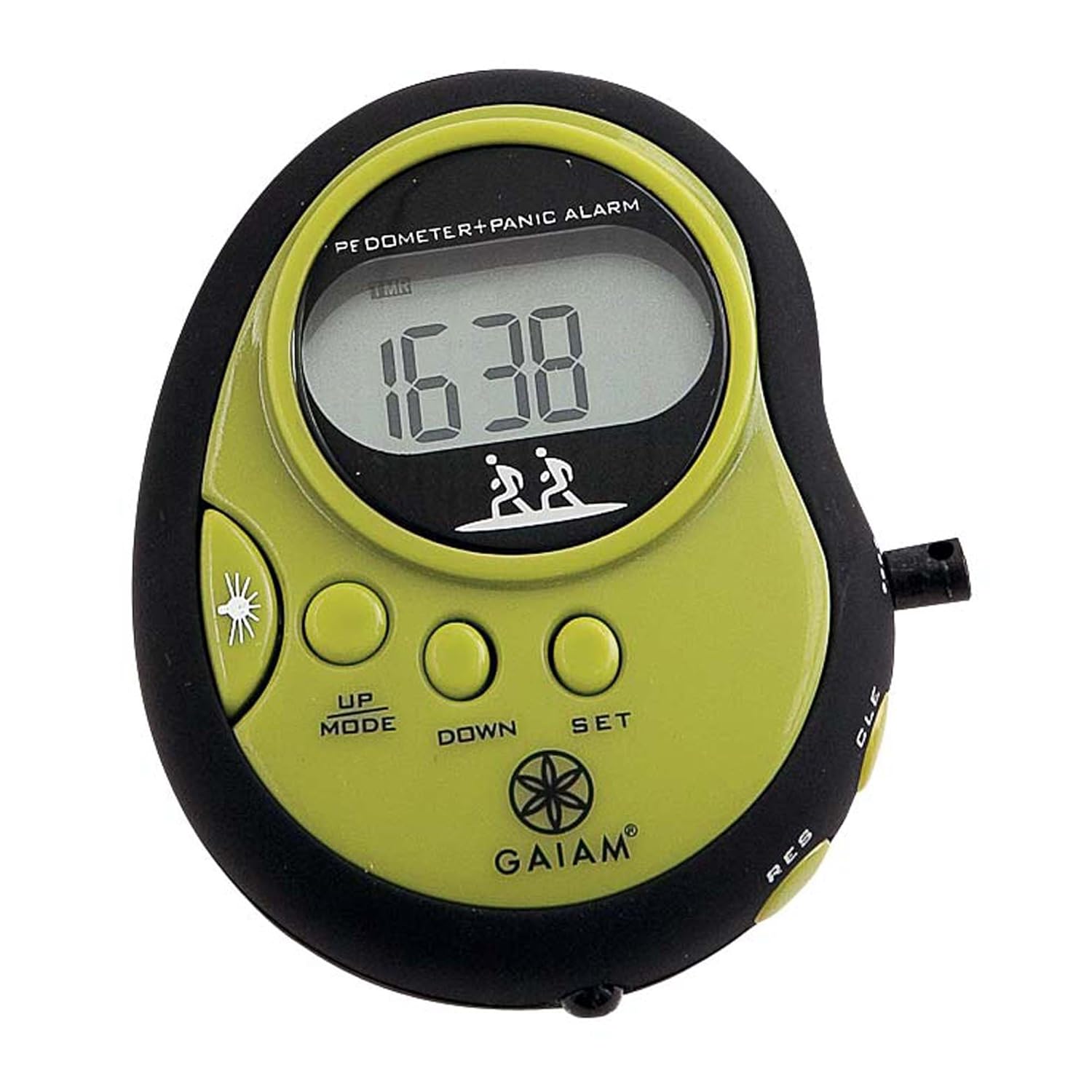
Слика 1: Gaiam Pedometer front view. The device is black and lime green, featuring a digital display, control buttons, and a panic alarm function.
The Gaiam Pedometer is a compact, clip-on device featuring a digital display, control buttons for mode selection and settings, and a built-in panic alarm. It is designed for easy portability and accurate tracking of your physical activity.
Сетуп
1. Инсталација батерије
The pedometer requires a Lithium-Ion battery (included). To install or replace the battery:
- Locate the battery compartment cover on the back of the pedometer.
- Use a small screwdriver or coin to open the cover.
- Insert the battery, ensuring the correct polarity (+/-).
- Replace the cover and secure it.
2. Почетна подешавања
After battery installation, the display may flash. Follow these steps to set up your personal data:
- време: Притисните тастер СЕТ button to enter time setting mode. Use UP/MODE и ДОВН дугмад за подешавање сати и минута. Притисните СЕТ да бисте потврдили сваки избор.
- Дужина корака: Accurate stride length is crucial for distance calculation. Measure your average stride (distance covered in one step). Enter this value in centimeters or inches.
- Тежина: Enter your body weight in kilograms or pounds for calorie calculation.
- Target Steps: Optionally, set a daily step target.
3. Attaching the Pedometer
For accurate readings, attach the pedometer securely to your waistband or belt, close to your hip. Ensure it is positioned vertically and does not swing freely.
Упутство за употребу
1. Основне функције
- Укључивање/искључивање: The pedometer typically powers on automatically when motion is detected or a button is pressed. It may enter a low-power sleep mode after a period of inactivity.
- Viewинг Дата: Притисните тастер UP/MODE button to cycle through different display modes: Steps, Distance, Calories, Time.
- Ресетовање података: To clear daily data (steps, distance, calories), press and hold the ЦЛЕ (Clear) button for a few seconds until the display resets to zero. This typically resets daily data, not personal settings.
2. Panic Alarm
The pedometer includes a panic alarm feature. To activate the alarm, press and hold the designated alarm button (often marked with a speaker or siren icon, or integrated with another button like РЕС or a dedicated side button). Release the button to deactivate the alarm.
3. Using the Audio CD
The included Audio CD provides guided walking or exercise routines at an intermediate level. Insert the CD into a compatible CD player and follow the audio instructions. It is designed to enhance your fitness experience by providing structured workouts.
Одржавање
- Чишћење: Wipe the pedometer with a soft, dry cloth. Do not use abrasive cleaners or immerse the device in water.
- Складиштење: Store the pedometer in a cool, dry place away from direct sunlight and extreme temperatures. If storing for an extended period, consider removing the battery to prevent leakage.
- Отпорност на воду: This device is not waterproof. Avoid exposure to rain, sweat, or other liquids.
Решавање проблема
| Проблем | Решење |
|---|---|
| Нема дисплеја или је дисплеј слаб. | Проверите постављање батерије. Замените батерију ако је потребно. |
| Нетачан број корака. | Ensure pedometer is securely attached and positioned vertically. Verify stride length setting is accurate. Avoid excessive shaking or non-walking movements. |
| Дугмад не реагују. | Remove and reinsert the battery to perform a soft reset. If the issue persists, the device may require service. |
| Panic alarm not working. | Ensure the battery has sufficient charge. Check if the alarm button is being pressed correctly and held for the required duration. |
Спецификације
- Број модела: 05-51976
- Бренд: Gaiam
- Тип сензора: Педометер
- Тип батерије: Литијум-јонски
- Тежина артикла: 113 г (3.99 унци)
- Димензије производа: 20.32 к 15.88 к 0.64 цм
- УПЦ: 018713519764
Гаранција и подршка
For warranty information or technical support, please refer to the contact details provided with your product packaging or visit the official Gaiam webсајт. Сачувајте рачун као доказ о куповини.