
SAMSON R5a
Samson Rubicon R5a Active Ribbon Studio Monitors User Manual
Model: R5a
Увод
The Samson Rubicon R5a Active Ribbon Studio Monitors are designed to provide accurate and natural sound reproduction for professional audio environments. This manual provides essential information for the proper setup, operation, and maintenance of your R5a monitors.
Each R5a monitor features a bi-amplified design, delivering 50 watts to a 5-inch inverted cone low-frequency driver and 25 watts to a 2-inch Velocity Ribbon high-frequency transducer. The monitors are housed in a shelf-ported wood enclosure and offer balanced 1/4-inch and XLR input connections. A 4-segment high-frequency lift control allows for precise adjustment of the ribbon tweeter output.
Важна безбедносна упутства
Please read these instructions carefully before operating your Samson Rubicon R5a monitors. Keep this manual for future reference.
- Извор напајања: Connect the unit only to a power supply of the type described in this operating instruction or marked on the unit.
- вентилација: Не блокирајте отворе за вентилацију. Инсталирајте у складу са упутствима произвођача.
- топлота: Не постављајте у близини извора топлоте као што су радијатори, грејни регистри, пећи или други уређаји (укључујући ampлифиерс) који производе топлоту.
- Вода и влага: Не користите овај апарат у близини воде.
- Чишћење: Чистите само сувом крпом.
- Сервисирање: Све сервисирање препустите квалификованом сервисном особљу. Сервисирање је потребно када је уређај оштећен на било који начин, као што је оштећен кабл за напајање или утикач, ако је течност проливена или су предмети упали у апарат, ако је апарат био изложен киши или влази, не ради нормално , или је одбачено.
Садржај пакета
Проверите да ли ваш пакет садржи следеће ставке:
- Samson Rubicon R5a Active Ribbon Studio Monitors (Pair)
- Power Cables (2)
- Кориснички приручник (овај документ)
Сетуп
Пласман
Proper placement of your studio monitors is crucial for accurate sound reproduction. Position the monitors to form an equilateral triangle with your listening position. The tweeters should be at ear level. Avoid placing monitors directly against walls or in corners, as this can exaggerate bass frequencies.
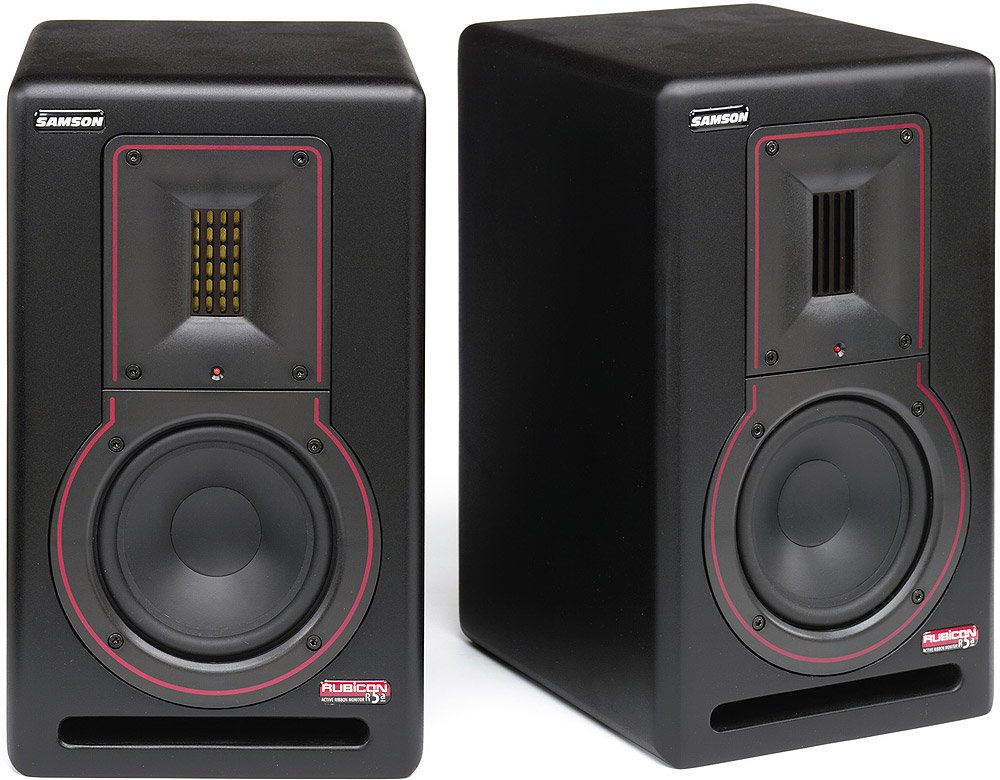
Слика: Фронт view of a Samson Rubicon R5a Active Ribbon Studio Monitor. It shows the 5-inch woofer, the 2-inch ribbon tweeter, and the Samson logo.
Везе
The Rubicon R5a monitors offer balanced 1/4-inch and XLR input connections. Use high-quality shielded cables to connect your audio source (e.g., audio interface, mixer) to the monitors.
- Ensure both the monitors and your audio source are powered off before making any connections.
- Connect the audio output from your source to the XLR or 1/4-inch input on each R5a monitor.
- Connect the supplied power cables to the IEC power inlets on the rear of each monitor and then to a suitable AC power outlet.
- Once all connections are secure, you can proceed to power on your equipment. It is recommended to power on your audio source first, then the monitors. When powering off, turn off the monitors first, then the audio source.
Упутство за употребу
Укључивање/искључивање
Locate the power switch on the rear panel of each monitor. Flip the switch to the "ON" position to power on the monitor. An indicator light on the front panel will illuminate. To power off, flip the switch to the "OFF" position.
Контрола јачине звука
Each R5a monitor has a volume control knob on the rear panel. Start with the volume set to a low level before playing audio. Gradually increase the volume to your desired listening level. It is generally recommended to control the overall system volume from your audio source (e.g., audio interface, mixer) and use the monitor's volume control for fine-tuning or balancing.
High-Frequency Lift Control
The R5a monitors feature a 4-segment high-frequency lift control. This allows you to adjust the output level of the ribbon tweeter to compensate for room acoustics or personal preference. Experiment with the different settings to find the optimal balance for your listening environment.
The settings typically include:
- 0 дБ: Раван одговор.
- +2 дБ: Slight boost in high frequencies.
- +4 дБ: Moderate boost in high frequencies.
- -2 дБ: Slight cut in high frequencies.
Одржавање
To ensure the longevity and optimal performance of your Samson Rubicon R5a monitors, follow these maintenance guidelines:
- Чишћење: Dust the monitors regularly with a soft, dry cloth. Do not use liquid cleaners or solvents, as these can damage the finish or internal components.
- вентилација: Ensure that the ventilation openings on the rear of the monitors are not obstructed. Adequate airflow is essential to prevent overheating.
- Складиштење: If storing the monitors for an extended period, keep them in a dry, temperature-controlled environment, ideally in their original packaging or a protective case.
- Избегавајте преоптерећење: Do not operate the monitors at excessively high volumes for prolonged periods, as this can cause damage to the drivers.
Решавање проблема
| Проблем | Могући узрок | Решење |
|---|---|---|
| No sound from monitor. |
|
|
| Изобличен звук. |
|
|
| Hum or buzz. |
|
|
If the problem persists after trying these solutions, please contact Samson customer support or a qualified service technician.
Спецификације
| Феатуре | Детаљ |
|---|---|
| Назив модела | Rubicon R5a |
| Спеакер Типе | Active Ribbon Studio Monitor |
| Нискофреквентни управљачки програм | 5-inch inverted cone |
| Високофреквентни претварач | 2-inch Velocity Ribbon |
| LF Ampлифиер Повер | 50 Ваттс |
| HF Ampлифиер Повер | 25 Ваттс |
| Укупна излазна снага | 75 Watts (Bi-ampед) |
| Технологија повезивања | XLR, 1/4-inch (balanced) |
| Извор напајања | Цордед Елецтриц |
| Енцлосуре Типе | Shelf-ported wood enclosure |
| Контрола високих фреквенција | 4-segment lift control |
| УПЦ | 809164005148 |
Информације о гаранцији
Samson Technologies warrants its products to be free from defects in materials and workmanship for a period of one (1) year from the date of original purchase. This warranty is non-transferable and applies only to the original purchaser.
This warranty does not cover damage resulting from accident, misuse, abuse, alteration, or unauthorized service. For full warranty terms and conditions, please refer to the official Samson webсајту или контактирајте корисничку подршку.
Корисничка подршка
For technical support, service, or warranty inquiries, please contact Samson Customer Service:
- Webсајт: www.samsontech.com/support
- Телефон: Refer to the Samson webсајт за регионалне контакт бројеве.
- Адреса: Samson Technologies Corp., 278-B Duffy Ave, Hicksville, NY 11801, USA
When contacting support, please have your product model (Rubicon R5a) and serial number available.