
1. Увод
The Mitsubishi HC1500 is a high-definition 720p DLP home theater projector designed to deliver clear and vibrant images. This manual provides essential information for the proper setup, operation, and maintenance of your projector, ensuring optimal performance and longevity.
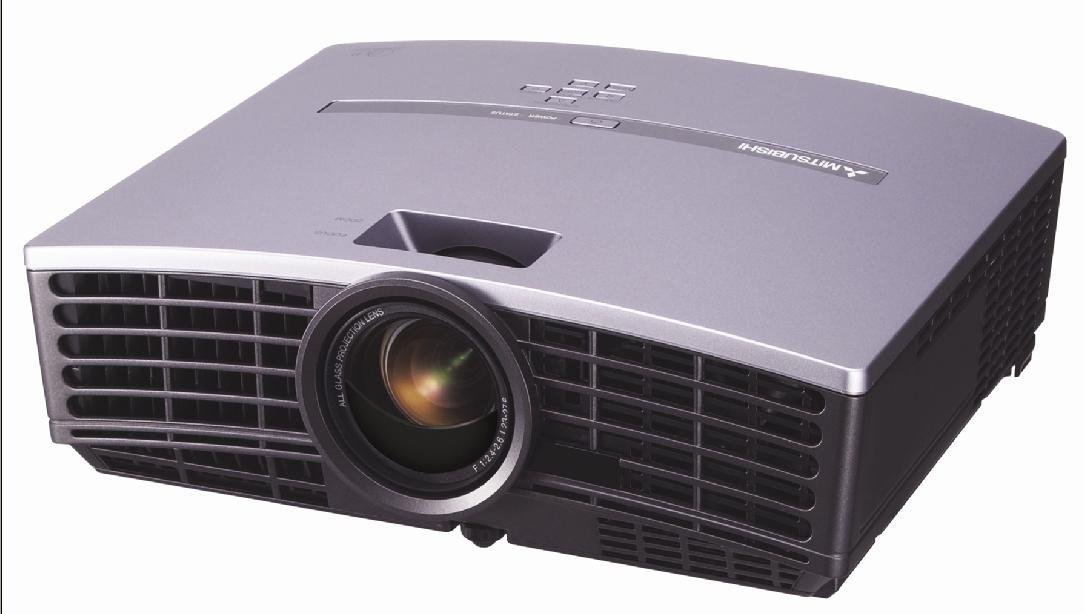
Слика 1: Фронт view of the Mitsubishi HC1500 projector. This image displays the projector's front panel, featuring the central projection lens and the prominent ventilation grilles on both sides, designed for efficient heat dissipation.
2. Безбедносне информације
Please read all safety instructions before operating the projector. Failure to follow these instructions may result in electric shock, fire, or damage to the projector.
- Не блокирајте вентилационе отворе. Обезбедите довољно простора око пројектора за правилан проток ваздуха.
- Не гледајте директно у сочиво пројектора када је укљученоamp је укључено, јер јако светло може изазвати оштећење ока.
- Не постављајте пројектор на нестабилна колица, постоље или сто.
- Unplug the projector from the power outlet before cleaning or when not in use for an extended period.
- Све сервисирање препустите квалификованом сервисном особљу.
3. Шта је у кутији
Проверите да ли су све ставке наведене у наставку укључене у ваш пакет:
- Mitsubishi HC1500 Projector
- Кабл за напајање наизменичном струјом
- RGB кабл
- РС-232Ц кабл
- Remote Unit with Battery
- Light Shade Cover
- Картица за брзи почетак
- Упутство за употребу (овај документ)
- Сафети Мануал
4. Подешавање
4.1 Постављање
Position the projector on a stable surface or mount it to the ceiling. Ensure the projector is placed at an appropriate distance from the screen to achieve the desired image size. The HC1500 can project an image from 40 inches to 275 inches diagonally. Maintain clear space around the projector for ventilation.
4.2 Везе
Повежите видео изворе са пројектором помоћу одговарајућих каблова.
- ДВИ: For high-definition digital video and audio signals. Use an HDMI 1.2 compatible cable for optimal performance.
- компонента: For high-definition analog video signals.
- РС-232Ц: За управљање пројектором преко рачунара или система за управљање.
- 12-Volt Trigger: To control a compatible motorized screen.
4.3 Укључивање/искључивање
- Connect the AC power cable to the projector and a power outlet.
- Притисните дугме за напајање на пројектору или даљинском управљачу да бисте укључили уређај. Индикаторска лампица напајања ће се упалити.
- To turn off the projector, press the power button again. Confirm shutdown if prompted. The projector will enter a cooling cycle before fully powering down.
5. Руковање пројектором
5.1 Даљински управљач
The included remote control allows for convenient operation of all projector functions, including power, input selection, menu navigation, and image adjustments. The remote features backlit buttons for use in dark environments.
5.2 Избор улаза
Press the 'Input' or 'Source' button on the remote control or projector control panel to cycle through available input sources (e.g., HDMI, Component, RGB). Select the input corresponding to your connected device.
5.3 Подешавање слике
- Прстен за фокусирање: Rotate the focus ring on the projector lens to sharpen the image.
- Прстен за зумирање: Adjust the zoom ring to change the image size without moving the projector.
- Кеистоне Цоррецтион: Use the digital keystone correction feature (vertical and horizontal) via the on-screen menu to correct trapezoidal image distortion if the projector is not perfectly perpendicular to the screen.
5.4 Лamp Режими
The projector offers different lamp modes to balance brightness and lamp живот:
- Светли режим: Provides maximum brightness (1600 ANSI lumens) for well-lit environments. Lamp life is approximately 2000 hours.
- Ниски режим: Reduces brightness for darker environments, extending lamp life to approximately 3000 hours and reducing fan noise (25dBA).
6. Одржавање
6.1 Лamp Замена
The projector features a convenient side-loading lamp design for easy replacement. When the lamp life is nearing its end, a warning message will appear on the screen. Always use a genuine Mitsubishi replacement lamp. Refer to the detailed instructions in the full user manual for the lamp поступак замене.
6.2 Чишћење
- Екстеријер: Обришите пројектор casing with a soft, dry cloth. For stubborn dirt, use a slightly damp крпу благим детерџентом, а затим обришите сувим.
- Објектив: Use a lens cleaning cloth and lens cleaning solution specifically designed for optical surfaces. Do not use abrasive cleaners.
- вентилација: Ensure the ventilation grilles are free from dust and obstructions. Use a soft brush or compressed air to gently clean the grilles.
КСНУМКС. Решавање проблема
Ако наиђете на проблеме са пројектором, погледајте следеће уобичајене проблеме и решења:
| Проблем | Могући узрок | Решење |
|---|---|---|
| Нема приказане слике | Power cable disconnected; incorrect input source selected; source device not powered on. | Проверите прикључке за напајање; изаберите исправан улазни извор; уверите се да је изворни уређај укључен. |
| Слика је мутна | Објектив је ван фокуса; пројектор је преблизу/предалеко од платна. | Adjust the focus ring on the lens; reposition the projector or adjust the zoom. |
| Слика је трапезоидног облика | Пројектор није нормалан у односу на платно. | Use keystone correction in the projector menu or adjust projector angle. |
| Нема звука | No internal speaker; external audio system not connected or muted. | The HC1500 does not have an internal speaker. Connect an external audio system to your source device. |
| Пројектор се прегрева или гаси | Blocked ventilation; high ambient temperature. | Ensure ventilation openings are clear; operate in a well-ventilated area. |
8. Спецификације
- Модел: ХЦ1500
- Технологија приказа: ДЛП (дигитална обрада светлости)
- Изворна резолуција: 1280 к 720 (720п)
- Осветљеност: КСНУМКС АНСИ Луменс
- Однос контраста: 2500:1
- Lamp живот: Up to 3000 hours (Low Mode), 2000 hours (Bright Mode)
- Ниво буке: 25dBA (Low Mode)
- Повезивање: HDMI, Component, RS-232C, 12-Volt Trigger
- Величина пројекције: 40 до 275 инча (дијагонала)
- Кеистоне Цоррецтион: Vertical and Horizontal Digital
- Димензије: Приближно 16.3 к 13.9 к 14 инча
- Тежина: Отприлике 6.39 фунти
9. Гаранција и подршка
9.1 Информације о гаранцији
The Mitsubishi HC1500 projector is backed by a Једногодишња ограничена гаранција на делове и радПројектор лamp is covered by a separate 90-day lamp гаранцијаМолимо вас да сачувате доказ о куповини за потребе гаранције.
9.2 Корисничка подршка
For technical assistance, troubleshooting beyond this manual, or warranty service, please contact Mitsubishi customer support. Refer to the official Mitsubishi website or the quick start guide for current contact information.