
Увод
This manual provides detailed instructions for the proper use and maintenance of your Casio WV-59E-1AVEF digital watch. This timepiece features radio-controlled timekeeping, ensuring accurate time display by receiving time calibration signals. Please read this manual thoroughly to ensure optimal performance and longevity of your watch.
Key features include display illumination, world time function, 5-bar water resistance, and an automatic calendar.
Производ је завршенview
The Casio WV-59E-1AVEF is a robust digital watch designed for daily wear. It features a square case, digital display, and a comfortable resin strap. The watch is equipped with multiple buttons for navigating its various functions.
Слика 1: Фронт view of the Casio WV-59E-1AVEF digital watch, displaying the time, date, and various mode indicators.
Контроле и дисплеј
- Приказ: Shows time, date, and function indicators.
- Дугмад: Typically located on the sides of the watch for mode selection, adjustment, and illumination.

Слика 2: Сиде view of the Casio WV-59E-1AVEF watch, highlighting the control buttons on the left and right sides of the case.

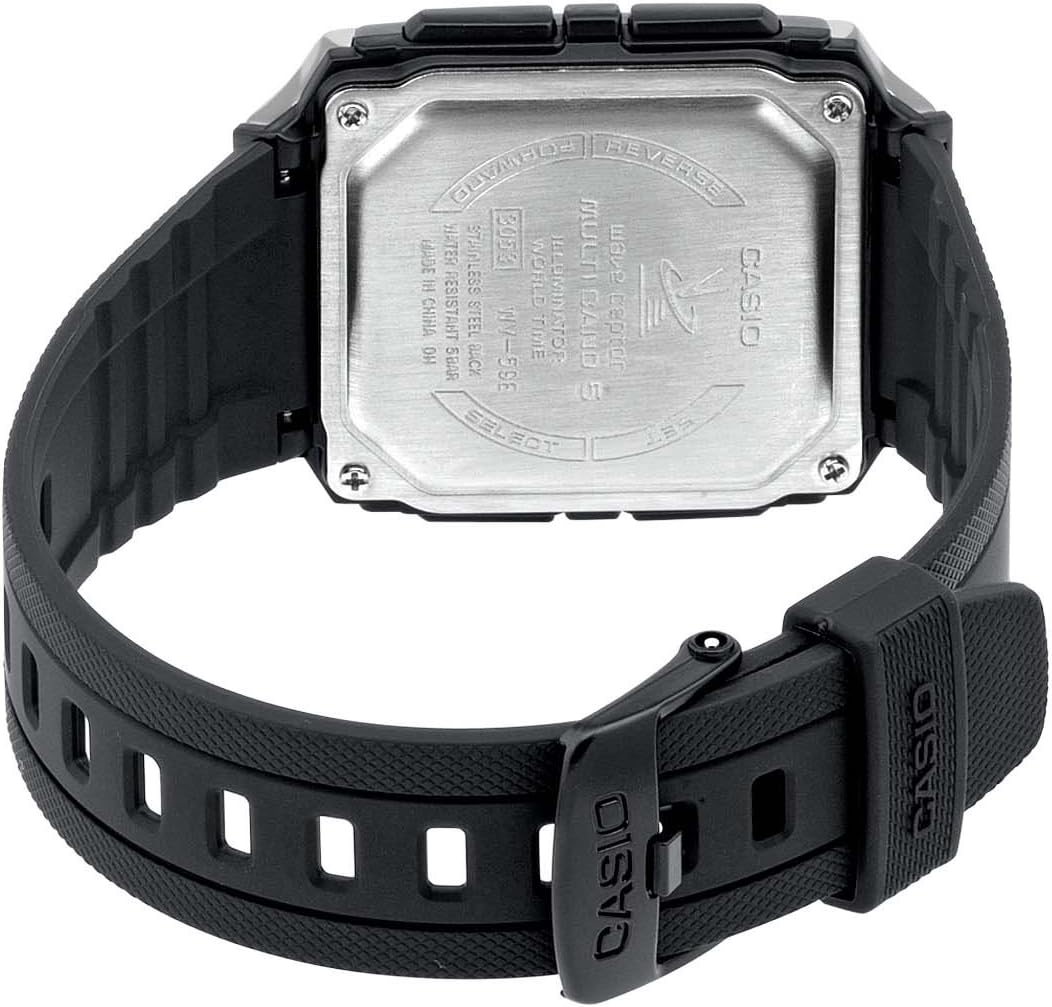
Слика 3: Позади view of the Casio WV-59E-1AVEF watch, showing the stainless steel case back with model number WV-59E, water resistance rating, and 'Wave Ceptor' branding.
Сетуп
Initial Time Setting and Time Zone
Upon first use or after a battery change, you may need to set your home city (time zone) manually. This is crucial for the watch to receive the correct time calibration signal.
- У режиму мерења времена, притисните и држите АДЈУСТ button (usually top-left) until the city code starts to flash.
- Користите НАПРЕД и РЕВЕРСЕ buttons (usually on the right side) to select your desired home city code. Refer to the world time map for city codes corresponding to your region.
- Притисните тастер МОДЕ button (usually bottom-left) to cycle through other settings like DST (Daylight Saving Time) and 12/24-hour format. Adjust these as needed using the НАПРЕД и РЕВЕРСЕ дугмад.
- Притисните тастер АДЈУСТ button again to exit the setting screen.
Radio Signal Reception (Wave Ceptor)
Your watch automatically receives time calibration signals to maintain accurate time. Automatic reception typically occurs in the early hours of the morning. For best reception, place the watch near a window overnight.
To manually initiate signal reception:
- У режиму мерења времена, притисните и држите РЕЦЕИВЕ button (refer to watch diagram for exact button, often bottom-right) for about two seconds.
- The watch will display "RCV" or "GET" to indicate it is attempting to receive the signal.
- Keep the watch stationary and away from sources of interference (e.g., computers, televisions) during reception.
- Successful reception will be indicated by "OK" or "RCVD". If reception fails, "ERR" or "FAIL" will be displayed.

Слика 4: The 'Wave Ceptor' logo, indicating the watch's radio-controlled timekeeping capability.
Оперативни режими
Притисните тастер МОДЕ button (usually bottom-left) to cycle through the different modes:
- Режим мерења времена: Приказује тренутно време и датум.
- Режим светског времена: Омогућава вам да view тренутно време у разним градовима широм света.
- Режим штоперице: Мери протекло време.
- Режим аларма: Подесите дневне аларме.
Режим светског времена
У режиму светског времена, користите НАПРЕД и РЕВЕРСЕ buttons to scroll through different city codes and view their current times.
Режим штоперице
- Уђите у режим штоперице.
- Притисните тастер СТАРТ/СТОП button (often top-right) to start and stop the stopwatch.
- Притисните тастер РЕСЕТ button (often bottom-right) to reset the stopwatch to zero.
Аларм Моде
- Уђите у режим аларма.
- Користите НАПРЕД и РЕВЕРСЕ buttons to select an alarm number (if multiple are available).
- Притисните и држите АДЈУСТ button until the alarm time starts to flash.
- Користите НАПРЕД и РЕВЕРСЕ buttons to set the alarm hour and minute.
- Притисните тастер АДЈУСТ дугме за чување подешавања аларма.
- Притисните тастер ОН/ОФФ button (often top-right) to toggle the alarm on or off.
Осветљење
Притисните тастер ЛИГХТ button (usually top-right or a dedicated button) to illuminate the display for easy viewинг у условима слабог осветљења.
Одржавање
Замена батерије
The watch is powered by a Lithium metal battery. When the display becomes dim or functions become unreliable, it is time to replace the battery. It is recommended to have battery replacement performed by a qualified watch technician to ensure proper sealing and water resistance.
Водоотпорност (50 метара / 5 бара)
Your watch is water resistant to 50 meters (5 bar). This means it is suitable for everyday use and can withstand splashes, rain, showering, and shallow swimming. It is не suitable for diving, snorkeling, or high-impact water sports. Do not operate buttons while the watch is wet or submerged.
Чишћење
Wipe the watch case and strap with a soft, dry cloth. For resin straps, you can use a mild soap solution and rinse thoroughly, then dry completely. Avoid using harsh chemicals or abrasive cleaners.
Решавање проблема
- Time is incorrect or not synchronizing:
- Ensure your home city code is set correctly for your time zone.
- Place the watch near a window overnight for automatic reception.
- Manually initiate signal reception (refer to "Radio Signal Reception" section).
- Check for strong interference sources nearby (e.g., electronic devices).
- Батерија је можда празна и потребно је да је заменимо.
- Екран је замагљен или празан:
- Батерија је можда испражњена. Замените батерију.
- Ensure the watch is not in a power-saving mode (if applicable to your model).
- Дугмад не реагују:
- Ensure the watch is not in a locked mode (if applicable).
- If the watch is wet, dry it thoroughly before operating buttons.
- A low battery can affect button responsiveness.
Спецификације

Слика 5: Diagram illustrating the dimensions of the Casio WV-59E-1AVEF watch face, with measurements in millimeters and inches for reference.
| Бранд | Цасио |
| Назив модела | WV-59E |
| Број модела | WV-59E-1AVEF |
| Облик предмета | Скуаре |
| Дисплаи Типе | Дигитал |
| Тип материјала кућишта | Акрил |
| Тип материјала за бирање прозора | Акрил |
| Врста материјала бенда | Смола |
| Банд Цолор | Црно |
| Боја бирања | Црно |
| Тип копче | Копча |
| Пречник кућишта | 39 милиметара |
| Цасе Тхицкнесс | 12.5 милиметара |
| Банд Видтх | 18 милиметара |
| Тежина артикла | 40 грама |
| Мовемент Типе | кварц |
| Дубина водоотпорности | 50 метара (5 бара) |
| Извор напајања | Battery Powered (1 Lithium metal battery included) |
| Посебне карактеристике | Radio-controlled time, Stopwatch, Alarm, Illumination, World Time, Automatic Calendar |
| Укључене компоненте | Resin strap |
| Међународни код чланка | 04971850882220 |
Гаранција и подршка
За информације о гаранцији и корисничку подршку, погледајте гарантни лист који је приложен уз ваш производ или посетите званичну веб страницу Casio-а. webсајт. Сачувајте рачун као доказ о куповини.
For service or repairs, contact an authorized Casio service center.