
1. Увод
Thank you for choosing the TFA Dostmann Digital Weather Station 35.1065. This device provides accurate indoor temperature, humidity, time, date, and a weather trend forecast. Please read this manual carefully before using the device to ensure proper operation and to prevent damage.
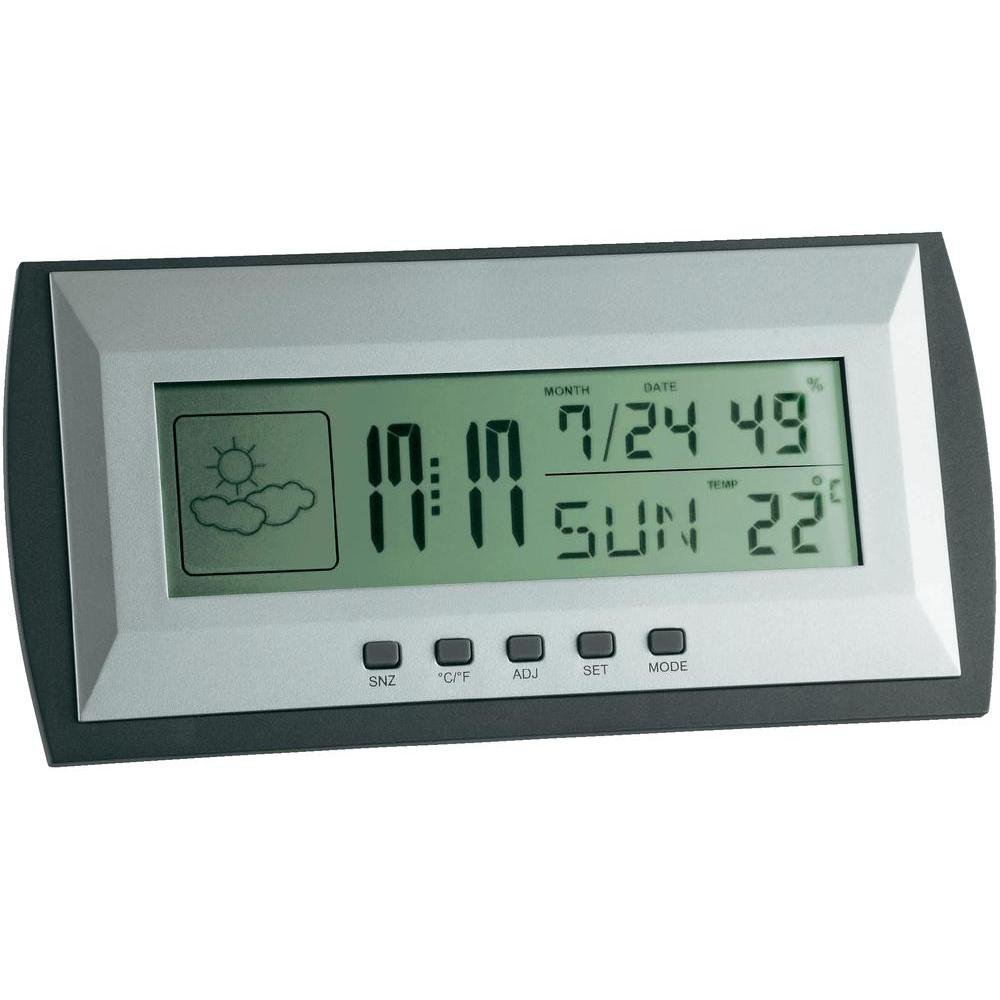
Figure 1: TFA Dostmann Digital Weather Station 35.1065 on a wooden desk. This image shows the weather station displaying time, date, and weather information in a typical home or office setting.
2. Безбедносне информације
- Сачувајте ово упутство за будућу употребу.
- Не излажите уређај екстремним температурама, вибрацијама или ударцима.
- Избегавајте директну сунчеву светлост и влагу.
- Не урањајте уређај у воду.
- Do not attempt to repair or modify the device yourself. Contact qualified personnel for service.
- Истрошене батерије одложите у складу са локалним прописима.
3. Подешавање
3.1 Садржај пакета
Уверите се да су сви предмети присутни:
- TFA Dostmann Digital Weather Station 35.1065
- 2 к АА батерије
- Кориснички приручник (овај документ)
3.2 Инсталација батерије
- Locate the battery compartment cover on the back of the weather station.
- Отворите поклопац.
- Insert two (2) AA batteries, observing the correct polarity (+ and - markings).
- Добро затворите поклопац одељка за батерије.
The device will power on automatically and display initial readings.
3.3 Initial Settings (Time, Date, Temperature Unit)
Upon first power-on or after battery replacement, you may need to set the time, date, and preferred temperature unit.
- Притисните и држите СЕТ button for a few seconds to enter setting mode. The digit to be set will flash.
- Користите АДЈ button to adjust the flashing value (e.g., hour, minute, year, month, day).
- Притисните тастер СЕТ button again to confirm the setting and move to the next parameter.
- Repeat steps 2 and 3 until all desired settings (time, date) are configured.
- Да бисте прелазили између Целзијуса (°C) и Фаренхајта (°F), притисните ° Ц/° Ф дугме.
4. Руковање метеоролошком станицом
4.1 Приказ прекоview
ЛЦД екран приказује разне информације:
- време: Тренутно време у 12-часовном или 24-часовном формату.
- Датум: Current month, day, and day of the week.
- температура: Indoor temperature, displayed in °C or °F.
- Влажност: Проценат влажности у затвореном просторуtage.
- Weather Forecast Icon: Indicates a trend forecast (e.g., sunny, cloudy, rainy). This is a prediction based on atmospheric pressure changes and may not always reflect actual weather.
4.2 Функције дугмета
- SNZ (Snooze): Activates the snooze function for the alarm.
- °Ц/°Ф: Пребацује се између приказа температуре у степену Целзијуса и степену Фаренхајта.
- ADJ (Adjust): Used to adjust values during setting mode.
- КОМПЛЕТ: Enters and confirms settings.
- НАЧИН: Switches between different display modes (e.g., time, alarm time).
4.3 Подешавање аларма
- Притисните тастер МОДЕ више пута док се не прикаже време аларма.
- Притисните и држите СЕТ button. The alarm hour will flash.
- Користите АДЈ дугме да бисте подесили жељени сат аларма.
- Притисните СЕТ да потврдите и пређете на минуте.
- Користите АДЈ да бисте подесили жељене минуте аларма.
- Притисните СЕТ да потврдите и изађете из подешавања аларма.
- Да бисте активирали/деактивирали аларм, притисните дугме АДЈ дугме док је приказано време аларма. Икона аларма ће се појавити/нестати.
5. Одржавање
5.1 Чишћење
Очистите уређај меком, дamp cloth. Do not use abrasive cleaners or solvents. Ensure no water enters the device.
5.2 Замена батерије
When the display becomes dim or the device stops functioning, replace the batteries. Follow the steps in Section 3.2. Always replace both batteries at the same time with new AA batteries.
5.3 Складиштење
If the device will not be used for an extended period, remove the batteries to prevent leakage and damage. Store in a cool, dry place.
КСНУМКС. Решавање проблема
| Проблем | Могући узрок | Решење |
|---|---|---|
| Нема дисплеја или је дисплеј слаб. | Батерије су празне или су неправилно постављене. | Замените батерије новим, водећи рачуна о исправном поларитету. |
| Нетачно време/датум. | Време/датум није правилно подешено. | Refer to Section 3.3 to set the time and date. |
| Нетачна очитавања температуре/влажности. | Device placed near heat sources, vents, or in direct sunlight. | Relocate the weather station to a stable indoor environment away from extreme temperature fluctuations. Allow time for readings to stabilize. |
| Weather forecast icon seems incorrect. | Weather forecast is a trend prediction based on atmospheric pressure, not a real-time forecast. | Understand that the icon indicates a general trend over the next 12-24 hours, not current conditions. |
7. Спецификације

Figure 2: TFA Dostmann Digital Weather Station 35.1065 with dimensions. This image provides a detailed view of the device, including its width (18 cm), height (9 cm), and depth (3.81 cm).
- Бренд: ТФА Достманн
- Модел: 35.1065
- Извор напајања: Battery-powered (2 x AA batteries, included)
- Материјал: Пластика
- Посебне карактеристике: Trend forecast
- Тип приказа: ЛЦД
- Димензије артикла (Д к Ш к В): 3.8 цм к 18 цм к 9 цм
- Тежина артикла: 164 грама
- Укључене компоненте: Weather station, batteries, user manual
- Препоручена употреба: Кућна канцеларија
- Специфичне употребе: Date, Humidity, Temperature, Time
- Земља порекла: Кина
8. Гаранција и подршка
For warranty information, please refer to the documentation provided at the time of purchase or visit the official TFA Dostmann website. For technical support or further assistance, please contact TFA Dostmann customer service through their official channels.
Official TFA Dostmann Webсајт: ввв.тфа-достманн.де