
Производ је завршенview
The Western Digital My Book Essential external hard drive provides 1 terabyte (1TB) of storage capacity. Designed for data backup and archiving, this device features a high-speed USB 2.0 interface for broad compatibility and efficient data transfer. Its design allows it to power on and off in conjunction with your computer, contributing to energy efficiency.
Кључне карактеристике:
- Једноставна инсталација: Функционалност „укључи и користи“ за тренутну употребу.
- Компактан дизајн: Occupies minimal desk space, similar to a paperback book.
- Енергетски ефикасан: Automatically enters standby mode after 10 minutes of inactivity to conserve power.
- УСБ 2.0 интерфејс: Offers convenient and compatible connectivity with various computers.
- PC and Mac Compatible: Supports Windows 2000/XP/Vista and Mac OS X 10.4.8 or later.
Шта је у кутији
Проверите да ли су све следеће ставке укључене у пакет вашег производа:
- Western Digital My Book Essential WDBAAF0010HBK Hard Drive
- УСБ кабл
- АЦ адаптер
- Водич за брзу инсталацију
Упутства за подешавање
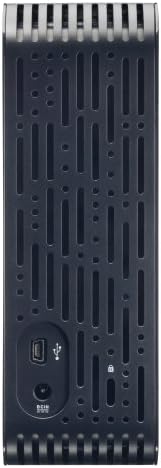
- Повежите АЦ адаптер: Plug the AC adapter into the power port on the back of the My Book Essential drive. Connect the other end of the AC adapter to a power outlet.
- Повежите УСБ кабл: Connect one end of the supplied USB cable to the USB 2.0 port on the back of the My Book Essential drive. Connect the other end of the USB cable to an available USB port on your computer.
- Укључено: The drive is designed to power on automatically with your computer. Ensure your computer is powered on. The drive's indicator light will illuminate.
- Почетно признање: Your operating system (Windows or Mac OS) should automatically detect and install the necessary drivers for the drive. This process may take a few moments.
- Приступ диску: Once installed, the drive will appear as a new storage device in 'My Computer' (Windows) or 'Finder' (Mac OS). You can now begin transferring files.
Note: For detailed operating system-specific instructions or if the drive is not recognized, refer to the included Quick Install Guide or the Western Digital support webсајту.
Упутство за употребу
The Western Digital My Book Essential drive functions as an external storage device for your computer. It is ideal for backing up important files, storing large media libraries, and freeing up space on your computer's internal hard drive.
Пренос података:
- За пренос files, simply drag and drop them to and from the My Book Essential drive icon in your computer's file истраживач.
- For optimal performance, ensure the USB cable is securely connected to a USB 2.0 port on your computer.
Управљање струјом:
- The drive is designed to turn on and off with your computer. When your computer is shut down or put to sleep, the drive will also enter a low-power state.
- After 10 minutes of inactivity, the drive will automatically enter standby mode to save energy. It will resume normal operation when accessed.
Безбедно уклањање:
Always use the "Safely Remove Hardware" option (Windows) or drag the drive icon to the Trash/Eject (Mac OS) before disconnecting the USB cable to prevent data corruption.
Одржавање
Proper maintenance ensures the longevity and reliable performance of your external hard drive.
- Физичка нега: Држите уређај у стабилном, добро проветреном простору. Избегавајте излагање екстремним температурама, директној сунчевој светлости или влази. Не блокирајте вентилационе отворе.
- Чишћење: Користите меку, суву крпу за чишћење спољашњости уређаја. Не користите течна средства за чишћење или аеросоле.
- Резервна копија података: Regularly back up critical data stored on the external drive to another location (e.g., cloud storage, another hard drive) to prevent data loss in case of unforeseen issues.
- Ажурирања фирмвера: Periodically check the Western Digital support webсајт за сва доступна ажурирања фирмвера за ваш модел.
Решавање проблема
If you encounter issues with your My Book Essential drive, try the following steps:
- Диск није откривен:
- Уверите се да је АЦ адаптер безбедно повезан и са диском и са исправном утичницом.
- Verify the USB cable is firmly connected to both the drive and your computer's USB port. Try a different USB port or cable if available.
- Поново покрените рачунар.
- Check your computer's Disk Management (Windows) or Disk Utility (Mac OS) to see if the drive is recognized but unformatted or unallocated.
- Спори пренос података:
- Ensure you are using a USB 2.0 port. While compatible with USB 1.1, performance will be significantly slower.
- Избегавајте покретање више захтевних апликација током великих file трансфери.
- Check for background processes that might be using system resources or disk I/O.
- Лампица за погон није упаљена:
- Confirm the AC adapter is connected and the power outlet is active.
- If connected to a computer, ensure the computer is powered on and not in sleep mode.
For further assistance, consult the Quick Install Guide or visit the Western Digital support webсајту.
Спецификације
| Феатуре | Детаљ |
|---|---|
| Назив модела | My Book Essential Edition 2.0 |
| Број модела | WDH1U10000N |
| Капацитет дигиталног складиштења | 1024 ГБ (1 ТБ) |
| Хард Диск Интерфаце | УСБ 2.0 |
| Технологија повезивања | УСБ |
| Фактор облика тврдог диска | 3.5 инча |
| Опис чврстог диска | Десктоп |
| Компатибилни уређаји | Десктоп |
| Врста инсталације | Плуг Ин |
| Боја | Црно |
| Брзина ротације чврстог диска | 7200 РПМ |
| Брзина читања | 60 мегабајта у секунди |
| Брзина медија | 30 МБ/с |
| Материјал кућишта | Hard Plastic or Metal |
| Тежина артикла | 3.3 фунти |
| Системски захтеви | Available USB port, Windows 2000/XP/Vista, Mac OS X 10.4.8 or later |
Гаранција и подршка
The Western Digital My Book Essential drive comes with a 1-годишња ограничена гаранција. For warranty claims, technical support, or to access additional resources such as drivers and software, please visit the official Western Digital support webсајту.
Подршка на мрежи: суппорт.вдц.цом
Слике производа




Видео снимци производа
WD Hard Drives: Essential vs. Home Edition Comparison
This video provides a comparison between the Western Digital My Book Essential and Home Edition hard drives, highlighting their physical differences and connectivity options. It helps users understand the specific features of the Essential model in context.