
1. Увод
The Datavideo ITC-100 is a professional 8-user wired intercom system designed for clear and reliable communication in live production environments. This rack-mountable base station facilitates seamless communication between a director and up to eight camera operators or crew members. It is compatible with Datavideo SE-500 or SE-800 Digital Video Switchers and supports a wide range of headsets, from standard cell phone headsets to high-quality professional units, offering flexibility and robust performance for various production needs.
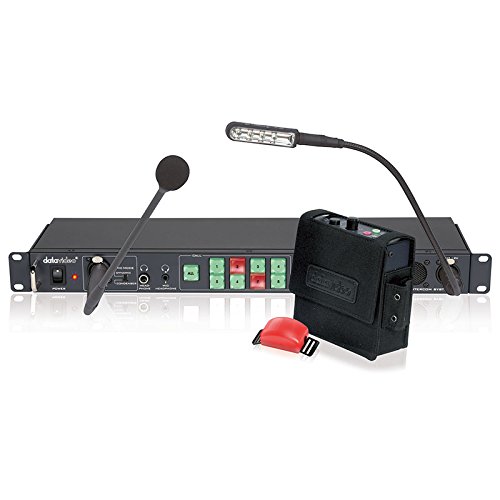
Image 1.1: The Datavideo ITC-100 Intercom System, showing the rack-mountable base station, gooseneck microphone, LED light, and a wired beltpack.
2. Садржај пакета
Молимо вас да проверите да ли су све ставке наведене у наставку укључене у ваш пакет:
- ITC-100 Base Station (Main Unit)
- Gooseneck Microphone for Base Station
- LED Gooseneck Light for Base Station
- Remote Control (if included with your specific kit)
Напомена: Beltpacks, headsets, and 5-Pin XLR cables are typically sold separately or as part of a complete kit. Refer to your purchase invoice for exact inclusions.
3. Систем је завршенview
3.1. ITC-100 Base Station
The ITC-100 base station is a 1U rack-mountable unit that serves as the central hub for your intercom system. Its front panel provides access to all essential controls and connections.
- Прекидач: Укључује или искључује јединицу.
- Gooseneck Mic Input: За повезивање укљученог микрофона.
- Прикључци за слушалице: Standard 1/4-inch (6.35mm) jacks for monitoring audio.
- Уграђени звучник: Provides audible monitoring of intercom audio.
- Channel Volume Controls: Individual rotary knobs to adjust the listening volume for each of the 8 connected users.
- ALL CALL Button: Activates a broadcast to all connected users.
- Дугме за утишавање: Mutes the base station's microphone output.
- Tally Light Output: Connects to beltpacks for visual cues (e.g., indicating which camera is live).
3.2. Beltpack (User Unit)
Each beltpack is a portable unit designed for individual users to communicate with the base station and other users.
- 5-Pin XLR Connector: For connecting to the base station via a wired cable.
- Утичница за слушалице: For connecting a compatible headset.
- Притисни за разговор (ПТТ) дугме: Активира микрофон за говор.
- Контрола јачине звука: Adjusts the listening volume for the user.
- Tally Light Indicator: Provides visual cues from the base station.
4. Подешавање и инсталација
4.1. Рацк Моунтинг
- Secure the ITC-100 base station into a standard 19-inch equipment rack using appropriate rack screws.
- Обезбедите одговарајућу вентилацију око уређаја како бисте спречили прегревање.
4.2. Connecting Beltpacks
- Connect each beltpack to the corresponding 5-Pin XLR port on the rear panel of the base station.
- Use high-quality 5-Pin XLR cables. The system supports cable lengths of up to 300 meters (approximately 984 feet).
4.3. Connecting Headsets
- For each beltpack user, plug their chosen headset into the headset jack on the beltpack.
- For the base station operator (director), plug the included gooseneck microphone into its dedicated input on the front panel.
- If the base station operator wishes to use a headset, plug it into one of the headphone jacks on the front panel.
4.4. Прикључак за напајање
- Connect the provided power adapter to the power input on the rear panel of the ITC-100 base station.
- Укључите адаптер за напајање у одговарајућу електричну утичницу.
4.5. Connecting to Video Switcher (Optional)
If integrating with a Datavideo SE-500 or SE-800 Digital Video Switcher, refer to the switcher's instruction manual for specific intercom integration details. This typically involves connecting dedicated intercom ports or audio input/output connections between the ITC-100 and the switcher.
5. Упутство за употребу
5.1. Укључивање/искључивање
- To power on the system, press the ПОВЕР button on the front panel of the base station. The power indicator light will illuminate.
- Да бисте искључили напајање, притисните ПОВЕР дугме поново.
5.2. Using Beltpacks
- говорећи: To speak to other users, press and hold the Притисни за разговор (ПТТ) button on your beltpack. Release the button to listen.
- Подешавање јачине звука: Adjust your listening volume using the rotary volume knob on the beltpack.
- Талли Лигхт: Observe the tally light indicator on the beltpack for visual cues from the base station (e.g., red for 'on-air').
5.3. Base Station Controls
- Channel Volume Controls: Use the individual rotary knobs on the front panel to adjust the listening volume for each connected beltpack user.
- ALL CALL Button: Press this button to broadcast a message to all connected users simultaneously. This overrides individual channel settings and ensures all users hear the message.
- Дугме за утишавање: Press this button to temporarily mute the base station's microphone output. This is useful if the operator needs to speak privately or prevent unwanted audio from being transmitted.
- Уграђени звучник: The integrated speaker provides monitoring of the intercom audio. Its volume can typically be adjusted via a dedicated knob or system settings.
6. Одржавање
Proper maintenance ensures the longevity and reliable performance of your Datavideo ITC-100 system.
- Чишћење: Keep the unit clean and free from dust. Use a soft, dry cloth for cleaning. Avoid liquid cleaners directly on the unit.
- Услови животне средине: Избегавајте излагање уређаја влази, екстремним температурама или директној сунчевој светлости.
- Инспекција каблова: Regularly inspect all 5-Pin XLR cables and headset cables for any signs of damage, fraying, or loose connections. Replace damaged cables promptly to ensure consistent communication.
- Складиштење: When not in use, store the system in a cool, dry place, ideally in its original packaging or a protective case.
КСНУМКС. Решавање проблема
If you encounter issues with your ITC-100 system, refer to the following common troubleshooting steps:
- No Audio from a Beltpack:
- Verify the 5-Pin XLR cable connection between the beltpack and the base station is secure.
- Ensure the headset is properly plugged into the beltpack's headset jack.
- Check the beltpack's volume control and ensure it is not set to minimum.
- Verify the corresponding channel volume knob on the base station is not set to minimum.
- No Audio from Base Station Speaker/Headphones:
- Check the base station's master volume or speaker/headphone volume control.
- Осигурајте МУТЕ button on the base station is not active.
- Verify the gooseneck microphone is properly connected and its volume is up.
- Intermittent Communication or Static:
- Inspect all 5-Pin XLR cables for damage, kinks, or loose connections. Replace any faulty cables.
- Ensure cable lengths do not exceed the maximum recommended 300 meters.
- Check headset connections for looseness.
- Искривљени звук:
- Check volume levels on both the beltpack and base station to avoid overdriving the audio signal.
- Ensure headset and microphone connections are secure and free from debris.
8. Спецификације
| Феатуре | Спецификација |
|---|---|
| Бранд | Датавидео |
| Модел | ИТЦ-100 |
| Број модела ставке | 2205-2000 |
| Број канала | 8 |
| Повезивање | Wired (5-Pin XLR) |
| Максимална дужина кабла | 300 метара (приближно 984 стопе) |
| Компатибилност са слушалицама | Low-cost cell phone headsets to professional units |
| Карактеристике базне станице | All Call, Mute, Mic Input, Built-in Speaker, Headphone Jacks |
| Рацк Моунттабле | да (1У) |
| Димензије производа | 19 к 7.87 к 1.75 инча (48.26 к 19.99 к 4.45 цм) |
| Тежина артикла | 23.1 фунте (10.5 кг) |
| Волtage | 12 Волтс |
| Фреквенцијски опсег | 550-3.6 кХз |
| Посебне карактеристике | Dust Proof, Long Range, Rackmountable, Waterproof |
9. Гаранција и подршка
For detailed warranty information, terms, and conditions, please refer to the warranty card or documentation included with your Datavideo ITC-100 purchase. Keep your proof of purchase, such as your receipt or invoice, as it will be required for any warranty claims.
For technical support, service, or further assistance, please visit the official Datavideo website or contact their customer support department. Contact information can typically be found on the Datavideo webсајту или у документацији вашег производа.