
Карлсон КА4548
Karlsson KA4548 Gummy Alarm Clock User Manual
Модел: КА4548
Увод
Welcome to the user manual for your new Karlsson KA4548 Gummy Alarm Clock. This battery-powered LCD alarm clock is designed for simplicity and functionality, featuring a unique rubberized casing that seamlessly integrates all control buttons. Its clear LCD display provides time at a glance, and the blue backlight activates only when the light button is pressed, ensuring no disruptive light emission during the night. This manual will guide you through the setup, operation, maintenance, and troubleshooting of your alarm clock.
Безбедносне информације
- Безбедност батерије: Always use the specified battery type (3 AAA batteries). Do not mix old and new batteries, or different types of batteries. Remove batteries if the clock will not be used for an extended period to prevent leakage. Dispose of used batteries responsibly.
- Пласман: Place the alarm clock on a stable, flat surface. Avoid placing it in direct sunlight, near heat sources, or in areas with high humidity.
- Чишћење: Clean the clock with a soft, dry cloth. Do not use abrasive cleaners or immerse the clock in water.
- деца: Држати ван домашаја мале деце. Овај производ није играчка.
Производ је завршенview
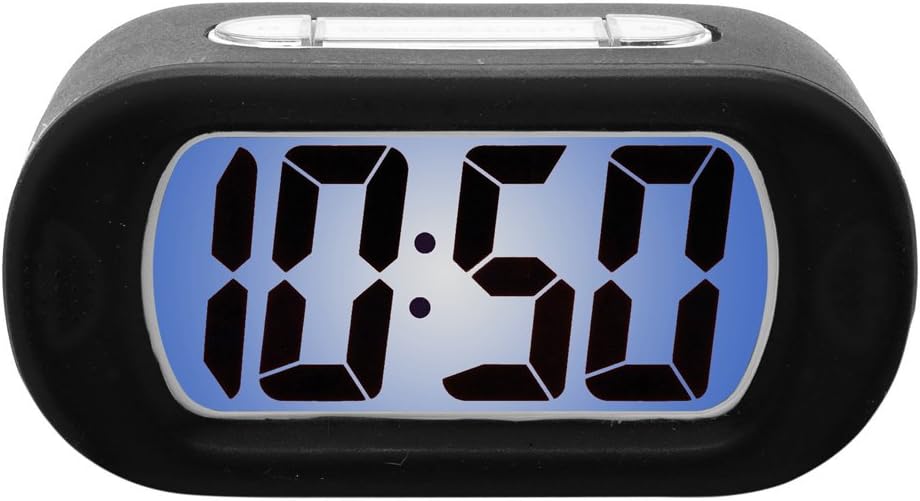
Figure 1: Karlsson KA4548 Gummy Alarm Clock. This image displays the Karlsson KA4548 Gummy Alarm Clock from a front-facing perspective. The clock features a black rubberized casing and a clear LCD screen with a blue backlight, currently displaying the time '10:50' in large, digital segments. The top of the clock shows subtle outlines of control buttons integrated into the rubber material.
Компоненте:
- ЛЦД екран: Shows time, alarm status, and other indicators.
- Rubberized Casing: Durable and provides integrated button access.
- Контролна дугмад: (Located on top/back, integrated into rubber) For setting time, alarm, snooze, and activating backlight.
- Одељак за батерије: Located on the back, for 3 AAA batteries.
Сетуп
Инсталација батерије:
- Пронађите одељак за батерије на задњој страни будилника.
- Отворите поклопац одељка за батерије.
- Уметните 3 нове ААА батерије, водећи рачуна о исправном поларитету (+ и -) као што је назначено унутар одељка.
- Close the battery compartment cover securely. The LCD display should now turn on.
Упутство за употребу
Подешавање времена:
- Press the 'SET' button (or equivalent, typically integrated into the rubber casing). The hour digits will start flashing.
- Use the '+' or '-' buttons (or up/down arrows) to adjust the hour.
- Press 'SET' again to confirm the hour and move to the minute setting. The minute digits will flash.
- Користите дугмад „+“ или „-“ да подесите минуте.
- Press 'SET' one more time to confirm the minutes and exit time setting mode.
Подешавање аларма:
- Press the 'ALARM SET' button (or similar, often labeled with an alarm icon). The alarm hour digits will start flashing.
- Користите дугмад „+“ или „-“ да бисте подесили сат аларма.
- Press 'ALARM SET' again to confirm the alarm hour and move to the alarm minute setting. The alarm minute digits will flash.
- Користите дугмад „+“ или „-“ да бисте подесили минуте аларма.
- Press 'ALARM SET' one more time to confirm the alarm minutes and exit alarm setting mode.
- Ensure the alarm is activated. There is usually a dedicated 'ALARM ON/OFF' switch or button. A small alarm icon should appear on the display when the alarm is active.
Одгода функција:
When the alarm sounds, press the 'SNOOZE' button (typically a large button on top). The alarm will temporarily stop and sound again after a few minutes (usually 5-9 minutes, depending on the model).
Функција позадинског осветљења:
To illuminate the display in the dark, press the 'LIGHT' button (often integrated with the snooze button). The blue backlight will activate for a few seconds and then turn off automatically to conserve battery life. The display does not remain continuously lit.
Одржавање
Чишћење:
Wipe the clock's surface with a soft, dry, lint-free cloth. For stubborn marks on the rubber casing, a slightly damp cloth can be used, but ensure no moisture enters the electronic components. Do not use chemical cleaners, solvents, or abrasive materials.
Замена батерије:
When the display dims or the alarm function becomes unreliable, it is time to replace the batteries. Follow the battery installation steps outlined in the 'Setup' section. Always replace all three AAA batteries at the same time with new ones.
Решавање проблема
- Екран је празан или замагљен:
решење: Проверите поларитет батерија. Замените их новим ААА батеријама. - Аларм се не оглашава:
решење: Ensure the alarm is set and activated (check for alarm icon on display). Verify that the time and alarm time are correctly set. Replace batteries if they are low. - Backlight does not work or is very dim:
решење: Press the 'LIGHT' button firmly. If it still doesn't work, replace the batteries. Note that the backlight is designed to be momentary, not continuously lit. - Дугмад не реагују:
решење: Ensure batteries are correctly installed and have sufficient power. Try removing and reinserting batteries to reset the device. - Нетачан приказ времена:
решење: Поново подесите време пратећи упутства у одељку „Подешавање времена“.
Спецификације
| Феатуре | Детаљ |
|---|---|
| Број модела | КА4548 |
| Бранд | Карлсон |
| Димензије производа | 14.73 к 5.08 к 7.62 цм |
| Тежина | 220 г |
| Боја | Црно |
| Дисплаи Типе | Дигитални ЛЦД |
| Извор напајања | Battery (3 x AAA required) |
| Батерије укључене | бр |
| Посебне карактеристике | Alarm, Momentary Backlight |
| Стиле | Модеран дизајн |
| Обавезна монтажа | бр |
Гаранција и подршка
Карлсон производи су произведени по високим стандардима квалитета. За информације о гаранцији, погледајте гарантни лист који сте добили уз куповину или посетите званичну веб страницу Карлсона. website. For technical support or further assistance, please contact Karlsson customer service through their official channels.
Ask a question about this manual
Ask about setup, troubleshooting, compatibility, parts, safety, or missing instructions. Manuals+ will review the question and use this page’s manual context to help answer it.