
KLH KL-300i
KLH AUDIO KL-300i Nostalgia 5-n-1 System
Model: KL-300i
Увод
Хвала вам на куповиниasing the KLH AUDIO KL-300i Nostalgia 5-n-1 System. This integrated audio system combines classic and modern audio playback capabilities, including a turntable, CD player, cassette player, AM/FM radio, and an iPod dock. This manual provides essential information for setting up, operating, and maintaining your system to ensure optimal performance and longevity.
Безбедносне информације
Пажљиво прочитајте сва безбедносна упутства пре руковања овим производом. Сачувајте ово упутство за будуће потребе.
- Извор напајања: Уређај повежите само на утичницу наизменичне струје наведене јачинеtage.
- вентилација: Обезбедите одговарајућу вентилацију. Не блокирајте вентилационе отворе.
- Вода и влага: Не излажите уређај киши или влази. Не стављајте предмете напуњене течношћу, као што су вазе, на уређај.
- топлота: Не постављајте уређај у близини извора топлоте као што су радијатори, грејни уређаји, шпорети или други уређаји (укључујући ampлифиерс) који производе топлоту.
- Чишћење: Искључите уређај из зидне утичнице пре чишћења. Користите само суву крпу.
- Сервисирање: Не покушавајте сами да сервисирате овај производ. Све сервисирање препустите квалификованом сервисном особљу.
Садржај пакета
Проверите да ли су све ставке наведене у наставку укључене у пакет:
- KLH AUDIO KL-300i Main Unit
- Ремоте Цонтрол
- Помоћни улазни кабл
- AM/FM Antenna Wire
- Упутство за употребу (овај документ)
Производ је завршенview
Familiarize yourself with the various components and controls of your KLH AUDIO KL-300i system.
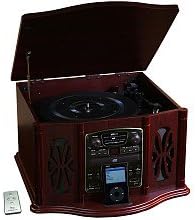
This image displays the KLH AUDIO KL-300i Nostalgia 5-n-1 System. The unit features a dark wood finish. The top lid is open, revealing a turntable. Below the turntable, the front panel includes controls for the CD player, AM/FM radio tuner, and an iPod dock. A small remote control is visible to the left of the main unit.
Контроле на предњој плочи:
- Дугме за напајање: Укључује или искључује јединицу.
- Бирач функција: Switches between Phono, CD, Radio, iPod, and Aux modes.
- Дугме за јачину звука: Подешава главни ниво јачине звука.
- CD Player Controls: Репродукција/Пауза, Стоп, Премотавање напред/назад.
- Радио тјунер: AM/FM band selector, Tuning knob.
- iPod Dock: Connector for iPod devices.
- Aux-In Jack: 3.5 мм улаз за екстерне аудио уређаје.
- Слушалице: 3.5 мм излаз за приватно слушање.
Горња плоча:
- Грамофонска плоча: For playing vinyl records.
- поклопац: Protects the turntable when not in use.
Бочна плоча:
- касетофон: For playing audio cassette tapes.
Сетуп
Follow these steps for initial setup of your audio system.
- Пласман: Place the unit on a stable, flat surface away from direct sunlight, heat sources, and excessive dust or moisture. Ensure there is adequate space around the unit for ventilation.
- Повезивање антене: For optimal AM/FM radio reception, connect the supplied antenna wire to the antenna terminal on the rear of the unit. Extend the wire fully for better reception.
- Прикључак за напајање: Укључите кабл за напајање наизменичном струјом у стандардну зидну утичницу.
- Почетно укључивање: Press the Power button on the front panel to turn on the unit.
Упутство за употребу
Општа операција:
- Укључивање/искључивање: Притисните дугме за напајање да бисте укључили или искључили јединицу.
- Избор функције: Use the Function Selector knob or buttons to choose your desired audio source (Phono, CD, Radio, iPod, Aux).
- Подешавање јачине звука: Rotate the Volume knob to increase or decrease the sound level.
Рад грамофона:
- Lift the lid of the unit.
- Ставите винилну плочу на плочу грамофона.
- Select the appropriate speed (33 1/3, 45, or 78 RPM) using the speed selector switch. For 45 RPM records, place the included adapter on the spindle if needed.
- Gently lift the tonearm and position the stylus over the desired starting groove of the record.
- Lower the tonearm slowly onto the record. Playback will begin automatically.
- To stop playback, gently lift the tonearm and return it to its rest.
Рад CD плејера:
- Press the Function Selector to CD mode.
- Press the Eject button to open the CD tray.
- Ставите CD у лежиште са страном са етикетом окренутом нагоре.
- Press the Eject button again to close the tray. The CD will begin playing automatically or display the track count.
- Use the Play/Pause, Stop, and Skip buttons to control playback.
Cassette Player Operation:
- Уметните касету у отвор за касету са стране уређаја.
- Притисните дугме Плаи да бисте започели репродукцију.
- Use the Fast Forward (FF) button to advance the tape quickly.
- To stop playback, press the Stop/Eject button. Pressing it halfway will eject the tape.
AM/FM Radio Operation:
- Press the Function Selector to Radio mode.
- Изаберите АМ или ФМ опсег помоћу прекидача за избор опсега.
- Rotate the Tuning knob to search for radio stations.
- Adjust the antenna wire for best reception.
iPod Dock Operation:
- Press the Function Selector to iPod mode.
- Carefully place your compatible iPod device onto the iPod dock connector.
- Use your iPod's controls to select and play music. Audio will be routed through the KLH AUDIO system's speakers.
Aux-In Operation:
- Press the Function Selector to Aux mode.
- Connect an external audio device (e.g., MP3 player, smartphone) to the Aux-In jack on the front panel using the supplied 3.5mm auxiliary cable.
- Play audio from your external device. The sound will be played through the KLH AUDIO system's speakers.
Употреба даљинског управљача:
The remote control primarily operates the CD player functions (Play, Pause, Stop, Skip). Note that the remote cannot turn the unit on or off.
Одржавање
Proper care will ensure the longevity of your system.
- Чишћење јединице: Обришите спољашњост уређаја меком, сувом крпом. Не користите абразивна средства за чишћење, воскове или раствараче.
- Брига о оловци: Handle the turntable stylus with extreme care. Clean the stylus periodically with a soft brush, brushing from back to front.
- Одржавање CD-ова/касета: Keep CDs and cassette tapes clean and free of dust. Store them in their cases when not in use.
Решавање проблема
If you experience issues with your system, refer to the following common problems and solutions.
| Проблем | Могући узрок | Решење |
|---|---|---|
| Но Повер | Кабл за напајање није безбедно прикључен. | Проверите прикључак кабла за напајање на уређај и зидну утичницу. |
| Нема звука | Volume too low; Incorrect function selected; Headphones connected. | Increase volume; Select correct function; Disconnect headphones. |
| Грамофон се не окреће | Unit not powered on; Belt dislodged. | Ensure unit is on; Contact service if belt issue suspected. |
| Слаб радио пријем | Антена није правилно продужена или постављена. | Extend and adjust the antenna wire for better signal. |
| CD се не репродукује | CD inserted incorrectly; CD is scratched or dirty. | Ensure CD is label-side up; Clean or replace CD. |
Спецификације
| Феатуре | Спецификација |
|---|---|
| Извор напајања | АЦ 120В ~ 60Хз |
| Димензије (Ш к Д к В) | Approx. 17" x 17" x 10.5" (43.2 cm x 43.2 cm x 26.7 cm) |
| Брзине грамофона | 33 1/3, 45, 78 о/мин |
| Опсег радио фреквенција | AM: 530-1710 kHz, FM: 88-108 MHz |
| ЦД компатибилност | ЦД, ЦД-Р/РВ |
| иПод Доцк | Compatible with older generation iPods (30-pin connector) |
Гаранција и подршка
This product is covered by a limited manufacturer's warranty. For specific warranty terms and conditions, please refer to the warranty card included with your purchase or contact KLH customer support. If you require technical assistance or have questions not covered in this manual, please contact KLH customer service through their official webсајт или контакт информације које сте добили уз производ.
Ask a question about this manual
Ask about setup, troubleshooting, compatibility, parts, safety, or missing instructions. Manuals+ will review the question and use this page’s manual context to help answer it.