
1. Увод
The Technoline WS 7394-IT Weather Station is designed to provide accurate and comprehensive weather information for your home. This device features a weather forecast with symbols, trend and air pressure display, and air pressure history. It also includes a radio-controlled clock with date and calendar display, indoor and outdoor temperature readings in Celsius or Fahrenheit, a battery level indicator, and an indoor comfort level and humidity indicator. The outdoor sensor utilizes IT+ technology for extended range.
2. Безбедносне информације
- Не излажите уређај екстремним температурама, директној сунчевој светлости или високој влажности.
- Избегавајте испуштање уређаја или његово излагање јаким ударцима.
- Не урањајте јединицу у воду.
- Use only the specified battery types. Ensure correct polarity when inserting batteries.
- Држите батерије ван домашаја деце.
- Не мешајте старе и нове батерије или различите типове батерија.
- Истрошене батерије одложите у складу са локалним прописима.
3. Садржај пакета
Молимо вас да проверите да ли су све компоненте присутне и у добром стању:
- Technoline WS 7394-IT Main Unit
- IT+ Outdoor Sensor (supports up to 3 external sensors, one included)
- Упутство за употребу
Напомена: За рад су потребне 4 АА батерије и нису укључене у пакет.
4. Подешавање
4.1 Инсталација батерије
Insert batteries into both the main unit and the outdoor sensor. Ensure correct polarity (+/-).
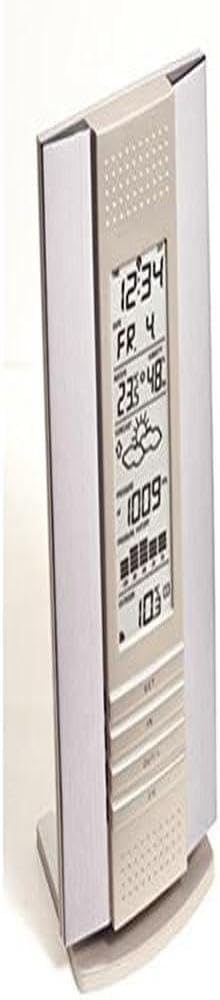
Image: Technoline WS 7394-IT Main Unit. This image shows the front of the weather station, where the display and control buttons are located. Batteries are inserted into the back of the unit.

Image: Technoline IT+ Outdoor Sensor. This image displays the compact outdoor sensor, which transmits temperature and humidity data to the main unit. Batteries are inserted into this unit as well.
4.2 Постављање сензора
Place the outdoor sensor in a shaded, dry location, protected from direct sunlight and rain, to ensure accurate temperature and humidity readings. The IT+ technology provides an extended range, typically up to 100 meters in open areas.
4.3 Почетна синхронизација
After inserting batteries, the main unit will automatically search for the outdoor sensor and the DCF-77 radio signal for time synchronization. This process may take a few minutes. Ensure the main unit is placed away from electronic interference.
4.4 Units Selection
Use the designated button (refer to the display overview in Section 5) to switch between Celsius (°C) and Fahrenheit (°F) for temperature display.
5. Упутство за употребу
5.1 Приказ прекоview
The main unit's display is divided into several sections, providing various pieces of information:

Image: Technoline WS 7394-IT Display with Labels. This image highlights different sections of the weather station's display, indicating where the time, date, indoor temperature, outdoor temperature, weather forecast, and air pressure are shown.
- Горњи део: Displays the radio-controlled time, date, and day of the week.
- Средњи део: Shows the weather forecast symbols, air pressure trend, current air pressure, and air pressure history.
- Lower Section: Indicates indoor temperature, indoor humidity, comfort level, outdoor temperature, and outdoor humidity (if applicable).
5.2 Временска прогноза
The weather station analyzes air pressure changes to predict upcoming weather conditions. Symbols such as sunny, partly cloudy, cloudy, rainy, or snowy will be displayed in the middle section of the screen.
5.3 Приказ температуре и влажности
The indoor temperature and humidity are measured by the main unit. The outdoor temperature and humidity are transmitted by the IT+ outdoor sensor. You can switch between Celsius and Fahrenheit as described in Section 4.4.
5.4 Air Pressure Display and History
The current air pressure is displayed, along with a trend indicator (rising, falling, stable). The station also maintains a history of air pressure readings, which contributes to the weather forecast.
5.5 Радио-контролисани сат
The clock automatically synchronizes with the DCF-77 radio signal, ensuring accurate time, date, and calendar display. Time zones (± 12 hours) can be adjusted if needed.
5.6 Индикатор нивоа удобности
The indoor comfort level indicator provides a quick visual reference to the current indoor climate based on temperature and humidity, helping you maintain an optimal environment.
6. Одржавање
6.1 Замена батерије
When the battery level indicator appears on the display, replace the batteries in both the main unit and the outdoor sensor. This ensures continuous and accurate operation.
6.2 Чишћење
Очистите јединицу меком, дamp крпу. Не користите абразивна средства за чишћење или раствараче, јер могу оштетити екран илиasing.
КСНУМКС. Решавање проблема
| Проблем | Могући узрок | Решење |
|---|---|---|
| Нема очитавања спољне температуре/влажности | Outdoor sensor out of range or batteries low. Interference. | Move sensor closer to the main unit. Replace sensor batteries. Relocate units away from electronic devices. |
| Нетачан приказ времена | Poor DCF-77 signal reception. Incorrect time zone setting. | Relocate the main unit to a window or open area. Manually adjust time zone. |
| Нетачна временска прогноза | Station still learning local air pressure patterns. Sudden, localized weather changes. | Allow 24-48 hours for the station to calibrate. Forecasts are based on air pressure trends and may not always match immediate local conditions. |
| Екран је затамњен или празан | Main unit batteries are low or depleted. | Замените батерије у главној јединици. |
8. Спецификације
- Бренд: techno line
- Модел: WS 7394-IT
- Извор напајања: Напајање батеријама (потребне су 4 АА батерије, нису укључене)
- Посебне карактеристике: DCF-77 radio-controlled, Time Zones (± 12 h), IT+ technology
- Материјал: Алуминијум
- Технологија повезивања: 433 МХз, 868 МХз
- Прецизност температуре: ±1 °Ц
- Тип приказа: Дигитал Дисплаи
- Препоручена употреба: Home, Temperature monitoring
- Образац ставке: Rectangular dome
- Произвођач: Технотрејд
- Земља порекла: Немачка
9. Информације о гаранцији
This product comes with a standard manufacturer's warranty. Please refer to the warranty card included in your original packaging or contact your retailer for specific details regarding warranty duration and terms. The warranty typically covers defects in materials and workmanship under normal use.
10. Подршка
For technical support, troubleshooting assistance, or inquiries about your Technoline WS 7394-IT Weather Station, please contact the retailer where you purchased the product or visit the official Technoline website for contact information. Please have your model number (WS 7394-IT) and purchase details ready when contacting support.