
1. Увод
This manual provides detailed instructions for the proper setup, operation, and maintenance of your Veho VMS-004 Discovery Deluxe USB Microscope. Please read this manual thoroughly before using the device to ensure optimal performance and longevity.
The Veho VMS-004 is a versatile USB microscope designed for detailed observation and digital capture of magnified images and videos. It features up to 400x magnification, a 2.0 Megapixel CMOS lens, and adjustable LED illumination, making it suitable for various applications including educational, hobbyist, and professional use.
2. Безбедносне информације
- Не растављајте: Attempting to disassemble or modify the microscope may cause damage and void the warranty.
- Избегавајте директну сунчеву светлост: Do not expose the microscope to direct sunlight or high temperatures.
- Пажљиво рукујте: The lens and internal components are delicate. Avoid dropping or subjecting the device to strong impacts.
- Држати суво: Овај уређај није водоотпоран. Избегавајте излагање води или високој влажности.
- Извор напајања: Use only the specified USB power source.
- деца: Keep out of reach of small children. Adult supervision is recommended during use.
3. Садржај пакета
Проверите да ли су све ставке присутне у вашем пакету:
- Veho VMS-004 Discovery Deluxe USB Microscope
- Flexi Alloy Stand
- Software CD (for drivers and application)
- Кориснички приручник (овај документ)
4. Производ је готовview
Familiarize yourself with the main components of the Veho VMS-004 microscope.

Figure 4.1: The Veho VMS-004 Discovery Deluxe USB Microscope mounted on its flexi alloy stand.
- Тело микроскопа: Contains the lens, CMOS sensor, and illumination LEDs.
- Точак фокуса: Located on the microscope body, used to adjust the focus for clear images.
- Дугме за снимак: A button on the microscope body for capturing still images.
- LED Illumination Control: A small wheel or dial to adjust the brightness of the built-in LEDs.
- УСБ кабл: For connecting the microscope to your computer.
- Flexi Alloy Stand: Provides a stable base and adjustable positioning for the microscope.

Слика 4.2: Крупни план view of the focus wheel and magnification markings on the microscope body.

Слика 4.3: Предња страна view of the microscope lens, showing the integrated LED illumination ring.
5. Подешавање
5.1 Склапање постоља
The flexi alloy stand provides stability and allows for precise positioning of the microscope.
- Attach the microscope holder to the flexible arm of the stand.
- Secure the microscope into the holder. Ensure it is firmly seated but not overly tightened to avoid damage.
- Поставите постоље на стабилну, равну површину.
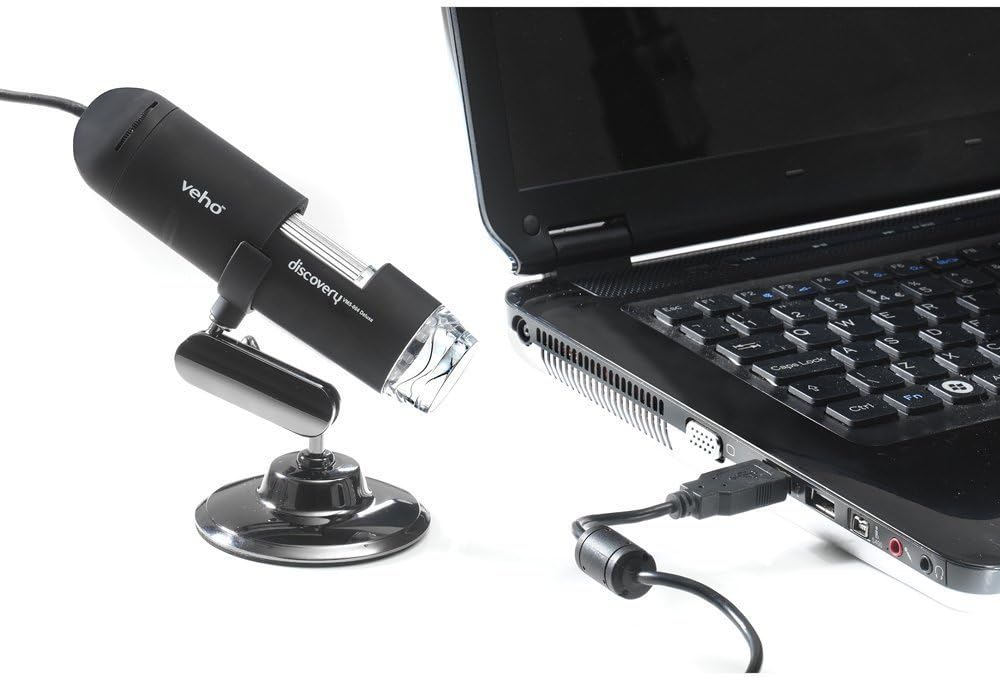
Figure 5.1: The microscope securely mounted on its flexi alloy stand.
5.2 Инсталација софтвера
The Veho VMS-004 requires driver and software installation for full functionality on your computer (PC or Mac compatible).
- Insert the provided software CD into your computer's CD/DVD drive. If your computer does not have a CD drive, please visit the official Veho support website to download the necessary drivers and software.
- Follow the on-screen instructions to install the drivers and the accompanying application.
- Поново покрените рачунар ако се то од вас затражи након инсталације.
5.3 Connecting the Microscope
Once the software is installed, connect the microscope to your computer.
- Plug the USB cable of the microscope into an available USB port on your computer.
- The computer should automatically detect the device.
- Launch the installed microscope application. You should see a live feed from the microscope's camera.

Figure 5.2: The USB microscope connected to a laptop, ready for use.
6. Упутство за употребу
6.1 Placing the Object
Position the object you wish to observe directly beneath the microscope lens. Adjust the flexible stand to bring the lens close to the object.

Figure 6.1: The microscope positioned over a coin for observation.
6.2 Adjusting Magnification and Focus
The microscope offers up to 400x digital magnification. To achieve a clear image:
- Adjust the distance between the microscope lens and the object using the flexible stand.
- Rotate the focus wheel on the microscope body until the image on your computer screen is sharp and clear.
- Напомена: The effective magnification changes with the distance from the object and the focus setting.
6.3 LED Illumination Control
The microscope features built-in LEDs to illuminate your subject. To adjust the brightness:
- Locate the LED illumination control (a small wheel or dial) on the microscope cable or body.
- Rotate the control to increase or decrease the LED brightness as needed for optimal viewинг.
6.4 Снимање слика и видео записа
The included software allows you to capture still images and record videos.
- Still Image: Press the snapshot button on the microscope body or click the capture button within the software interface.
- Видео снимак: Use the record function within the software application to start and stop video capture.
- Цаптуред files are typically saved to a default folder on your computer, which can usually be configured within the software settings.
6.5 Measurement Software
The accompanying software includes measurement capabilities. Refer to the software's help documentation for detailed instructions on how to calibrate and use the measurement tools. For accurate measurements, it is recommended to use a known reference scale in your image.
7. Одржавање
- Чишћење сочива: Користите меку крпу без влакана, посебно дизајнирану за оптичка сочива. Не користите абразивна средства за чишћење или раствараче.
- Чишћење тела: Wipe the microscope body and stand with a dry or slightly damp, мекана тканина.
- Складиштење: When not in use, store the microscope in a clean, dry, and dust-free environment.
- Ажурирања софтвера: Periodically check the Veho official website for software and driver updates to ensure compatibility and optimal performance.
КСНУМКС. Решавање проблема
| Проблем | Могући узрок | Решење |
|---|---|---|
| No image on screen / Device not detected |
|
|
| Слика је мутна или ван фокуса |
|
|
| Слика је превише тамна или превише светла |
|
|
| Magnification does not appear to be 400x |
|
|
9. Спецификације
| Број модела | VMS-004D |
| Увећање | Up to x400 (digital) |
| Ленс | ЦМОС од 2.0 мегапиксела |
| Осветљење | On/Off LEDs (adjustable brightness) |
| Становање | Tacton Rubber Touch |
| Стани | Flexi Alloy Stand |
| Повезивање | УСБ |
| Компатибилност | Компатибилан са ПЦ-ом и Мац-ом |
| Димензије производа | 13.46 к 10.92 к 22.35 цм |
| Тежина артикла | 159 г |
| Волtage | 5 волти (напајање преко УСБ-а) |
| Тип извора светлости | Халоген |
| Реал Англе оф View | 30 степени |
10. Гаранција и подршка
For warranty information, technical support, or service inquiries, please refer to the warranty card included with your product or visit the official Veho webсајт. Сачувајте доказ о куповини за потребе гаранције.
Veho Official Webсајт: ввв.вехо-ворлд.цом