
1. Увод
The Manhattan 158220 PCI Parallel Adapter Card is designed to add a single DB25 parallel port to a desktop computer system. This allows for connection and communication with various parallel peripheral devices. The card supports data transfer rates of up to 1.5 MBps and complies with PCI 2.3 specifications, ensuring efficient performance with most desktop computers and compatible parallel devices.
This manual provides detailed instructions for the proper installation, operation, and maintenance of your Manhattan 158220 PCI Parallel Adapter Card.
2. Садржај пакета
- Manhattan 158220 PCI Parallel Adapter Card
- Standard-height bracket (pre-installed)
- Лов-проfile носач (за кућишта малог формата)
- Driver CD (may not be required for modern operating systems)
3. Системски захтеви
- Available PCI expansion slot (not PCI Express)
- Compatible operating system (e.g., Windows XP/Vista/7/8/10, Linux)
- Desktop computer with an accessible interior
4. Подешавање и инсталација
4.1 Мере предострожности
- Увек искључите рачунар и искључите га из зидне утичнице пре отварања кућишта.
- Discharge any static electricity by touching a grounded metal object (e.g., the computer chassis) before handling internal components.
- Handle the PCI card by its edges to avoid touching the gold connectors or components.
4.2 Физичка инсталација
- Искључите рачунар и искључите све каблове.
- Open the computer case. Refer to your computer's manual for specific instructions on how to open it.
- Locate an available PCI expansion slot on your motherboard. These are typically white or cream-colored slots, distinct from shorter PCIe slots.
- Remove the metal slot cover corresponding to the chosen PCI slot from the back of your computer case.
- If necessary, replace the standard-height bracket on the card with the low-profile bracket provided, by unscrewing the two small screws holding the bracket to the card, swapping the brackets, and re-securing the screws.
- Carefully align the Manhattan 158220 PCI Parallel Adapter Card with the chosen PCI slot.
- Apply even, firm pressure to both ends of the card until it is fully seated in the slot. Ensure the gold connectors are completely inserted.
- Secure the card to the computer case using the screw from the removed slot cover or a similar screw.
- Затворите кућиште рачунара и поново повежите све каблове.
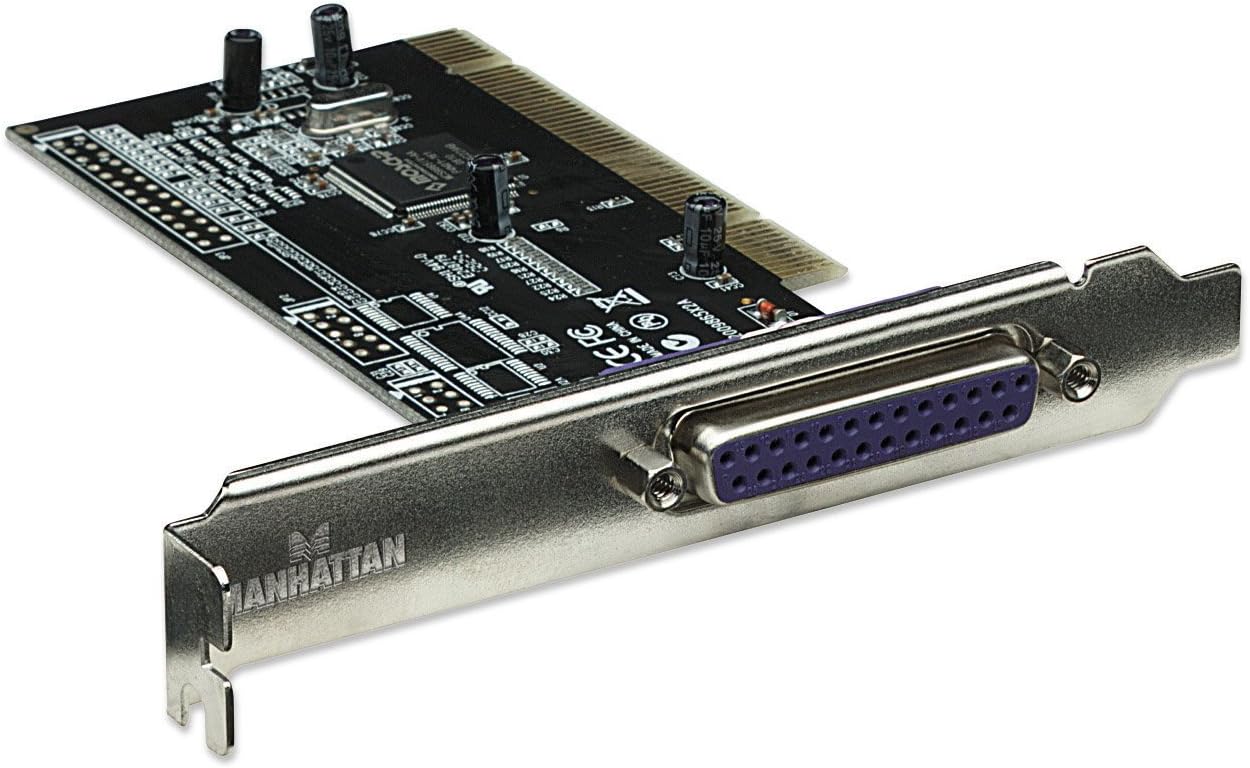
Слика 1: Предња страна view of the Manhattan 158220 PCI Parallel Adapter Card, highlighting the DB25 port and the PCI connector.

Слика 2: Задња страна view of the adapter card, displaying the integrated circuits and the PCI interface pins.
4.3 Инсталација драјвера
- Укључите рачунар.
- For most modern operating systems (e.g., Windows 7/8/10), the system should automatically detect the new hardware and install the necessary drivers. Allow the operating system to complete this process.
- If automatic driver installation fails or if you are using an older operating system, insert the provided driver CD into your computer's optical drive and follow the on-screen instructions. Alternatively, visit the Manhattan webсајт за најновије драјвере.
- After driver installation, it may be necessary to restart your computer for the changes to take effect.
5. Упутство за употребу
Once the Manhattan 158220 PCI Parallel Adapter Card is successfully installed and its drivers are loaded, the parallel port will be available for use by your operating system and applications.
- Connect your parallel device: Plug the DB25 cable from your parallel peripheral (e.g., printer, scanner, CNC machine) into the DB25 port on the adapter card.
- Verify device recognition: Check your operating system's Device Manager (Windows) or equivalent utility to ensure the connected device is recognized and functioning correctly.
- Use with applications: Configure your software applications to use the newly installed parallel port for communication with your peripheral device.

Слика 3: Детаљно view of the DB25 female connector on the adapter card's bracket.
6. Одржавање
The Manhattan 158220 PCI Parallel Adapter Card requires minimal maintenance. Follow these guidelines to ensure its longevity:
- Keep your computer's interior clean and free of dust to prevent overheating and component failure.
- Ensure proper airflow within your computer case.
- Avoid physical shock or excessive vibration to the computer.
- Do not attempt to repair the card yourself. Refer to the warranty information for service.
КСНУМКС. Решавање проблема
If you encounter issues with your Manhattan 158220 PCI Parallel Adapter Card, consider the following troubleshooting steps:
- Картица није откривена:
- Ensure the card is fully seated in the PCI slot.
- Try installing the card in a different PCI slot.
- Verify that your motherboard's BIOS settings allow for PCI device detection.
- Уређај не ради:
- Confirm that the parallel device is properly connected to the card.
- Check the device's own power and connection status.
- Verify that the correct drivers for both the adapter card and the peripheral device are installed and up to date.
- Ensure your operating system is compatible with the card and the peripheral. Some older hardware may have limited compatibility with newer operating systems like Windows 11.
- Проблеми са возачем:
- Uninstall existing drivers for the card from Device Manager and attempt a fresh installation.
- Download the latest drivers directly from the Manhattan website if the provided CD drivers are outdated or incompatible.
8. Спецификације
| Назив производа | 158220 1-port PCI Parallel Adapter |
| Број модела | 158220 |
| Бранд | МАНХАТТАН |
| Хардверски интерфејс | ПЦИ |
| Портс | 1 x 25-pin DB-25 Female IEEE 1284 Parallel |
| Форм Фацтор | Плуг-ин картица |
| Брзина преноса података | До 1.5 МБпс |
| Димензије (В к Ш к Д) | 4.8 cm x 4.9 cm x 0.9 cm (приближно) |
| Тежина артикла | 0.14 фунте (приближно) |
| Компатибилни уређаји | Персонал Цомпутер |
9. Гаранција и подршка
Manhattan products are designed for reliability and performance. This product may be covered by a lifetime warranty, as indicated by some user feedback. For specific warranty terms and conditions, please refer to the documentation included with your purchase or visit the official Manhattan webсајту.
For technical support, driver downloads, or further assistance, please visit the Manhattan support webсајт или контактирајте њихову службу за кориснике. Контакт информације се обично могу наћи на паковању производа или на званичном бренду webсајту.

Figure 4: Manhattan brand logo.