
Увод
Хвала вам на куповиниasing the Snakebyte Wireless Bluetooth Premium PS3 Controller. This manual provides detailed instructions for setting up, operating, maintaining, and troubleshooting your new controller. Please read this manual thoroughly before use to ensure optimal performance and longevity of your device.
Садржај пакета
Молимо вас да проверите да ли су све ставке присутне у пакету:
- Snakebyte Wireless Bluetooth Premium PS3 Controller
- USB Charging Cable (approximately 3 meters)
- Упутство за употребу (овај документ)

Image: The Snakebyte Wireless Bluetooth Premium PS3 Controller shown in its retail blister packaging, indicating the product and included cable.
Сетуп
1. Пуњење контролера
Before initial use, fully charge the controller. Connect the supplied USB charging cable to the controller's charging port and the other end to a USB port on your PlayStation 3 console or a compatible USB power adapter. The indicator lights on the controller will show charging status and turn off or change color when fully charged.
2. Повезивање са PlayStation 3
To connect the controller wirelessly to your PlayStation 3 console:
- Уверите се да је ваша PlayStation 3 конзола укључена.
- Connect the controller to the PS3 console using the supplied USB charging cable. This will register the controller with the console.
- Притисните тастер Дугме ПС (located in the center of the controller) once. The controller will power on and attempt to establish a connection.
- Once the controller is registered and connected, the indicator lights will illuminate, typically assigning a player number.
- You can now disconnect the USB cable for wireless gameplay. If the connection is lost, reconnect the USB cable and press the PS button again.

Слика: Фронт view of the Snakebyte Wireless Bluetooth Premium PS3 Controller, showing the button layout including the central PS button.
Упутство за употребу
Распоред и функције контролера
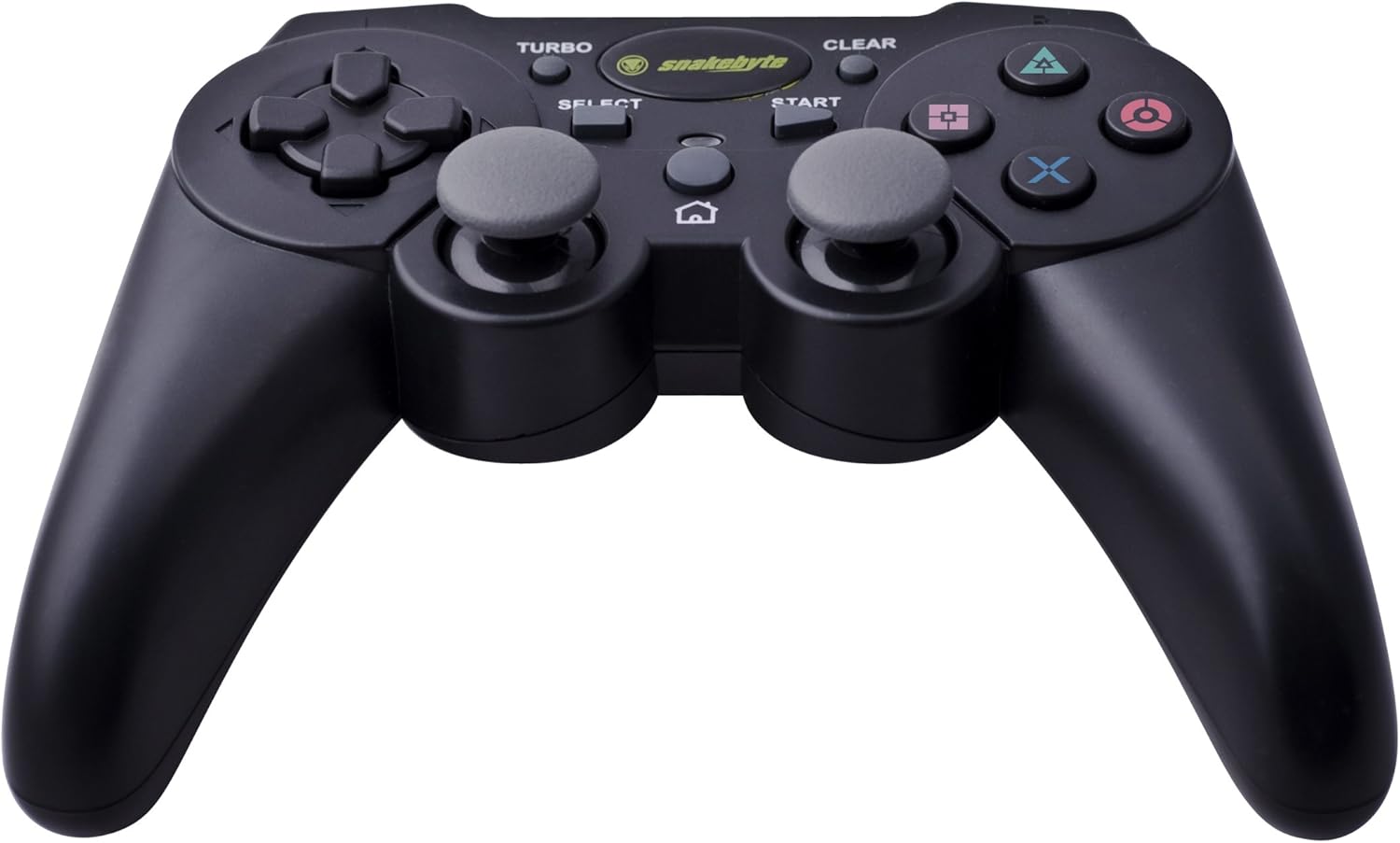
Image: The Snakebyte Wireless Bluetooth Premium PS3 Controller, highlighting the dual analog sticks and various buttons.
- Смерни тастер (D-Pad): For precise directional input in games.
- Леви аналогни штап: Примарна контрола кретања.
- Десни аналогни штап: Контрола камере или секундарно кретање.
- Дугмад за акције (троугао, круг, крст, квадрат): Game-specific actions.
- Л1/Р1 дугмад: Shoulder buttons for various in-game functions.
- L2/R2 окидачи: Analog triggers for pressure-sensitive input, often used for acceleration/braking or aiming/firing.
- Старт дугме: Pauses games or opens menus.
- Дугме СЕЛЕЦТ: Opens in-game maps, inventories, or other menus.
- ПС дугме: Powers on the controller, accesses the PS3 XMB (Cross Media Bar) menu, or turns off the controller/console.
- ТУРБО дугме: Activates the turbo function for other buttons.
- Дугме ЦЛЕАР: Деактивира турбо функцију.
Турбо функција
The controller features a TURBO function, allowing a selected button to register multiple presses rapidly with a single hold. This can be useful for certain game mechanics.
- To activate TURBO: Press and hold the Дугме ТУРБО, then press the desired action button (e.g., Cross, Square, Circle, Triangle, L1, R1, L2, R2). Release both buttons. The selected button will now have the TURBO function enabled.
- To deactivate TURBO for a specific button: Press and hold the Дугме ЦЛЕАР, then press the button for which TURBO is currently active. Release both buttons.
- To deactivate all TURBO functions: Press the Дугме ЦЛЕАР once without holding it down.
Motion Sensing and Vibration Feedback
This controller supports motion sensing capabilities, allowing for intuitive control in compatible games. It also provides vibration feedback to enhance immersion during gameplay, reacting to in-game events such as impacts or explosions.
Укључивање и искључивање
- Да бисте укључили: Притисните дугме Дугме ПС.
- To power off: The controller will automatically enter sleep mode after a period of inactivity to conserve battery. Alternatively, you can hold the Дугме ПС for several seconds to bring up the PS3 menu, where you can choose to turn off the controller.
Одржавање
- Чишћење: Користите меку, суву крпу за чишћење контролера. Не користите абразивна средства за чишћење или раствараче.
- Складиштење: Чувајте контролер на хладном и сувом месту, даље од директне сунчеве светлости и екстремних температура.
- Одржавање батерије: Да бисте продужили век трајања батерије, избегавајте често потпуно пражњење контролера. Редовно га пуните, чак и ако га не користите стално.
- Избегните штету: Do not drop the controller or expose it to excessive force or moisture.
Решавање проблема
| Проблем | Могуће решење |
|---|---|
| Controller does not connect wirelessly. |
|
| Дугмад или аналогни палице не реагују. |
|
| Контролер се не пуни. |
|
Ресетовање контролера
If the controller behaves erratically or becomes unresponsive, you can perform a reset. Locate the small reset button on the back of the controller (often in a small hole). Use a thin, pointed object (like a straightened paperclip) to press and hold the reset button for a few seconds. This will restart the controller's internal electronics.
Спецификације
- Бренд: Snakebyte
- Број модела: СБ904714
- Компатибилна платформа: Сони ПлаиСтатион 3
- Повезивање: бежични (Блуетоотх)
- Број дугмади: 16
- Димензије (Д к Ш к В): Приближно 23.01 к 16.31 к 8.51 цм (9.06 к 6.42 к 3.35 инча)
- Тежина: Приближно 419.99 г (0.93 фунте)
- Боја: Црно
Гаранција и подршка
For warranty information and technical support, please refer to the documentation provided with your purchase or contact your retailer. You may also visit the official Snakebyte website for further assistance and product information.