
HEWLETT PACKARD J9450A
HP Procurve 1810G-24 Switch (J9450A) User Manual
Модел: Ј9450А
Увод
The HP Procurve 1810G-24 Switch (J9450A) is a managed Gigabit Ethernet switch designed for small and medium-sized businesses. It provides reliable network connectivity with advanced features for enhanced performance and security. This manual provides essential information for the setup, operation, maintenance, and troubleshooting of your switch.

Figure 1: HP Procurve 1810G-24 Switch (J9450A) - Front Angled View
This image shows the overall design of the HP Procurve 1810G-24 Switch, highlighting its compact form factor and the arrangement of its ports and indicators.
Садржај пакета
Проверите да ли су све ставке присутне у пакету:
- HP Procurve 1810G-24 Switch (J9450A)
- Кабл за напајање
- Комплет за монтирање у рацк
- Кабл за конзолу
Сетуп
1. Физичка инсталација
The HP Procurve 1810G-24 Switch can be placed on a desktop or mounted in a standard 19-inch equipment rack using the included rack-mount kit.
- Монтажа на рацк: Attach the rack-mount brackets to the sides of the switch using the provided screws. Secure the switch into the rack.
- Положај на радној површини: Ensure adequate ventilation around the switch. Do not block any ventilation openings.
2. Прикључак за напајање
Connect the provided power cable to the power inlet on the rear of the switch and then to a grounded AC power outlet. The switch will power on automatically.

Figure 2: Rear Panel of the Switch
This image displays the rear panel of the HP Procurve 1810G-24 Switch, showing the power input and product labels.
3. Мрежне везе
Connect your network devices (computers, servers, other switches) to the RJ45 ports on the front panel of the switch using standard Ethernet cables. The switch supports 10/100/1000 Mbps connections.

Figure 3: Front Panel of the Switch
Ова слика пружа јасан view of the front panel of the HP Procurve 1810G-24 Switch, detailing the 24 Gigabit Ethernet ports and indicator lights.
The switch also features dual-personality ports (ports 23 and 24) which can function as either 10/100/1000 RJ45 ports or mini-GBIC (SFP) slots for optional fiber connectivity (e.g., Gigabit-SX, -LX, -LH, or 100-FX).

Figure 4: Front Panel Indicators and Controls
This close-up image highlights the power indicator, fault locator, LED mode, and speed indicators on the front panel of the HP Procurve 1810G-24 Switch.
Управљање прекидачем
Web Управљање интерфејсом
The HP Procurve 1810G-24 Switch features an intuitive web-based management interface for configuration, monitoring, and administration. To access the web интерфејс:
- Уверите се да је рачунар повезан са прекидачем.
- Отвори а web browser and enter the default IP address of the switch (refer to the product documentation or sticker for the default IP).
- Log in using the default credentials (if applicable).
- Фром тхе web interface, you can configure various settings, including:
- VLAN Support and Tagгинг: Configure up to 64 port-based VLANs and dynamic IEEE 802.1Q VLAN tagging for network segmentation and security.
- Конфигурација порта: Adjust port speed, duplex settings, and enable/disable ports.
- Агрегација веза: Комбинујте више портова за повећани пропусни опсег и редундантност.
- Квалитет услуге (КоС): Дајте приоритет мрежном саобраћају за критичне апликације.
ЛЕД индикатори
The front panel LEDs provide visual status of the switch and its ports:
- ЛЕД за напајање: Означава статус напајања.
- Fault Locator LED: Indicates system faults.
- ЛЕД индикатори за везу/активност (по порту):
- Solid Green: Link established.
- Flashing Green: Activity on the port.
- Speed LEDs (per port):
- Off: 10 Mbps
- Flash: 100 Mbps
- On: 1000 Mbps (Gigabit)
Одржавање
The HP Procurve 1810G-24 Switch is designed for low maintenance. It operates without internal fans, contributing to a quiet environment and reduced dust accumulation.
- Ажурирања фирмвера: Periodically check the official HP website for firmware updates to ensure optimal performance and security. Follow the instructions provided with the firmware update package.
- Чишћење: Користите меку, суву крпу за чишћење спољашњости прекидача. Не користите течна или аеросолна средства за чишћење.
- вентилација: Уверите се да отвори за вентилацију нису блокирани како бисте спречили прегревање.
Решавање проблема
Но Повер
- Verify the power cable is securely connected to both the switch and the power outlet.
- Проверите да ли је утичница функционална тако што ћете је тестирати са другим уређајем.
No Link Light on Port
- Check the Ethernet cable connection at both ends (switch and connected device).
- Пробајте други Етернет кабл.
- Test the port with a known working device.
- Уверите се да је повезани уређај укључен и да исправно функционише.
Connectivity Issues After Power Failure
In some rare instances, the switch may not fully restore network connectivity to all ports immediately after a power outage. If this occurs:
- Циклус напајања: Disconnect the power cable from the switch, wait for approximately 30 seconds, and then reconnect it.
- Reseat Cables: Physically disconnect and reconnect the Ethernet cables for affected devices.
- Фацтори Ресет: If issues persist, a factory reset may be necessary. This will revert all settings to their default values. Consult the detailed product manual for the specific procedure, which often involves using a small pointed object (like a paperclip) to press a reset button.
Web Interface Inaccessible
- Verify your computer's IP address is in the same subnet as the switch's default IP address.
- Обришите кеш меморију и колачиће прегледача.
- Покушајте другачије web претраживач.
- Perform a factory reset if you have forgotten the login credentials or if the interface remains unresponsive.
Спецификације
| Феатуре | Опис |
|---|---|
| Број модела | Ј9450А |
| Тип прекидача | Управљани гигабитни Етхернет прекидач |
| Број портова | 24 (22 x 10/100/1000BASE-T, 2 x Dual-Personality 10/100/1000BASE-T or SFP) |
| Брзина преноса података | 1000 мегабита у секунди (гигабит) |
| Тип интерфејса | РЈ45, СФП |
| Материјал кућишта | Метал |
| Димензије (Д к Ш к В) | 17 к 7 к 2 инча (приближно) |
| Тежина артикла | 5 фунти |
| Повер Инпут | 100-127V ~ 0.75A (0.75A), 200-240V ~ 0.4A (0.4A) |
| Радна температура | 0°Ц до 40°Ц (32°Ф до 104°Ф) |
| Хлађење | Без вентилатора |
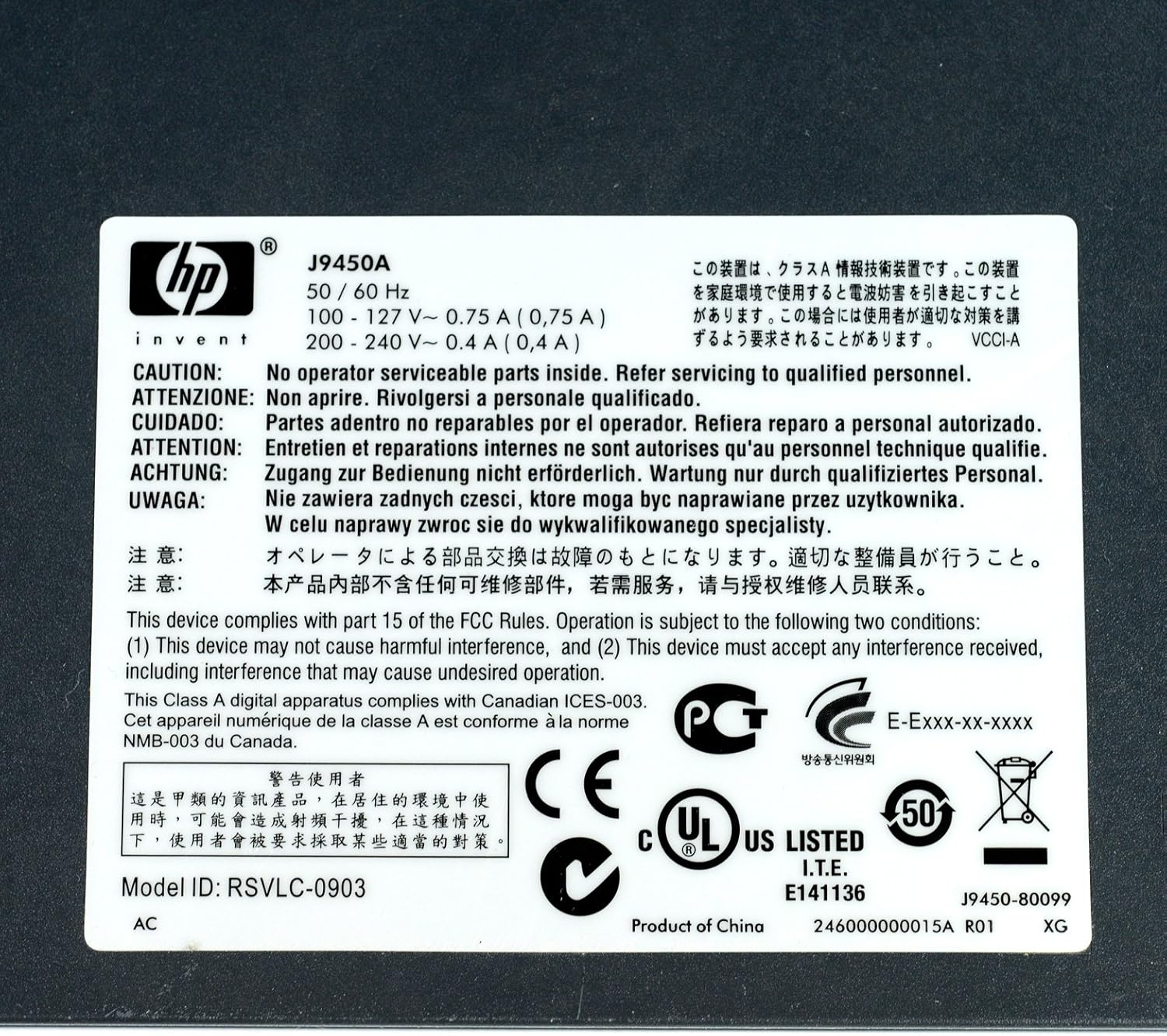
Figure 5: Product Label with Specifications
This image displays the product label, which includes the model number, electrical ratings, and various compliance marks.
Гаранција и подршка
Информације о гаранцији
The HP Procurve 1810G-24 Switch typically comes with a Доживотна замена гаранција for the original owner. Please refer to the official HP warranty documentation for complete terms and conditions, as warranty details may vary by region and purchase date.
Техничка подршка
For technical assistance, product registration, or to download the latest drivers and firmware, please visit the official HP support website. Have your product model number (J9450A) and serial number ready when contacting support.
You can typically find support resources at: ввв.хп.цом/суппорт
Ask a question about this manual
Ask about setup, troubleshooting, compatibility, parts, safety, or missing instructions. Manuals+ will review the question and use this page’s manual context to help answer it.