
Увод
The Nokia Bluetooth Stereo Headset BH-905 is designed to provide a superior audio experience with active noise cancellation and wide compatibility. This manual provides instructions for setting up, operating, and maintaining your headset to ensure optimal performance.
The headset features 10 microphones: 8 dedicated to capturing ambient noise for cancellation and 2 for capturing speech in noisy environments. It offers versatile connectivity, supporting both wireless Bluetooth and wired connections with various devices.
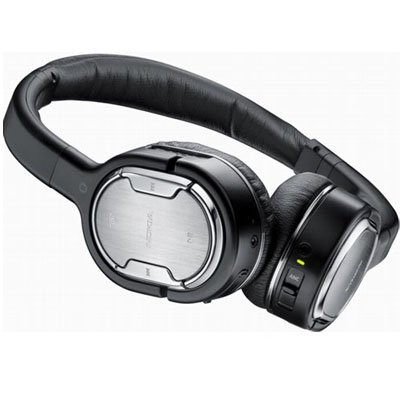
Image: The Nokia Bluetooth Stereo Headset BH-905, showcasing its sleek design and over-ear cups.
Кључне карактеристике
- Активно поништавање буке (АНЦ): Significantly reduces ambient noise for an immersive listening experience.
- 10 Microphones: Utilizes 8 microphones for noise capture and 2 for clear speech transmission in loud surroundings.
- Широка компатибилност: Connects wirelessly via Bluetooth or wired to a variety of mobile phones, music players, and other audio devices.
- Seamless Control: Intuitive controls allow for easy switching between music and calls without needing to look at the device.
Сетуп
Блуетоотх упаривање
- Ensure your headset is charged and powered off.
- Активирајте Блуетоотх на свом мобилном уређају.
- Press and hold the power button on the headset until the indicator light flashes blue rapidly, indicating pairing mode.
- On your device, search for Bluetooth devices and select "Nokia BH-905" from the list.
- If prompted, enter the passcode (usually "0000").
- Once paired, the indicator light will turn solid blue or flash slowly.
Жичана веза
For devices without Bluetooth or when battery is low, use the provided audio cables. The headset includes plugs for standard audio jacks and airplane adapters for versatile use.
- Connect one end of the audio cable to the headset's audio input port.
- Connect the other end to your audio source (e.g., mobile phone, MP3 player, airplane entertainment system).
Упутство за употребу
Укључивање/искључивање
- Да бисте укључили напајање, притисните и држите дугме за напајање док се индикаторска лампица не упали.
- Да бисте искључили напајање, притисните и држите дугме за напајање док се индикаторска лампица не угаси.
Отказивање активне буке (АНЦ)
The BH-905 features advanced Active Noise Cancellation technology. With 8 dedicated microphones, it captures ambient low-frequency noise and generates an inverse sound wave, effectively canceling out unwanted sounds. This allows for a clearer audio experience, especially in noisy environments like airplanes or busy streets.
- To activate ANC, locate the ANC switch on the headset and slide it to the 'On' position. A green indicator light will confirm activation.
- To deactivate ANC, slide the switch to the 'Off' position.
Управљање позивима
The headset is equipped with 2 microphones specifically designed for speech. These microphones not only capture your voice clearly but also work to cancel out ambient noise, ensuring that the person you are speaking with hears you, not your surroundings.
- Одговарање / завршавање позива: Use the dedicated call button on the headset.
- Switching between Music and Calls: The headset allows for seamless transitions between listening to music and taking calls. When a call comes in, your music will pause, and you can answer the call directly from the headset.
Репродукција музике
Control your music directly from the headset using the intuitive buttons. The design supports "blind usage," meaning you can operate the controls by feel without needing to look at them.
- Пусти/паузирај: Use the play/pause button.
- Прескочи песме: Use the forward/backward track buttons.
- Контрола јачине звука: Подесите јачину звука помоћу посебних дугмади за јачину звука.
Video: An official Nokia video demonstrating the features and technology behind the BH-905 headset, including its active noise cancellation and multi-microphone system for clear audio and calls.
Одржавање
- Редовно чистите слушалице меком, сувом крпом.
- Избегавајте излагање слушалица екстремним температурама, влази или директној сунчевој светлости.
- Чувајте слушалице у заштитној футроли када се не користе како бисте спречили оштећења.
- Не покушавајте да растављате или модификујете слушалице, јер ће то поништити гаранцију.
Решавање проблема
- Нема напајања: Уверите се да су слушалице потпуно напуњене.
- Не може се упарити: Make sure the headset is in pairing mode and within range of your device. Try restarting both devices.
- Нема звука/лош квалитет звука: Check volume levels on both the headset and your connected device. For wired connections, ensure cables are securely plugged in. For Bluetooth, ensure a stable connection.
- АНК не функционише ефикасно: Ensure the ANC switch is in the 'On' position.
- Callers Cannot Hear Me Clearly: Ensure the headset's microphones are not obstructed.
If issues persist, refer to the Nokia support webсајт или контактирајте корисничку службу за додатну помоћ.
Спецификације
| Феатуре | Спецификација |
|---|---|
| Бранд | Нокиа |
| Број модела | 02716Ј5 |
| Форм Фацтор | Over-ear (two_ear) |
| Контрола буке | Активно поништавање буке |
| Технологија повезивања | Блуетоотх, жични |
| Бежична комуникациона технологија | Блуетоотх |
| Додатне карактеристике | Microphone; Stereo |
| Тип контроле | Контрола медија |
| Тежина артикла | 0.32 фунти |
| УПЦ | 758478021477 |
| ГТИН | 758478021477 |
Гаранција и подршка
The Nokia Bluetooth Stereo Headset BH-905 comes with a 12-месечна гаранција од датума куповине. Ова гаранција покрива производне недостатке при нормалној употреби. Молимо вас да сачувате доказ о куповини за потребе подношења захтева за гаранцију.
For technical support, warranty service, or additional information, please visit the official Nokia support website or contact your local Nokia customer service center.