
Degen DE1125
DEGEN DE1125 User Manual
Model: DE1125 | Brand: Degen
1. Производ је готовview
The DEGEN DE1125 is a compact and versatile portable device that integrates multiple functionalities into a single unit. It serves as a world-band radio, an MP3 player, a digital recorder, and an ebook reader. Designed for portability, it features a slim profile and lightweight construction, making it ideal for travel and on-the-go use.
Кључне карактеристике укључују:
- Pocket-size world-band radio with built-in speaker and Digital Signal Processing (DSP) technology.
- 4 GB flash memory MP3 player for music playback.
- Digital recorder for radio programs and voice recording, offering up to 150 hours of recording time (at 32 kbps).
- 255 preset memories for radio stations.
- Built-in battery charger.
- LED back-lit display for clear visibility.
- Digital clock, sleep timer, key lock, and numeric volume indicator.
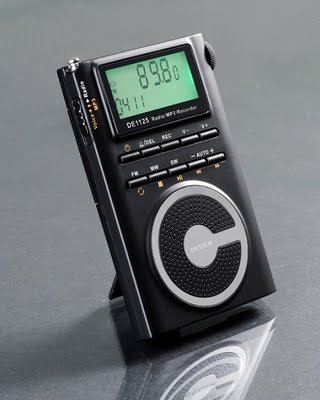
Figure 1.1: The DEGEN DE1125 portable radio and multimedia player, shown standing upright with its integrated kickstand.
2. Водич за подешавање
2.1 Распакивање и почетни преглед
Пажљиво извадите све компоненте из паковања. Проверите да ли су све ставке наведене у наставку присутне и да нису оштећене:
- DEGEN DE1125 Unit
- Слушалице
- AC Wall Plug (Charger)
- УСБ кабл
- Торбица за ношење
- Пуњива батерија
- Кориснички приручник (овај документ)
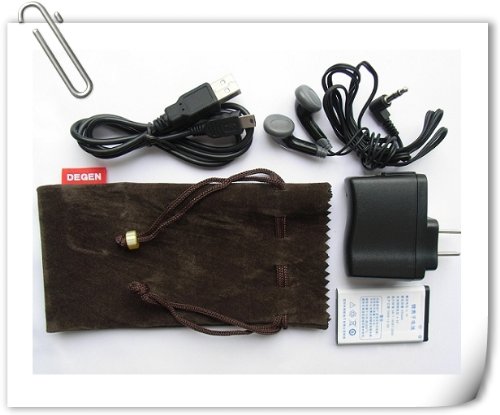
Figure 2.1: All included accessories for the DEGEN DE1125, including earphones, USB cable, AC adapter, carrying pouch, and rechargeable battery.
2.2 Инсталација и пуњење батерије
The DE1125 is powered by a rechargeable lithium battery. Before first use, ensure the battery is properly installed and fully charged.
- Пронађите одељак за батерију на задњој страни уређаја.
- Insert the rechargeable battery, ensuring correct polarity as indicated inside the compartment.
- Добро затворите поклопац одељка за батерије.
- Connect the small end of the USB cable to the mini-USB port on the side of the DE1125.
- Connect the standard USB end of the cable to the AC wall plug, then plug the AC wall plug into a standard electrical outlet. Alternatively, connect the standard USB end directly to a computer's USB port for charging.
- The display will indicate charging status. Allow the battery to fully charge before initial use.
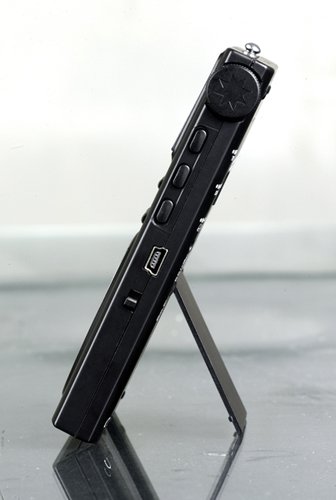
Слика 2.2: Страна view of the DEGEN DE1125, highlighting the mini-USB port for charging and data transfer.
3. Упутство за употребу
3.1 Опште контроле
Familiarize yourself with the buttons and display on the DE1125:
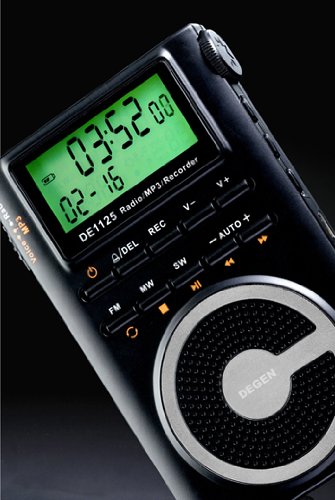
Слика 3.1: Крупни план view of the DEGEN DE1125's display and control panel, showing buttons for power, mode selection, tuning, and volume.
- Дугме за укључивање (): Притисните и држите да бисте укључили или искључили уређај.
- Volume Buttons (V+, V-): Подесите ниво аудио излаза.
- Дугме менија: Access the main menu or settings within a mode.
- Тастери за навигацију (, ): Navigate through menus or adjust frequencies/tracks.
- Mode Buttons (FM, MW, SW, MP3, REC): Изаберите жељени режим рада.
- Дугме за репродукцију/паузу (): Start or pause playback in MP3 mode, or confirm selections.
3.2 Radio Operation (FM, AM, SW)
The DE1125 supports FM (64.0 - 108.0 MHz), MW (520-1710 KHz), and SW (2.3-23.0 MHz) bands.
- Укључите уређај.
- Press the corresponding mode button (FM, MW, or SW) to select the desired radio band.
- Опције подешавања:
- Аутоматско скенирање: Press and hold the 'AUTO' button to automatically scan and store available stations.
- Ручно подешавање: Користите дугмад за навигацију (, ) to fine-tune the frequency step-by-step.
- Digital Tuning: Enter the desired frequency directly using the numeric keypad (if available, or through menu options).
- ATS (Auto Tuning Storage): Automatically scans and stores strong signals into memory presets.
- Унапред подешене станице: The device can store up to 255 preset stations. Use the 'M+' and 'M-' buttons to navigate through stored presets.
3.3 MP3 Player Function
The DE1125 features 4GB of internal flash memory for MP3 playback.

Figure 3.2: The DEGEN DE1125 display indicating the 'Music' mode, ready for MP3 playback.
- Press the 'MP3' button to enter MP3 player mode.
- За пренос музике files from your computer, connect the DE1125 to your computer using the provided USB cable. The device will appear as a removable disk drive. Drag and drop your MP3 files into the device's storage.
- Користите дугмад за навигацију (, ) to select tracks.
- Притисните дугме Репродукуј / Паузирај () да бисте покренули или паузирали репродукцију.
3.4 Digital Recorder Function
The DE1125 can record radio programs or function as a voice recorder.

Figure 3.3: The DEGEN DE1125 display showing the 'Record' mode, indicating readiness for audio capture.

Figure 3.4: The DEGEN DE1125 display showing the 'Voice' mode, used for voice recording functions.
- Press the 'REC' button to enter recording mode.
- Select either 'Radio Record' or 'Voice Record' from the menu.
- Press the 'REC' button again to start recording. The display will show recording time.
- Press the 'REC' button again to stop recording. Recorded files are saved to the internal memory.
- To play back recordings, navigate to the 'Recordings' folder in MP3 mode.
3.5 Ebook Reader Function
The DE1125 supports basic ebook reading functionality.

Figure 3.5: The DEGEN DE1125 display showing the 'Ebook' mode, indicating readiness to display text files.
- Connect the DE1125 to your computer via USB.
- Transfer compatible text files (e.g., .TXT) to the device's internal memory.
- Искључите уређај са рачунара.
- Navigate to the 'Ebook' mode using the menu or mode selection.
- Select the desired ebook file да отворим и прочитам.
4. Нега и одржавање
Proper care ensures the longevity and optimal performance of your DEGEN DE1125.
- Чишћење: Use a soft, dry cloth to clean the exterior of the device. Do not use liquid cleaners, aerosols, or abrasive materials.
- Складиштење: Store the device in a cool, dry place away from direct sunlight, extreme temperatures, and high humidity. Use the provided carrying pouch for protection during transport.
- Одржавање батерије: To maintain battery health, avoid fully discharging the battery frequently. If storing for an extended period, charge the battery to about 50% and recharge every few months.
- Изложеност води: This device is not waterproof. Avoid exposure to water or other liquids.
- Утицај: Protect the device from drops and impacts, which can damage internal components or the screen.
КСНУМКС. Решавање проблема
If you encounter issues with your DEGEN DE1125, refer to the following common problems and solutions:
| Проблем | Могући узрок | Решење |
|---|---|---|
| Уређај се не укључује. | Батерија је испражњена или није правилно постављена. | Напуните батерију. Уверите се да је батерија уметнута са исправним поларитетом. |
| No radio reception or poor signal. | Weak signal area, antenna not extended, interference. | Extend the telescopic antenna fully. Move to an area with better reception. Avoid sources of electronic interference. |
| МП3 fileне свира. | Неподржано file формат, оштећен file, бр files on device. | Осигурати files are in MP3 format. Re-transfer files. Verify files exist in the device's memory. |
| Cannot record audio. | Insufficient storage space, incorrect mode. | Обриши старо files to free up space. Ensure you are in the correct recording mode (Radio Record or Voice Record). |
| Екран је празан или замрзнут. | System error, low battery. | Press and hold the power button for 10 seconds to force a restart. Charge the battery. |
6. Техничке спецификације
| Феатуре | Спецификација |
|---|---|
| Бранд | Degen |
| Модел | ДЕ1125 |
| Димензије производа | 11 к 1.5 к 6.7 цм |
| Тежина артикла | 113 г |
| Капацитет меморије | 4 ГБ |
| Хардверски интерфејс | УСБ |
| Технологија тјунера | AM, FM, SW |
| ФМ Фреквенцијски опсег | 64.0 - 108.0 MHz |
| MW Frequency Range | 520 - 1710 kHz |
| СВ Фреквенцијски опсег | 2.3 - 23.0 MHz |
| Компатибилни уређаји | Слушалица |
| Дисплаи Типе | ЛЕД |
| Величина екрана | 0.5 Inches (visible diagonal 1" / 2 cm) |
| Извор напајања | Баттери Поверед |
| Тип батерије | Lithium Rechargeable |
| Тип конектора | УСБ |
| Компатибилни тип медија | МП3 |
| Материјал | Остало |
7. Гаранција и подршка
7.1 Информације о гаранцији
This product is covered by a manufacturer's warranty. Please refer to the warranty policy provided at the time of purchase or contact your retailer for specific details regarding warranty duration and terms. Keep your proof of purchase for warranty claims.
7.2 Корисничка подршка
For technical assistance, troubleshooting beyond this manual, or inquiries about your DEGEN DE1125, please contact the retailer or the manufacturer's customer support. Refer to the contact information provided with your purchase documentation.
Ask a question about this manual
Ask about setup, troubleshooting, compatibility, parts, safety, or missing instructions. Manuals+ will review the question and use this page’s manual context to help answer it.