
Увод
This manual provides comprehensive instructions for the setup and operation of your RCA RCU704 4-Function Universal Remote Control. This remote is designed to control up to four different audio/video components, simplifying your home entertainment experience.
Безбедносне информације
- Немојте мешати старе и нове батерије.
- Немојте мешати алкалне, стандардне (угљен-цинк) или пуњиве (никл-кадмијум) батерије.
- Извадите батерије ако даљински управљач неће бити коришћен дуже време како бисте спречили цурење.
- Држите батерије ван домашаја деце.
Садржај пакета
- RCA RCU704 Universal Remote Control
- Кориснички приручник (овај документ)
Производ је завршенview
The RCA RCU704 remote control features a straightforward layout for easy operation of your home entertainment devices.
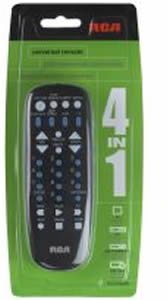
слика: Фронт view of the RCA RCU704 universal remote control, showcasing its button layout and ergonomic design.
Key buttons and their functions include:
- СНАГА: Turns the selected component on or off.
- TV, VCR, DVD, AUX: Component selection buttons to switch control to the desired device.
- ВОЛ +/-: Подешава ниво јачине звука.
- ЦХ +/-: Мења канале горе или доле.
- МУТЕ: Утишава аудио излаз.
- INPUT/VIDEO: Selects the video input source on your TV or other display device.
- НУМЕРИЧКА ТАСТАТУРА (0-9): За директан унос канала или навигацију кроз мени.
Сетуп
1. Инсталација батерије
- Remove the battery compartment cover located on the back of the remote control.
- Insert two fresh AAA batteries, ensuring that the (+) and (-) terminals align correctly with the markings inside the compartment.
- Вратите поклопац одељка за батерије безбедно.
2. Програмирање даљинског управљача
There are two primary methods to program your universal remote to control your devices:
Method A: Direct Code Entry
- Turn on the component (e.g., TV, DVD player) you wish to control.
- Притисните и држите ПРЕТРАГА КОДОВА button until the indicator light on the remote turns on.
- Док наставља да се држи ПРЕТРАГА КОДОВА, press and release the component button (e.g., TV, ДВД) corresponding to the device you want to program. The indicator light will blink once and then remain steadily on.
- Enter the 4-digit code for your brand from the provided code list (refer to the separate code booklet that came with your remote).
- If the code is valid, the indicator light will turn off. If the code is invalid, the light will flash rapidly.
- Тестирајте даљински управљач притиском на ПОВЕР button. If the component turns off, try other functions like ВОЛ +/-. If it works, programming is complete.
- If the component does not respond or functions incorrectly, repeat the process with the next code listed for your brand.
Метод Б: Аутоматска претрага кода
- Turn on the component you wish to control.
- Притисните и држите ПРЕТРАГА КОДОВА button until the indicator light on the remote turns on.
- Док наставља да се држи ПРЕТРАГА КОДОВА, press and release the component button (e.g., TV, ДВД) you want to program. The indicator light will blink once and then remain steadily on.
- Point the remote at the component and repeatedly press the ПОВЕР дугме (или ЦХ+ for TVs) until the component turns off.
- Once the component turns off, immediately press the ЕНТЕР button to save the code. The indicator light will turn off.
- Test the remote. If it does not work correctly, repeat the auto code search process.
Управљање даљинским управљачем
To operate a component after it has been programmed:
- Press the corresponding component button (TV, ВЦР, ДВД, или АУКС) to select the device you want to control. The indicator light will flash once to confirm selection.
- Point the remote at the component and press the desired function button (e.g., ПОВЕР, ВОЛ +/-, ЦХ +/-).
Одржавање
- Clean the remote with a soft, dry cloth. Do not use liquid cleaners or abrasive materials.
- Avoid exposing the remote to extreme temperatures, high humidity, or direct sunlight.
- Do not drop the remote or subject it to strong impacts, as this may damage internal components.
Решавање проблема
| Проблем | Решење |
|---|---|
| Remote does not operate your component. | Ensure batteries are fresh and installed correctly. Reprogram the remote using a different code for your brand or try the auto code search method. Ensure the remote is pointed directly at the component and there are no obstructions. |
| Индикаторска лампица се не укључује. | Check battery installation. Replace batteries if necessary. Ensure the battery compartment cover is closed properly. |
| Some buttons work, but others don't. | The programmed code may only partially match your component. Try programming with a different code for your brand or use the auto code search to find a more compatible code. |
| Remote loses programming. | This is typically due to low batteries. Replace batteries with fresh ones and reprogram the remote. |
Спецификације
- Модел: RCU704 (RCARC704)
- Функције: 4 (TV, VCR, DVD, AUX)
- Повезивање: Инфрацрвени (ИР)
- Снага: 2 к ААА батерије (нису укључене)
- Максимални домет: 10 метра (приближно 33 стопа)
- Број дугмади: 4 component selection buttons + various function buttons
- Тежина: Приближно 2.4 унци (без батерија)
Гаранција и подршка
For detailed warranty information or technical support, please refer to the documentation included with your original purchase or visit the official RCA webсајт. Препоручује се да сачувате рачун о куповини као доказ о куповини за потребе гаранције.
Note: Specific warranty terms and support contact details may vary by region and retailer.