
1. Увод
The Intermatic EI500WC is a 7-day single-pole digital time switch designed for automated control of lights, fans, pumps, and other medium-duty loads. It offers up to 7 ON and 7 OFF operations per week, providing flexibility for energy savings, security, and convenience. This timer is compatible with incandescent, fluorescent, CFL, and LED lighting.
This manual provides detailed instructions for the safe installation, setup, programming, and maintenance of your EI500WC digital time switch.

Figure 1: Intermatic EI500WC Digital Time Switch installed in a standard wall plate.
2. Мере предострожности
Please read and understand all instructions before installing or operating this device. Failure to follow these instructions may result in electrical shock, fire, or serious injury.
- УПОЗОРЕЊЕ: Risk of Electric Shock. Disconnect power at the circuit breaker or fuse box before installation or servicing.
- Инсталацију мора да изврши квалификовани електричар у складу са свим локалним и националним електричним прописима.
- Do not use this device with loads exceeding its specified electrical ratings.
- Уверите се да су сви жичани спојеви безбедни и правилно изоловани.
- Овај уређај је само за унутрашњу употребу.
3. Садржај пакета
- Intermatic EI500WC 7-Day Digital Time Switch
- Жичане матице
- Упутство за употребу (овај документ)
4. Производ је готовview
The EI500WC features a clear digital display and intuitive buttons for programming. The main ON and OFF buttons are visible on the front, while programming buttons are located behind a hinged cover.

Слика 2: Предња страна view of the EI500WC with the programming button cover open, showing CLK, DAY, PROG, RESET, HOUR, MIN, and MODE buttons.
5. Упутства за инсталацију
5.1. Потребан алат
- Одвијач (Пхиллипс и/или равна глава)
- Скидачи жице
- Волtagе Тестер
- Електрична трака
5.2. Упутства за ожичење
- Искључите напајање: Пронађите прекидач или осигурач који контролише прекидач који замењујете и искључите га. Проверите да ли је напајање искључено помоћу регулатора волумена.tagе тестер.
- Remove old switch: Пажљиво уклоните постојећу зидну плочу и прекидач из електричне кутије.
- Identify wires: The EI500WC requires a neutral wire. Identify the LINE (hot), LOAD, NEUTRAL, and GROUND wires in your electrical box. If a neutral wire is not present, consult a qualified electrician.
- Повежите жице: Use the provided wire nuts to connect the EI500WC wires to your household wiring as shown in the diagram below.
- Black wire (LINE): Connect to the incoming hot wire from the circuit breaker.
- Red wire (LOAD): Connect to the wire going to the light fixture or appliance.
- White wire (NEUTRAL): Connect to the neutral wire (typically white) in the electrical box.
- Green wire (GROUND): Connect to the bare copper or green ground wire in the electrical box.
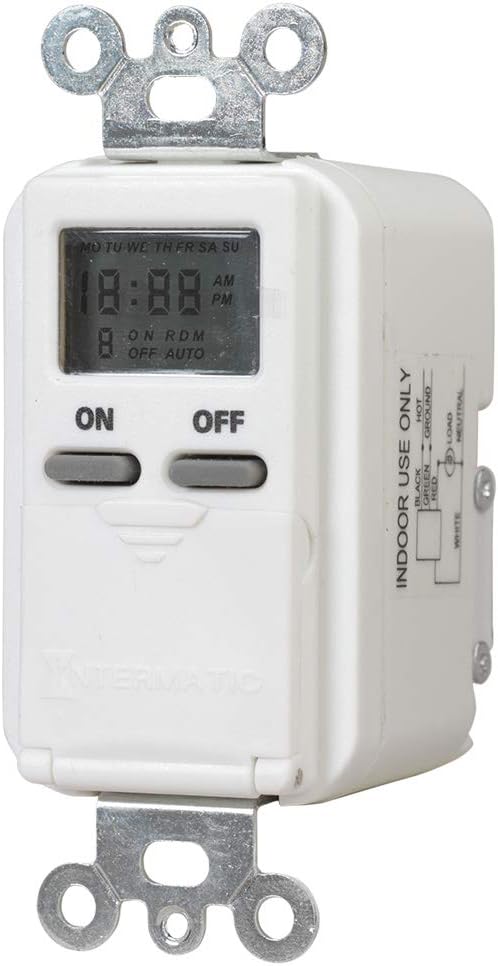
Figure 3: Wiring diagram for the EI500WC, showing connections for LINE (Black), LOAD (Red), NEUTRAL (White), and GROUND (Green).
5.3. Монтажа
- Carefully push the wired timer into the electrical box, ensuring wires are not pinched.
- Secure the timer to the electrical box using the mounting screws.
- Attach the wall plate (not included) over the timer.
- Врати струју: Поново укључите напајање на прекидачу.
6. Почетно подешавање
Upon initial power-up or after a power outage, the display may show '12:00 AM' and 'MO'. The internal battery maintains settings during brief power interruptions.
6.1. Подешавање тренутног времена и дана
- Open the hinged cover to access the programming buttons (refer to Figure 2).
- Притисните тастер ЦЛК дугме. Приказ времена ће трептати.
- Притисните тастер ХОУР button to set the current hour. Observe the AM/PM indicator.
- Притисните тастер МИН дугме за подешавање тренутне минуте.
- Притисните тастер ДАН button to set the current day of the week (MO, TU, WE, TH, FR, SA, SU).
- Притисните ЦЛК again to save the settings and exit time setting mode.
7. Управљање и програмирање
The EI500WC allows for up to 7 ON and 7 OFF programming events per week. Each event can be set for a specific day or combination of days.
7.1. Подешавање програма УКЉУЧИВАЊА/ИСКЉУЧИВАЊА
- Отворите поклопац са шаркама.
- Притисните тастер ПРОГ button. The display will show '1 ON' and the time will flash.
- Притисните ХОУР и МИН to set the desired ON time for program 1.
- Притисните ДАН to select the day(s) for this program. Options include individual days, weekdays (MO TU WE TH FR), weekends (SA SU), or all days (MO TU WE TH FR SA SU).
- Притисните ПРОГ again. The display will show '1 OFF' and the time will flash.
- Притисните ХОУР и МИН to set the desired OFF time for program 1.
- Притисните ДАН to select the day(s) for this OFF program (should match the ON program days).
- Repeat steps 2-7 for additional ON/OFF programs (up to 7 pairs). To skip a program, press ПРОГ repeatedly until you reach the desired program number or exit programming mode.
- Притисните ЦЛК to exit programming mode and return to normal operation.
7.2. Random Mode
The random mode feature varies the ON/OFF schedule by a few minutes, providing a 'lived-in' appearance for enhanced security.
- To activate Random Mode: Press the МОДЕ button until 'RDM' appears on the display.
- To deactivate Random Mode: Press the МОДЕ button until 'RDM' disappears.
7.3. Мануал Оверриде
You can manually turn the connected load ON or OFF at any time without affecting the programmed schedule.
- Притисните велики ON button to manually turn the load ON.
- Притисните велики ОФФ button to manually turn the load OFF.
- The timer will revert to its programmed schedule at the next scheduled ON or OFF event.
8. Одржавање
8.1. Информације о батерији
The EI500WC includes an internal battery that provides backup power to maintain time and program settings during power outages. This battery is typically long-lasting and not user-replaceable. If the display is blank or settings are lost frequently after power interruptions, the unit may need replacement.
8.2. Чишћење
Clean the surface of the timer with a soft, damp тканина. Немојте користити абразивна средства за чишћење или раствараче.
КСНУМКС. Решавање проблема
- Timer display is blank: Ensure power is supplied to the circuit. Check circuit breaker.
- Load does not turn ON/OFF as programmed:
- Verify current time and day are set correctly.
- Check that ON/OFF programs are set for the correct times and days.
- Ensure the timer is not in manual override mode conflicting with the program.
- Confirm wiring connections are secure.
- Timer loses settings after power outage: The internal backup battery may be depleted. The unit may require replacement.
- Ресет: If the timer behaves erratically, use a pointed object (like a paperclip) to press the recessed РЕСЕТ button. This will clear all settings and restore default values, requiring you to re-enter time, day, and programs.
10. Техничке спецификације
| Феатуре | Спецификација |
|---|---|
| Број модела | EI500WC |
| Волtage | 125 ВАЦ, 60 Хз |
| Максимално оптерећење | 15 Amps (1875 Watts) Resistive, 1000 Watts Tungsten |
| Оптерећење мотора | КСНУМКС / КСНУМКС КС |
| Број програма | Up to 7 ON/OFF events per week |
| Тип прекидача | Single-Pole (1-way) |
| Тип монтаже | Decorator Wall Plate/Standard Wall Box |
| Димензије (В к Ш к Д) | 2.75 cm x 1.75 cm x 1.36 cm |
| Боја | Бела |
| Цертификати | УЛ Листед |
11. Информације о гаранцији
Intermatic warrants this product to be free from defects in material and workmanship for a period of one (1) year from the date of purchase. This warranty covers replacement of the unit only and does not include labor costs associated with removal or reinstallation.
This warranty does not apply to defects resulting from improper installation, misuse, abuse, accident, or unauthorized modifications. For warranty service, please contact Intermatic customer support.
12. Корисничка подршка
If you have any questions regarding the installation, operation, or troubleshooting of your Intermatic EI500WC Digital Time Switch, please refer to the Intermatic website or contact their customer support directly. Always have your model number (EI500WC) available when contacting support.