
Увод
Хвала вам на куповиниasing the Optimus F-1760 16-inch Wave Oscillating Stand Fan. This manual provides important information regarding the safe operation, assembly, maintenance, and troubleshooting of your fan. Please read these instructions thoroughly before use and retain them for future reference.

Image: The Optimus F-1760 stand fan positioned in a bedroom, showcasing its design and size relative to furniture.
Важна безбедносна упутства
Када користите електричне уређаје, увек треба поштовати основне мере предострожности како бисте смањили ризик од пожара, електричног удара и повреда особа, укључујући следеће:
- Прочитајте сва упутства пре коришћења овог вентилатора.
- Use this fan only as described in this manual. Other uses not recommended may cause fire, electric shock, or injury to persons.
- Да бисте се заштитили од струјног удара, не стављајте вентилатор у прозор, не потапајте уређај, утикач или кабл у воду или их не прскајте течностима.
- Неопходан је пажљив надзор када било који уређај користе деца или у близини деце.
- Искључите вентилатор из утичнице када га не користите, када га премештате са једне локације на другу и пре чишћења.
- Do not operate fan in the presence of explosive and/or flammable fumes.
- Не постављајте вентилатор или било које делове близу отвореног пламена, уређаја за кување или другог грејног уређаја.
- Do not operate fan with a damaged cord or plug, or after the fan malfunctions or has been dropped or damaged in any manner.
- Избегавајте контакт са покретним деловима.
- Да бисте га искључили, ухватите утикач и извуците га из зидне утичнице. Никада не вуците кабл.
- Увек користите на сувој, равној површини.
- Не вешајте и не постављајте вентилатор на зид или плафон.
- Немојте радити без правилно постављених решетки вентилатора.
- This product employs overload protection (fuse). A blown fuse indicates an overload or short-circuit situation. If the fuse blows, unplug the product from the outlet. Replace the fuse as per the servicing instructions (follow product marking for proper fuse rating) and check the product. If the replacement fuse blows, a short-circuit may be present and the product should be discarded or returned to an authorized service facility for examination and/or repair.
Подешавање и монтажа
The Optimus F-1760 fan requires minimal assembly. Ensure all components are present and undamaged before proceeding.
- Склоп базе: Attach the weighted base legs to the main pole. Ensure they are securely fastened to provide stability. The base is designed to be sturdy, with weights at the ends of the feet.
- Подешавање висине: The fan's height can be adjusted. Loosen the height adjustment knob on the pole, extend or retract the pole to the desired height, and then securely tighten the knob.
- Додатак за главу вентилатора: Ensure the fan head is securely attached to the top of the pole. The motor housing and fan blade are plastic, while the grill is metal.
- Пласман: Place the fan on a dry, level surface. Ensure there is adequate space around the fan for proper air circulation and oscillation.
Упутство за употребу
The Optimus F-1760 fan offers multiple control options and features for customized comfort.
Цонтрол Панел
The fan features a 4-position push-button switch on the pole for basic operation.
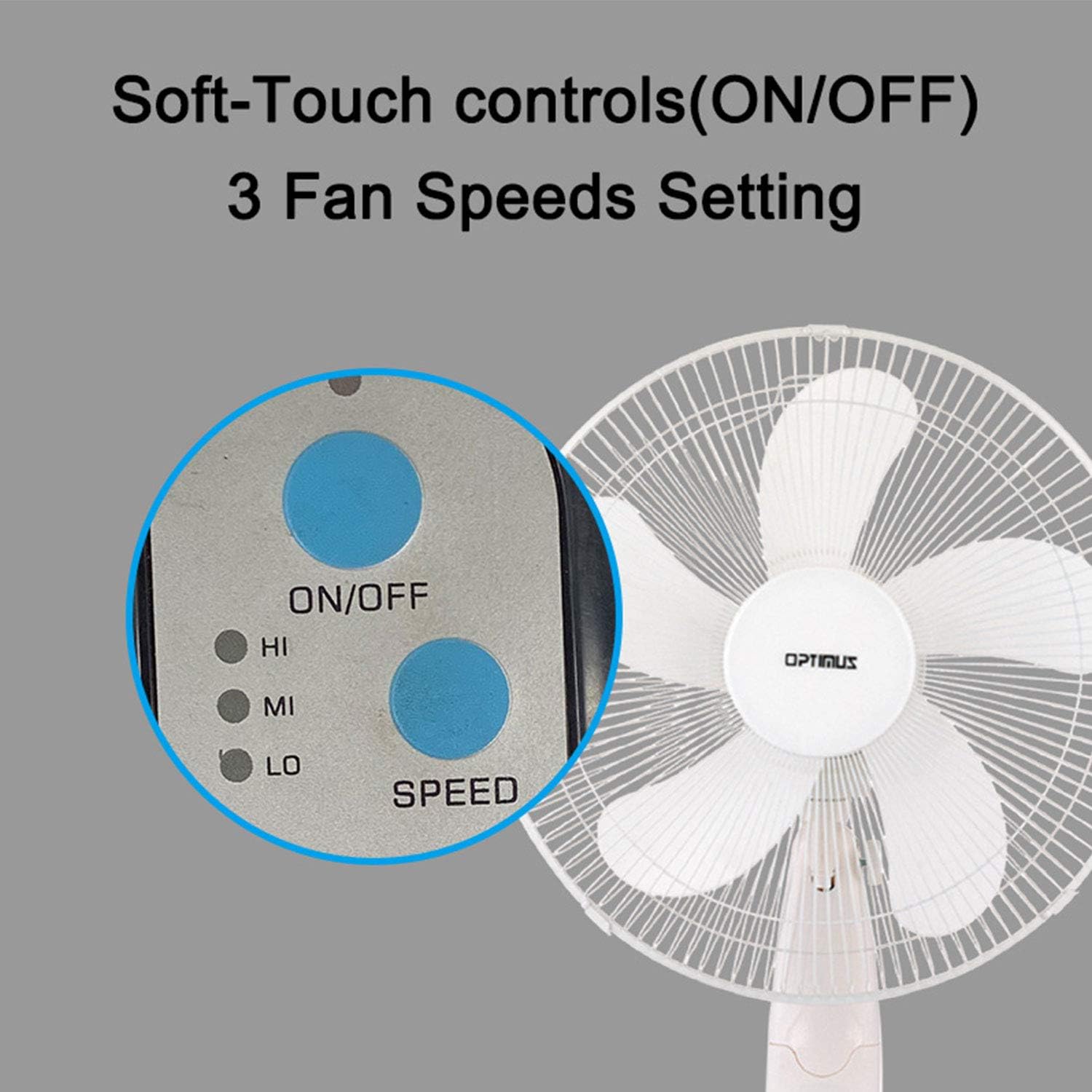
Image: The fan's soft-touch control panel, showing buttons for ON/OFF and SPEED, with indicators for High (HI), Medium (MI), and Low (LO) fan speeds.
- УКЉУЧЕНО/ИСКЉУЧЕНО: Притисните да бисте укључили или искључили вентилатор.
- Подешавања брзине: Select from Low, Medium, or High speeds. The 3-speed, energy-saving, whisper-quiet operation motor provides efficient airflow.
Ремоте Цонтрол
The fan comes with a remote control for convenient operation from a distance. (Batteries not included).

Image: The remote control for the fan, featuring buttons for Mode, Time, Speed, and ON/OFF functions.
- УКЉУЧЕНО/ИСКЉУЧЕНО: Укључује или искључује вентилатор.
- БРЗИНА: Cycles through the three fan speeds (Low, Medium, High).
- НАЧИН: Selects between different wind modes.
- ВРЕМЕ: Activates and sets the shut-off timer.
Режими ветра
The fan offers three distinct wind modes to suit your preference:

Image: The fan's control panel highlighting the MODE button and indicators for Normal, Natural, and Sleep wind modes.
- нормалан режим: The fan blows at a constant speed based on your selected setting.
- Природни режим: The fan speed fluctuates to mimic a natural breeze.
- Режим спавања: The fan operates at a lower, quieter speed, ideal for sleeping, with gentle speed variations.
Осцилација
The F-1760 features unique wave oscillation for comprehensive air distribution.

Image: A diagram illustrating the fan's capability for both vertical (up/down) and horizontal (left/right) wave oscillation, providing wider air coverage.
- Up/Down & Left/Right Wave Oscillating: Activates a unique oscillation pattern that moves the fan head both horizontally and vertically, distributing air throughout the room.
- Да бисте зауставили осцилацију, поново притисните дугме за осцилацију.
Функција тајмера
Подесите вентилатор да се аутоматски искључи након одређеног периода.

Image: The fan's control panel showing the TIME button and indicators for 1 hour (1H), 2 hours (2H), and 4 hours (4H) timer settings. The fan can be programmed for up to 7 hours.
- The timer can be set for 1, 2, 4, or up to 7 hours. Press the TIME button repeatedly to cycle through the desired duration.
Одржавање и чишћење
Редовно чишћење помаже у одржавању перформанси вентилатора и продужава његов век трајања.
- Пре чишћења: Увек искључите вентилатор из електричне утичнице пре чишћења.
- Спољно чишћење: Користите меку, дamp крпу за брисање спољашњих површина вентилатора. Не користите абразивна средства за чишћење или раствараче.
- Чишћење роштиља: The metal grill can be cleaned with a soft brush or vacuum cleaner to remove dust. For thorough cleaning, the grill may need to be carefully removed.
- Чишћење оштрице: If necessary, the fan blades can be cleaned. Ensure the fan is completely off and unplugged. The care instructions specify "Hand Wash" for components.
- Складиштење: Када се вентилатор не користи дуже време, чувајте га на хладном и сувом месту, пожељно у оригиналном паковању.
Решавање проблема
| Проблем | Могући узрок | Решење |
|---|---|---|
| Вентилатор се не укључује. | No power supply. Blown fuse. | Ensure the fan is plugged into a working outlet. Check the fuse in the plug and replace if necessary (refer to safety instructions for fuse replacement). |
| Fan operates but air movement is weak. | Low speed setting. Dust accumulation on blades/grill. | Increase the fan speed. Clean the fan blades and grills as per maintenance instructions. |
| Даљински управљач не ради. | Dead batteries. Obstruction between remote and fan. | Replace batteries in the remote control. Ensure a clear line of sight between the remote and the fan's receiver. |
| Fan changes speed automatically or unexpectedly. | Interference from other remote controls (e.g., TV remote). | This fan may respond to frequencies from other remote controls. Try operating the fan manually or repositioning the fan/other devices to minimize interference. |
| Fan makes clicking noises during oscillation. | Normal operation of oscillation gears. | A slight clicking noise from the oscillation gears can occur during normal operation. If the noise is excessive or new, ensure the fan head is securely attached. |
| Fan feels unstable. | Base not properly assembled or tightened. Uneven surface. | Ensure all base components are securely fastened and the fan is placed on a firm, level surface. |
Спецификације
- Назив модела: Ф-1760
- Бренд: Оптимус
- Пречник вентилатора: 16 инча
- Дизајн електричног вентилатора: Подни вентилатор
- Извор напајања: Цордед Елецтриц
- Ватtage: 60 вати
- Волtage: 6 Волтс
- Број оштрица: 3
- Подешавања брзине: 3 RPM (Low, Medium, High)
- Метод контроле: Даљински, дугме
- Посебне карактеристике: Up/Down & Left/Right Wave Oscillating, Adjustable Height, Timer Function (up to 7 hours), Wind Modes (Normal, Natural, Sleep)
- Унутрашња/спољна употреба: Индоор
- Тежина артикла: 9.9 фунти
- Укључене компоненте: Производ, Упутство
Информације о гаранцији
This Optimus F-1760 fan comes with a 1-годишња ограничена гаранција from the date of purchase. This warranty covers defects in materials and workmanship under normal use. It does not cover damage resulting from misuse, accident, alteration, or unauthorized repair. Please retain your proof of purchase for warranty claims.
Корисничка подршка
For technical assistance, warranty claims, or questions regarding your Optimus F-1760 fan, please contact Optimus customer service. Refer to the product packaging or the official Optimus webсајт за најновије контакт информације.