
1. Увод
This instruction manual provides essential information for the proper installation, operation, and maintenance of the HP 512MB Battery Backed Write Cache (BBWC) module, model 462975-001. This module is designed to enhance the performance and data integrity of HP SmartArray controllers by providing a temporary storage area for data before it is written to disk, and protecting this data during power outagес.
Please read this manual thoroughly before proceeding with installation or operation to ensure safe and effective use of the product.
2. Безбедносне информације
Придржавајте се следећих мера безбедности како бисте спречили повреде и оштећења опреме:
- Always power off the server and disconnect all power cords before installing or removing any internal components.
- Носите антистатичку наруквицу и радите на антистатичкој простирци како бисте спречили оштећење осетљивих електронских компоненти услед електростатичког пражњења (ESD).
- Handle the module by its edges only. Avoid touching the gold connectors or integrated circuits.
- Ensure proper ventilation around the server to prevent overheating.
3. Садржај пакета
Проверите да ли ваш пакет садржи следећу ставку:
- HP 512MB Battery Backed Write Cache Module (462975-001)
If any components are missing or damaged, contact your vendor or HP support immediately.
4. Подешавање и инсталација
This section details the steps for installing the 512MB BBWC module into a compatible HP SmartArray controller.
4.1 Контролна листа пре инсталације
- Ensure the server is powered off and disconnected from all power sources.
- Open the server chassis according to the server's service manual.
- Locate the HP SmartArray controller where the BBWC module will be installed. Refer to your server's documentation for the exact location.
- Prepare an anti-static workspace.
4.2 Инсталација модула
- Carefully remove the BBWC module from its anti-static packaging.
- Identify the BBWC slot on the SmartArray controller. This slot is typically a dedicated memory slot.
- Align the module with the slot, ensuring the gold connectors are correctly oriented. The module is keyed to fit in only one direction.
- Apply even pressure to both ends of the module until it is fully seated in the slot. You may hear a click as the retention clips engage.
- If your SmartArray controller uses a separate battery pack for the BBWC, connect the battery cable to the designated port on the controller or module. Ensure the connection is secure.

Слика 1: Врх view of the HP 512MB BBWC module (462975-001) showing connectors and labels.
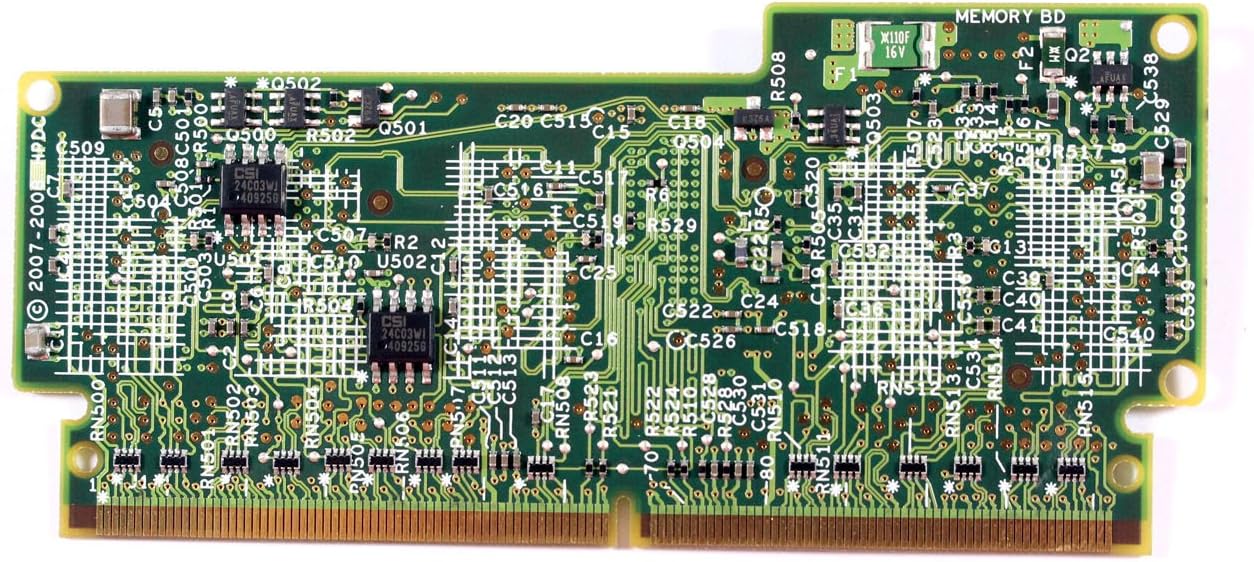
Слика 2: Дно view of the HP 512MB BBWC module (462975-001) showing the circuit board.
4.3 Након инсталације
- Close the server chassis.
- Reconnect all power cords and power on the server.
- During server boot, observe the POST messages for any errors related to the SmartArray controller or BBWC module.
5. Руковање модулом
The HP 512MB BBWC module operates automatically once installed and recognized by the SmartArray controller. Its primary function is to provide a non-volatile cache for write operations, improving disk I/O performance and protecting data in the event of a power failure.
5.1 Verifying Operation
To verify the module's operational status:
- Access the SmartArray controller's configuration utility (e.g., during server boot via a key press, or through HP's management software like HP System Management Homepage).
- Navigate to the controller's cache settings. The 512MB BBWC should be detected and reported as active.
- Check the battery status within the utility. A newly installed battery may require a full charge cycle.
6. Одржавање
The BBWC module itself is generally maintenance-free. However, the associated battery pack has a finite lifespan and requires periodic monitoring and eventual replacement.
6.1 Надгледање батерије
- Regularly check the battery status through the SmartArray controller's management utility.
- Look for warnings or errors indicating a low charge, failed battery, or battery nearing end-of-life.
- The typical lifespan of a BBWC battery varies but is generally several years.
6.2 Замена батерије
If the battery requires replacement:
- Obtain a compatible replacement battery pack from HP or an authorized reseller.
- Follow the safety precautions outlined in Section 2.
- Power off the server and disconnect power.
- Locate and disconnect the old battery pack.
- Connect the new battery pack, ensuring proper orientation and secure connection.
- Одложите стару батерију одговорно у складу са локалним прописима.
- Power on the server and verify the new battery status in the controller utility.
КСНУМКС. Решавање проблема
Овај одељак пружа основне кораке за решавање уобичајених проблема.
7.1 Module Not Detected
- Check Seating: Power off the server, open the chassis, and ensure the BBWC module is fully and correctly seated in its slot.
- Проверите компатибилност: Confirm that the module (462975-001) is compatible with your specific SmartArray controller model and server.
- Прегледајте има ли оштећења: Visually inspect the module and controller slot for any physical damage or bent pins.
- Ажурирање фирмвера: Ensure your SmartArray controller's firmware is up to date. Outdated firmware can sometimes cause detection issues.
7.2 Battery Errors
- Проверите везе: Ensure the battery cable is securely connected to both the battery pack and the controller/module.
- Allow Charge Cycle: A new battery may take several hours to fully charge. Monitor its status over time.
- Замените батерију: If errors persist after checking connections and allowing a charge cycle, the battery pack may be faulty and require replacement.
For more complex issues, refer to your SmartArray controller's documentation or contact HP technical support.
8. Спецификације
| Феатуре | Опис |
|---|---|
| Број модела | 462975-001 |
| Бранд | HEWLETT PACKARD (HP) |
| Величина меморије | 512 МБ |
| Тип | Battery Backed Write Cache (BBWC) Module |
| Компатибилност | Designed for HP SmartArray controllers (e.g., DL380 G6 cto) |
| Тежина артикла | 3.52 унце (приближно 100 грама) |
9. Гаранција и подршка
This HP product is covered by a limited warranty. For specific warranty terms and conditions, please refer to the documentation included with your original server or SmartArray controller, or visit the official HP support webсајту.
For technical assistance, product information, or to report issues, please contact HP customer support through their official channels. Have your product model number (462975-001) and server serial number ready when contacting support.
ХП подршка Webсајт: ввв.хп.цом/суппорт