
1. Увод
Хвала вам на куповиниasinг Сtagg 15-Watt Guitar Amplifier with Digital Reverb. This amplifier is designed to provide a versatile and reliable sound solution for guitar and double bass players. Please read this manual thoroughly to understand the features and proper operation of your new ampлифиер.
2. Безбедносна упутства
- Не излажите овај уређај киши или влази.
- Не блокирајте вентилационе отворе.
- Уверите се да се по каблу за напајање не гази или да није пригњечен.
- Искључите ampспасилац током олуја са грмљавином или када се не користи дуже време.
- Све сервисирање препустите квалификованом сервисном особљу.
3. Садржај пакета
Проверите да ли су све ставке наведене у наставку укључене у ваш пакет:
- Stagg 15-Watt Guitar Amplifier (Model: 15 GA DR USA)
- Повер Цорд
- Кориснички приручник (овај документ)
4. Производ је готовviewКонтроле и функције
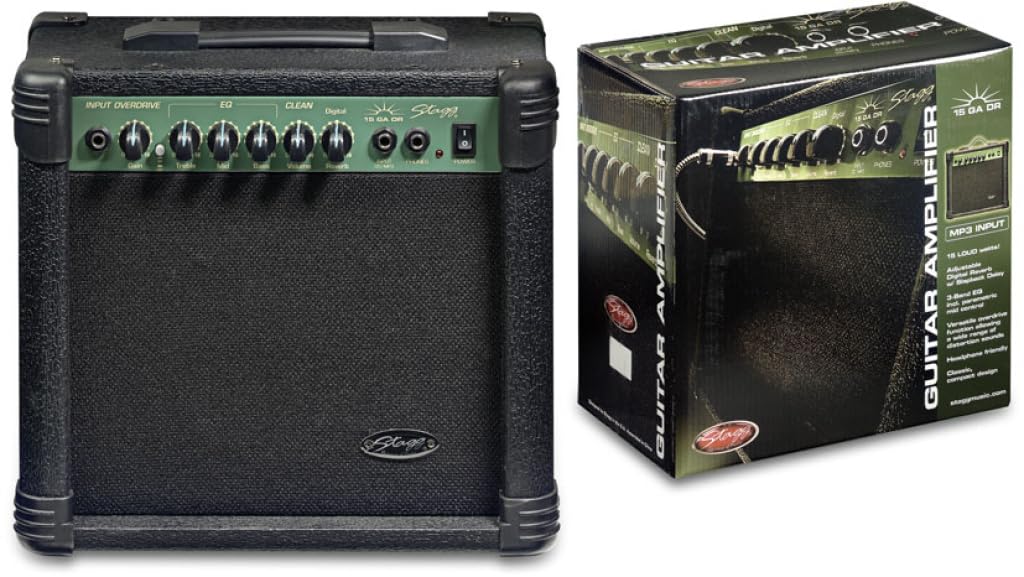
Figure 1: Front panel of the Stagg 15-Watt Guitar Amplifier. Shows input jack, control knobs, and switches.
Тхе С.tagg 15-Watt Guitar Amplifier features a comprehensive set of controls for shaping your sound:
- Улазни прикључак: Connect your guitar or other instrument here.
- Гаин Цонтрол: Adjusts the input sensitivity and the amount of overdrive.
- Overdrive Switch: Engages the built-in distortion effect for versatile sounds.
- Контрола јачине звука: Подешава укупни излазни ниво ampлифиер.
- 3-Band EQ (Bass, Middle, Treble): Allows for precise tonal shaping across low, mid, and high frequencies.
- Parametric Mid Control: Provides additional control over the mid-range frequencies for fine-tuning your sound.
- Digital Reverb: Adds a spacious, ambient effect to your sound.
- Излаз за слушалице: For silent practice. Connect standard stereo headphones.
- Stereo Jack Input (CD/MP3 Players): Connect external audio sources like CD or MP3 players for practice along.
5. Подешавање
- Пласман: Поставите amplifier on a stable, flat surface. Ensure adequate ventilation around the unit.
- Прикључак за напајање: Осигурајте amplifier's power switch is in the OFF position. Connect the supplied power cord to the amplifier's power input and then to a suitable AC power outlet.
- Прикључак инструмента: Connect your guitar or double bass to the Улазни прикључак using a standard 6.35mm instrument cable.
- External Audio (Optional): If desired, connect an external audio source (e.g., CD/MP3 player) to the Stereo Jack Input користећи одговарајући кабл.
- Слушалице (опционо): За тихо вежбање, повежите слушалице са Излаз за слушалице. This will mute the ampговорник животног света.
6. Упутство за употребу
- Укључено: Окрените amplifier's power switch to the ON position. The power indicator light should illuminate.
- Почетна подешавања:
- Подесите Волуме control to its minimum position.
- Подесите Добитак control to a low setting.
- Подесите Бас, Средњи, и Високи тонови EQ controls to their center (12 o'clock) positions.
- Осигурајте Overdrive Switch is disengaged for a clean sound.
- Adjusting Volume and Gain: Полако повећавајте Волуме control to your desired listening level. Adjust the Добитак control to achieve the desired amount of input sensitivity and clean tone. For distorted sounds, engage the Overdrive Switch and then adjust the Добитак control to increase the distortion level.
- Обликовање тонова: Користите Бас, Средњи, и Високи тонови controls to adjust the amplifier's tonal characteristics. The Parametric Mid Control allows for more precise adjustments to the mid-range frequencies.
- Реверб ефекат: Подесите Дигитал Реверб control to add depth and ambiance to your sound.
- Искључивање: Before disconnecting any cables or moving the amplifier, turn the Волуме control to minimum and then switch the power OFF.
7. Одржавање
- Чишћење: За чишћење користите меку, суву крпу ampспољашњост пуњача. Не користите абразивна средства за чишћење или раствараче.
- Складиштење: Чувајте amplifier in a dry, cool environment away from direct sunlight and extreme temperatures.
- вентилација: Уверите се да су вентилациони отвори чисти од прашине и остатака како бисте спречили прегревање.
- Нега каблова: Regularly inspect power and instrument cables for damage. Replace any damaged cables immediately.
КСНУМКС. Решавање проблема
| Проблем | Могући узрок | Решење |
|---|---|---|
| Нема звука |
|
|
| Distorted sound (unintended) |
|
|
| Зујање или зујање |
|
|
9. Спецификације
| Модел | 15 GA DR USA |
| Оутпут Ватtage | 15 Ваттс |
| Димензије (Д к Ш к В) | 12.2 к 13.8 к 7.5 инча |
| Тежина артикла | 13.9 фунти |
| Тип конектора | 6.35 мм Јацк |
| Извор напајања | Цордед Елецтриц |
| Компатибилни уређаји | Guitar, Double Bass |
10. Гаранција и подршка
For warranty information and technical support, please refer to the warranty card included with your purchase or visit the official Stagg webсајт. Сачувајте доказ о куповини за евентуалне рекламације по гаранцији.
Произвођач: Stagg
Webсајт: ввв.сtaggmusic.com