
1. Производ је готовview
The Intermatic MIL72ASTUZH-240 is a robust 24-hour electromechanical timer module designed for precise control of electrical circuits. It is suitable for mounting inside a control panel, offering flexibility with both surface and DIN rail mounting options. This timer is engineered for light-duty commercial applications operating on 240 VAC single-phase power. Its applications include, but are not limited to, lighting control, HVACR systems, pumps, motors, fan controls, access control systems, and general-purpose electrical circuits. The unit features a non-replaceable Nickel Metal Hydride battery, which is pre-installed.
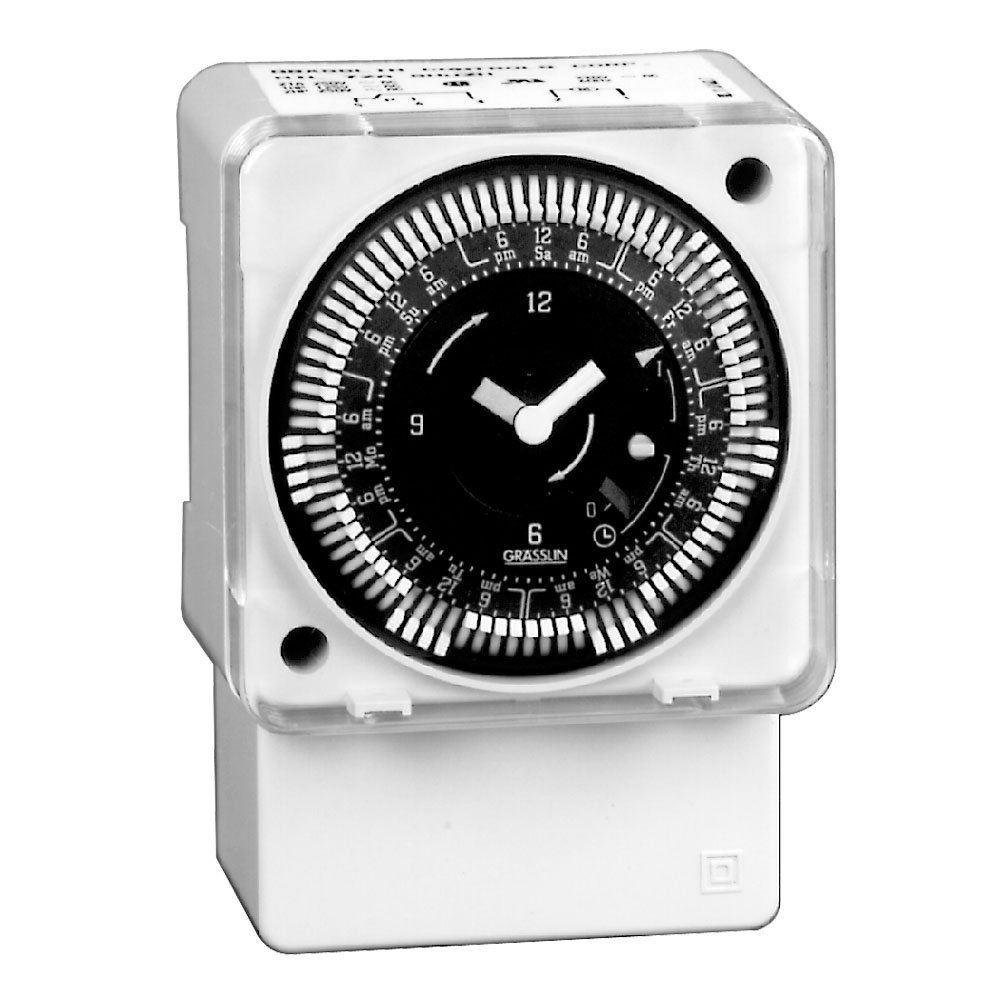
Слика 1.1: Предња страна view of the Intermatic MIL72ASTUZH-240 Electromechanical Time Control module.
2. Кључне карактеристике
- Synchronous Drive: Operates without the need for battery backup for its primary timing function.
- 21 Amp SPDT Switch: Provides reliable switching for various electrical loads.
- Captive Trippers: Features 15-minute interval trippers for precise scheduling, which are captive to prevent loss.
- 1/4-Inch Quick-Connect Terminals: Facilitates easy and secure electrical connections.
- 3-Way Manual Override: Allows for temporary manual control of the timer's output, overriding the programmed schedule.
3. Спецификације
| Број модела | MIL72ASTUZH-240 |
| Оперативни режим | Мануал |
| Цуррент Ратинг | 21 Amps |
| Оператинг Волtage | 240 Волтс |
| Тип контакта | Normally Open (SPDT Switch) |
| Тип конектора | Quick Connect (1/4-Inch) |
| Цирцуит Типе | 3-ваи |
| Ацтуатор Типе | Push Button (for manual override) |
| Материјал | Метал |
| Димензије (Д к Ш к В) | 4.63 к 3.25 к 3.25 инча |
| Тежина артикла | 8 унци |
| Оцена међународне заштите | ИП00 |
| Батерија | Non-replaceable Nickel Metal Hydride (pre-installed) |
4. Инсталација и подешавање
4.1 Мере предострожности
- УПОЗОРЕЊЕ: Disconnect power at the circuit breaker or fuse box before installing or servicing the timer. Failure to do so may result in serious injury or death.
- Installation should be performed by a qualified electrician in accordance with all national and local electrical codes.
- Осигурајте радну волtage of the timer (240V) matches the supply voltage.
4.2 Монтажа
The MIL72ASTUZH-240 timer module is designed for installation inside a control panel. It supports two mounting methods:
- Површински носач: Secure the timer directly to a flat surface within the control panel using appropriate fasteners (not included).
- Монтажа на DIN шину: Attach the timer to a standard DIN rail within the control panel. Ensure the timer is securely clipped onto the rail.

Слика 4.1: Детаљно view of the timer showing mounting points and quick-connect terminals.
4.3 Ожичење
Connect the timer to the 240 VAC power supply and the load using the 1/4-inch quick-connect terminals. Refer to the wiring diagram provided with the product packaging for specific connection details. Ensure all connections are tight and secure.
- Identify the Line (L1, L2) and Load terminals.
- Connect the incoming 240V power to the appropriate Line terminals.
- Connect the device to be controlled (load) to the Load terminals.
5. Упутство за употребу
5.1 Setting the Time of Day
Rotate the dial clockwise until the current time aligns with the time indicator arrow on the timer face. The dial is marked for 24 hours.
5.2 Програмирање времена укључивања/искључивања
The timer uses captive trippers for programming. Each tripper represents a 15-minute interval.
- Да бисте подесили ON period, push the trippers outwards (away from the center) for the desired duration.
- Да бисте подесили ОФФ period, leave the trippers in their inward position (towards the center).
- Ensure that the desired ON/OFF periods are clearly defined by the tripper positions.
5.3 Ручно пребацивање
The MIL72ASTUZH-240 features a 3-way manual override switch. This allows you to temporarily change the timer's state without altering the programmed schedule.
- Consult the timer's face or specific markings for the exact positions of the 3-way override. Common positions include:
- НА: Forces the connected load to remain ON, regardless of the program.
- АУТО: Allows the timer to follow its programmed schedule.
- ВАН: Forces the connected load to remain OFF, regardless of the program.
- To return to automatic operation, set the override switch to the "AUTO" position.
6. Одржавање
The Intermatic MIL72ASTUZH-240 is designed for minimal maintenance. Regular inspection is recommended to ensure optimal performance.
- Чишћење: Keep the timer free from dust and debris. Use a dry, soft cloth for cleaning. Do not use liquid cleaners or solvents.
- Везе: Периодично проверавајте електричне спојеве на чврстоћу и знаке корозије.
- батерија: The unit contains a non-replaceable Nickel Metal Hydride battery. This battery is primarily for internal clock operation during power outages and is not user-serviceable. The synchronous drive means the main timing function does not rely on this battery for continuous operation.
- Услови животне средине: Ensure the timer is operated within its specified environmental conditions (e.g., temperature, humidity) to prevent damage.
КСНУМКС. Решавање проблема
| Проблем | Могући узрок | Решење |
|---|---|---|
| Timer not operating / Load not switching | No power supply; Incorrect wiring; Manual override engaged; Trippers not set correctly. |
|
| Load remains ON or OFF continuously | Manual override engaged; Trippers stuck or incorrectly set. |
|
| Timer dial not advancing | Нема напајања за тајмер. | Verify power supply to the timer. |
If troubleshooting steps do not resolve the issue, contact a qualified electrician or Intermatic customer support for assistance.
8. Гаранција и подршка
This product is sold without an explicit warranty from the manufacturer as per available information. For specific warranty details or support inquiries, please refer to the documentation included with your purchase or contact Intermatic directly through their official webсајт или канали за корисничку подршку.
Произвођач: Интерматиц Инцорпоратед
Webсајт: ввв.интерматиц.цом (This is a general link, specific support contact may vary)