
Harry Potter T71339
Harry Potter Monster Book of Monsters Keep Safe Box Instruction Manual
Model: T71339 | Brand: Harry Potter
Увод
This manual provides essential instructions for the setup, operation, and maintenance of your Harry Potter Monster Book of Monsters Keep Safe Box. This replica item functions as a secure storage box, featuring electronic sensors for password protection and authentic sound effects.
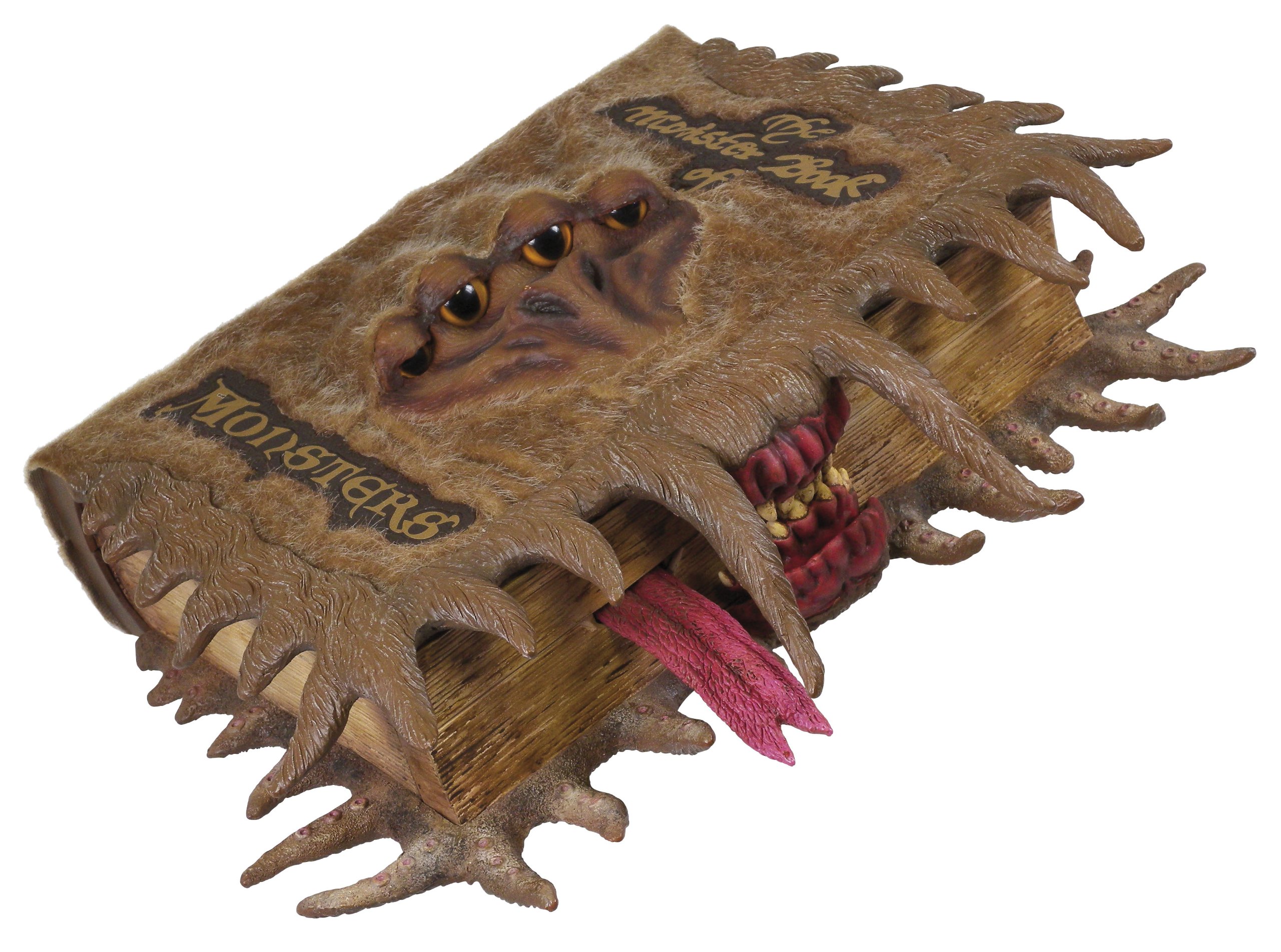
Image: The Monster Book of Monsters Keep Safe Box, closed. The cover is brown and furry, with four yellow eyes peering out. A red mouth with sharp teeth and a pink tongue is visible at the bottom, giving the appearance of a creature.
Безбедносне информације
- Чувати даље од воде и прекомерне влаге.
- Do not attempt to force open the safe.
- Уверите се да су батерије правилно уметнуте према ознакама поларитета.
- Уклоните батерије ако се производ неће користити дужи период.
- This product contains small parts and is not suitable for children under 3 years. Recommended for ages 6 and up.
Садржај пакета
- 1 x Harry Potter Monster Book of Monsters Keep Safe Box
- 3 x AA батерије (унапред инсталиране или укључене засебно)
- Упутство за употребу (овај документ)
Сетуп
1. Инсталација батерије
- Locate the battery compartment, typically on the underside or back of the safe.
- Користећи мали одвијач (није укључен), отворите поклопац одељка за батерије.
- Уметните 3 АА батерије, водећи рачуна о исправном поларитету (+/-) као што је назначено унутар одељка.
- Вратите поклопац одељка за батерије и причврстите га завртњем.
- The safe may emit a sound or light to indicate it is powered on.
2. Setting Your Personal Password
The Monster Book of Monsters uses a unique "knock" combination system. The default password is a specific sequence of 4 up and down knocks on the spine. You can set your own custom 4-knock sequence.
- With the safe closed, locate the "Set" button (usually a small, recessed button near the battery compartment or on the spine).
- Press and hold the "Set" button until you hear a confirmation sound or see a light indicator.
- Enter your desired 4-knock sequence on the spine. Each "up" or "down" movement of the spine counts as one knock.
- After entering your 4-knock sequence, press the "Set" button again to confirm. You should hear another confirmation sound.
- Test your new password immediately to ensure it has been set correctly.
Важно: Remember your password. There is no master reset code. If you forget your password, you may not be able to open the safe.
Operating the Safe
1. Отварање сефа
- With the safe closed, gently perform your 4-knock password sequence on the spine.
- If the correct sequence is entered, the safe will emit a positive sound (e.g., a click or a friendly growl) and unlock.
- You can then open the front cover to access the storage compartment.
- If an incorrect sequence is entered, the safe will emit a "terrifying growl or grunt" to deter intruders.
2. Затварање сефа
- Close the front cover firmly until it clicks into place. The safe will automatically re-lock.
3. Sound Effects
- The safe is designed to emit growls and grunts when an incorrect password is attempted or when the spine is disturbed without the correct sequence.
- These sounds are intended to mimic the Monster Book of Monsters from the Harry Potter series.
Одржавање
1. Чишћење
- Обришите спољашњост меком, сувом крпом.
- Не користите абразивна средства за чишћење или раствараче, јер могу оштетити завршну обраду.
2. Замена батерије
- When the sound effects become faint or the safe fails to respond, it is time to replace the batteries.
- Follow the "Battery Installation" steps in the Setup section to replace the 3 AA batteries.
- Старе батерије одлажите одговорно у складу са локалним прописима.
Решавање проблема
| Проблем | Могући узрок | Решење |
|---|---|---|
| Safe does not open with password. | Incorrect password entered; batteries low or dead; password not set correctly. |
|
| No sound effects or faint sounds. | Празне или празне батерије. | Замените батерије (погледајте одељак Одржавање). |
| Safe does not close properly. | Obstruction in the closing mechanism; misalignment. |
|
| Teeth do not move (if applicable to model). | Mechanical issue; obstruction. |
|
Спецификације
- Бренд: Харри Поттер
- Произвођач: Tomy
- Број модела: Т71339
- Димензије артикла (Д к Ш к В): 11.61 к 9.25 к 3.46 инча (29.5 к 23.5 к 8.8 цм)
- Тежина артикла: 930 грама (2.05 фунте)
- Тип материјала: Paper (exterior finish)
- Извор напајања: 3 к АА батерије (укључене)
- Режим рада: Manual (password entry)
- Minimum Age Recommendation: 72 месеци (6 година)
Информације о гаранцији
This product is covered by a standard manufacturer's warranty. Please retain your proof of purchase for any warranty claims. Specific warranty terms and duration may vary by region. For detailed warranty information, please refer to the documentation provided at the time of purchase or contact the manufacturer directly.
Корисничка подршка
For further assistance, technical support, or inquiries regarding your Harry Potter Monster Book of Monsters Keep Safe Box, please contact the manufacturer, Tomy, through their official website or customer service channels. Please have your model number (T71339) and purchase details ready when contacting support.
Ask a question about this manual
Ask about setup, troubleshooting, compatibility, parts, safety, or missing instructions. Manuals+ will review the question and use this page’s manual context to help answer it.