
1. Увод
The BUFFALO Giga Switching Hub LSW3-GT-24NSR is a 24-port Gigabit Ethernet switch designed for high-speed network environments. It is ideal for small to medium-sized offices and workplaces requiring robust and reliable network connectivity. This device supports full Gigabit speeds across all ports, ensuring efficient data transfer.
Key features include a fanless design for silent operation and enhanced reliability, as well as a loop detection function to prevent network disruptions caused by accidental network loops.
2. Безбедносне информације
Молимо вас да прочитате и разумете следеће мере безбедности пре употребе уређаја како бисте спречили повреде или оштећења.
- Напајање: Use only the provided power adapter. Ensure the power outlet meets the specified voltagе захтеве.
- вентилација: Не блокирајте вентилационе отворе. Обезбедите адекватан проток ваздуха око уређаја како бисте спречили прегревање.
- Окружење: Avoid exposing the device to water, high humidity, extreme temperatures, or direct sunlight.
- Руковање: Do not drop or subject the device to strong impacts. Do not attempt to open or repair the device yourself. Refer all servicing to qualified personnel.
- Каблови: Ensure all network cables are properly connected and secured.
3. Садржај пакета
Проверите да ли су све ставке присутне у пакету:
- BUFFALO Giga Switching Hub LSW3-GT-24NSR Unit
- Повер Цабле
- Rack Mount Brackets (if included with your model)
- Гумене ножице (за постављање на радну површину)
4. Подешавање
4.1 Физичка инсталација
The LSW3-GT-24NSR can be installed on a desktop or mounted in a 19-inch equipment rack.
Положај на радној површини:
- Attach the included rubber feet to the bottom of the unit to prevent slipping and provide stability.
- Place the unit on a flat, stable surface with adequate ventilation.
Монтажа на рацк:
- Attach the rack mount brackets to the sides of the unit using the provided screws.
- Secure the unit into a standard 19-inch equipment rack using appropriate rack screws (not included).
4.2 Повезивање мрежних каблова
Connect your network devices (computers, servers, other switches) to any of the 24 RJ-45 ports on the front panel using standard Ethernet cables (Category 5e or higher recommended for Gigabit speeds).

Слика 1: Предњи панел изнадview with 24 Ethernet Ports and Status LEDs.
4.3 Повезивање напајања
- Connect the power cable to the AC IN port on the rear of the device.
- Укључите други крај кабла за напајање у одговарајућу утичницу.
- The device will power on automatically. The POWER LED on the front panel should illuminate.

Слика 2: Задњи панел изнадview with AC IN Power Port.
5. Упутство за употребу
5.1 ЛЕД индикатори
The front panel features several LED indicators to monitor the status of the switch and its ports.
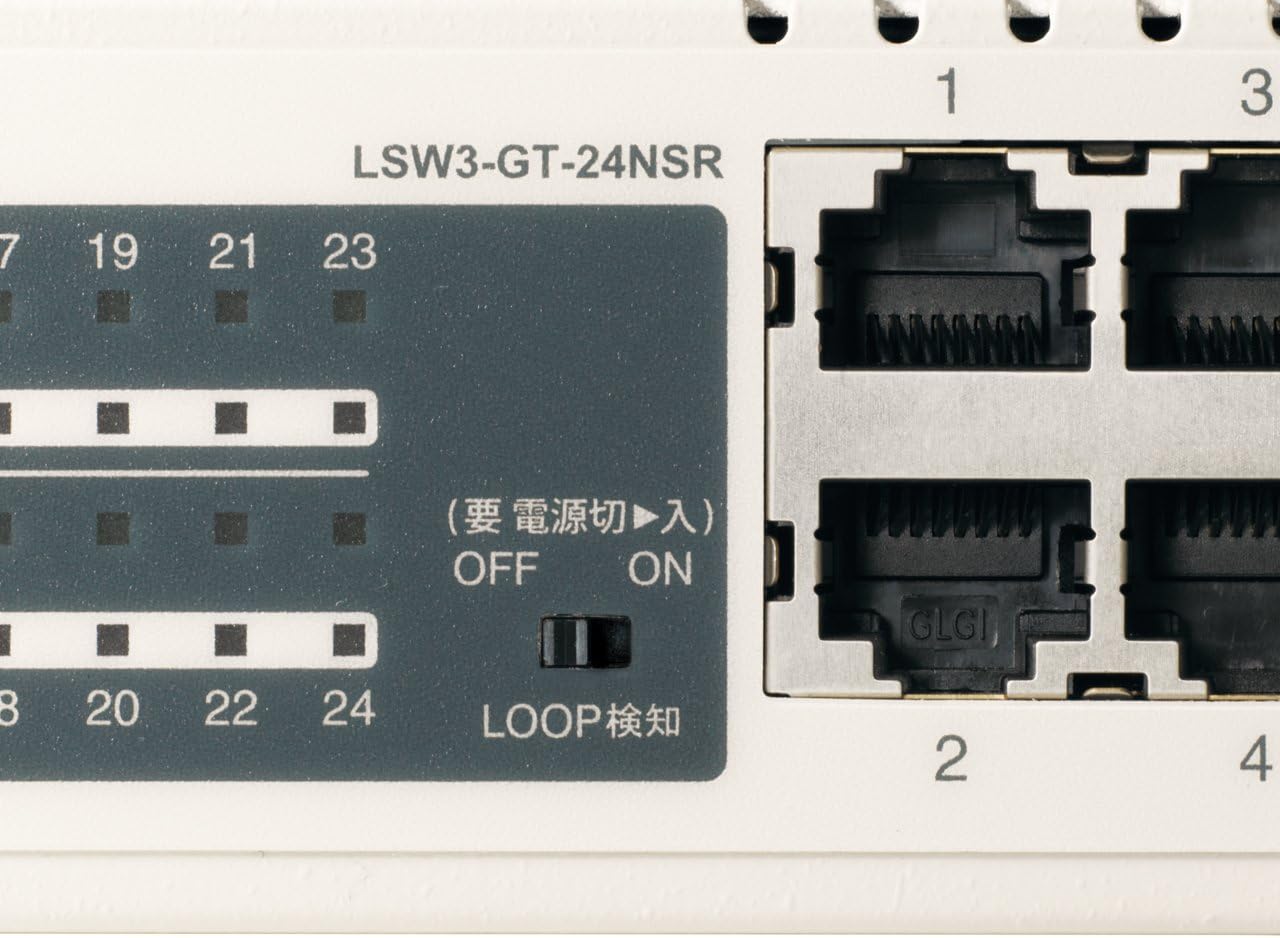
Слика 3: Детаљно view of LED Indicators and Loop Detection Switch.
| ЛЕД назив | Статус | Опис |
|---|---|---|
| ПОВЕР | On | Уређај је укључен. |
| ВЕЗА / АКТ (по порту) | On | A network device is connected and a link is established. |
| Трепери | Подаци се преносе или примају преко порта. | |
| 1000/100/10М (по порту) | Зелена | Port is operating at 1000 Mbps (Gigabit Ethernet). |
| Оранге | Port is operating at 100 Mbps (Fast Ethernet). | |
| Офф | Port is operating at 10 Mbps (Ethernet). | |
| LOOP DETECT | On | A network loop has been detected. |
5.2 Loop Detection Function
The LSW3-GT-24NSR features a hardware switch for enabling or disabling the loop detection function. This function helps prevent network instability caused by accidental network loops.
Figure 4: Loop Detection Switch (ON/OFF).
- НА: Loop detection is active. If a loop is detected, the corresponding port will be automatically shut down to prevent network broadcast storms, and the LOOP DETECT LED will illuminate.
- ВАН: Loop detection is disabled.
It is recommended to keep the loop detection function ON for network stability.
6. Одржавање
6.1 Чишћење уређаја
To maintain optimal performance, periodically clean the exterior of the switch.
- Disconnect the power cable before cleaning.
- Користите меку, суву крпу да обришете површину.
- Do not use liquid cleaners, aerosols, or solvents, as these may damage the casinг или унутрашње компоненте.
6.2 Разматрања животне средине
Ensure the device is operated within its specified environmental conditions:
- температура: 0°Ц до 40°Ц (32°Ф до 104°Ф)
- Влажност: 10% до 85% (без кондензације)
КСНУМКС. Решавање проблема
If you encounter issues with your BUFFALO Giga Switching Hub, refer to the following common problems and solutions.
7.1 Нема напајања
- Симптом: ЛЕД лампица ПОВЕР је искључена.
- решење: Check if the power cable is securely connected to both the device and the power outlet. Ensure the power outlet is functional.
7.2 No Link or Slow Speed on a Port
- Симптом: The LINK/ACT LED for a connected port is off, or the 1000/100/10M LED indicates a lower speed than expected (e.g., 100M instead of 1000M).
- решење:
- Проверите да ли је Етернет кабл безбедно повезан на оба краја.
- Try a different Ethernet cable. Ensure it is a Category 5e or higher cable for Gigabit speeds.
- Повежите уређај са другим портом на прекидачу.
- Check the network adapter settings on the connected device (computer, server) to ensure it is configured for auto-negotiation or the correct speed.
7.3 Network Instability / LOOP DETECT LED is On
- Симптом: The LOOP DETECT LED is illuminated, and network performance is degraded or unstable.
- решење:
- A network loop has been detected. This typically occurs when two ports on the same switch (or different switches) are connected to each other, creating an infinite data path.
- Carefully inspect your network cabling to identify and remove any redundant connections that form a loop.
- If the loop detection switch is ON, the affected port will be automatically shut down. Once the loop is resolved, the port should resume normal operation.
8. Спецификације
| Феатуре | Опис |
|---|---|
| Бранд | БИВОЛИ |
| Број модела | LSW3-GT-24NSR |
| Порт Цоунт | 24 к 10/100/1000БАСЕ-Т РЈ-45 портова |
| Преклопни капацитет | 48 Gbps (Non-blocking) |
| Форвардинг Рате | 35.7 Мппс |
| Величина табеле МАЦ адреса | 8К уноса |
| Подршка за Јумбо Фраме | До 9 КБ |
| Карактеристике | Auto-MDI/MDIX, Auto-Negotiation, Loop Detection Function, Fanless Design |
| Повер Суппли | Интерно напајање наизменичном струјом |
| Димензије (Ш к Д к В) | (Specific dimensions not provided in source, typical for 1U rackmount) |
| Тежина | (Specific weight not provided in source) |
| Радна температура | 0°Ц до 40°Ц |
| Радна влажност | 10% до 85% (без кондензације) |
9. Гаранција и подршка
This BUFFALO product is covered by a manufacturer's warranty. Please refer to the warranty card included with your product or visit the official BUFFALO webсајт за детаљне услове гаранције.
For technical support, product registration, or further assistance, please visit the official BUFFALO support webсајту или контактирајте њихову службу за кориснике. Контакт информације се обично могу наћи на произвођачевој webсајту или у паковању производа.