
HEWLETT PACKARD JC507A
HP 3502 IP Phone User Manual
Model: JC507A
1. Увод
This manual provides comprehensive instructions for the setup, operation, and maintenance of your HP 3502 IP Phone. The HP 3502 is a robust Voice over IP (VoIP) telephone designed for business environments, featuring four softkeys and full-duplex speakerphone capabilities for clear communication.
2. Садржај пакета
Please verify that all items listed below are present in your package. If any items are missing or damaged, contact your vendor immediately.
- HP 3502 IP Phone Unit
- Слушалица
- Кабл слушалице
- Етхернет кабл (РЈ-45)
- Адаптер за напајање (ако се не користи напајање преко етернета - PoE)
- Водич за брзи почетак
3. Производ је готовview
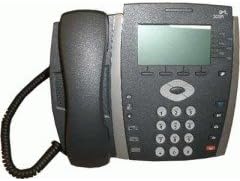
Слика 3.1: Фронт view of the HP 3502 IP Phone. The image displays the phone's handset resting on its cradle on the left side. The main unit features a rectangular display screen at the top, below which are four softkeys. To the right of the display is a navigation cluster, and below that is a standard numeric keypad with additional function buttons.
The HP 3502 IP Phone is designed for intuitive use and reliable performance. Key features include:
- Екран: A 4.3-inch screen for call information, menus, and status.
- Softverski tasteri: Four context-sensitive buttons located directly below the display, whose functions change based on the phone's current state.
- Фулл-Дуплек спикерфон: Allows for hands-free conversations with clear audio.
- Нумеричка тастатура: Standard 0-9 keys for dialing, along with * and #.
- Навигациони кластер: Buttons for menu navigation and selection.
- Наменска функционална дугмад: Includes buttons for volume control, mute, headset, speaker, and message waiting indicator.
- Извор напајања: Supports both Corded Electric power and Power over Ethernet (PoE).
4. Подешавање
4.1 Физичка веза
- Повежите слушалицу: Укључите један крај спиралног кабла слушалице у слушалицу, а други крај у прикључак за слушалицу на телефонској бази.
- Повежите се на мрежу:
- Locate the "LAN" or "NETWORK" port on the back of the phone.
- Connect one end of the Ethernet cable to this port and the other end to an active network port (e.g., a wall jack or network switch).
- Прикључите напајање:
- If your network supports Power over Ethernet (PoE), the phone will power on automatically once the Ethernet cable is connected.
- If PoE is not available, connect the provided power adapter to the "POWER" port on the phone and then plug the adapter into a standard electrical outlet.
- Почетно покретање: The phone will power on and begin its boot sequence. This may take a few moments. The display will show boot progress and then indicate network status.
4.2 Network and Account Configuration
The HP 3502 IP Phone typically obtains network settings (IP address, subnet mask, gateway, DNS) automatically via DHCP. VoIP account registration (SIP or H.323) is usually provisioned by your IT administrator or service provider. Consult your IT department for specific configuration details if manual setup is required.
- Аутоматско обезбеђивање: Most enterprise deployments use automatic provisioning servers to configure the phone.
- Ручна конфигурација: If manual configuration is necessary, access the phone's menu system (often via a "Menu" or "Settings" button) to enter network parameters and SIP/H.323 account details. Refer to your IT administrator's instructions for these values.
5. Упутство за употребу
5.1 Обављање позива
- Подигните слушалицу: Pick up the handset, or press the Спеакер button for hands-free mode. You will hear a dial tone.
- Позовите број: Унесите жељени број телефона помоћу нумеричке тастатуре.
- Покрени позив: Притисните тастер Диал softkey (if available) or wait a few seconds for the call to automatically connect.
5.2 Примање позива
- When the phone rings, lift the handset to answer.
- Алтернативно, притисните тастер Спеакер button to answer in hands-free mode, or press the Одговори софткеи.
5.3 In-Call Functions
- Контрола јачине звука: Користите Волуме buttons (usually +/-) to adjust the handset, headset, or speakerphone volume during a call.
- Искључи звук: Притисните тастер Муте дугме за искључивање микрофона. Притисните га поново да бисте укључили звук.
- Задржите: Притисните тастер Чекај softkey or button to place the current call on hold. Press it again to resume the call.
- Трансфер:
- У току активног позива притисните Трансфер softkey or button.
- Позовите број на који желите да пребаците позив.
- Притисните тастер Трансфер softkey again to complete a blind transfer, or wait for the other party to answer and then press Трансфер for a supervised transfer.
- Конференција:
- У току активног позива притисните Конференција softkey or button.
- Позовите број треће стране.
- Once the third party answers, press the Конференција softkey again to join all parties.
- Заврши позив: Replace the handset in the cradle, or press the Заврши позив softkey or Спеакер button if in hands-free mode.
6. Одржавање
Proper care ensures the longevity of your HP 3502 IP Phone.
- Чишћење: Use a soft, dry, lint-free cloth to clean the phone's surface. For stubborn marks, slightly dampИсперите крпу водом. Избегавајте употребу јаких хемикалија, абразивних средстава за чишћење или растварача.
- Окружење: Keep the phone away from excessive heat, direct sunlight, and moisture. Ensure adequate ventilation around the device.
- Руковање: Избегавајте испуштање телефона или излагање јаким ударцима.
КСНУМКС. Решавање проблема
This section addresses common issues you might encounter with your HP 3502 IP Phone.
| Проблем | Могући узрок | Решење |
|---|---|---|
| No dial tone / Phone not powering on | No power, network cable loose, network issue. |
|
| Не могу да упућујем или примам позиве | No network connection, incorrect VoIP account registration, firewall issues. |
|
| Poor audio quality (echo, static) | Network congestion, faulty cable, environmental interference. |
|
If the problem persists after attempting these solutions, please contact your IT support or the product manufacturer for further assistance.
8. Спецификације
| Феатуре | Детаљ |
|---|---|
| Бранд | HP (Hewlett Packard) |
| Број модела | ЈЦ507А |
| Врста производа | IP Phone (VoIP Phone) |
| Величина екрана | 4.3 инча |
| Извор напајања | Corded Electric, Power over Ethernet (PoE) |
| Диалер Типе | Једна тастатура |
| Тип система за одговор | Дигитал |
| Вишелинијски рад | Вишелинијски рад |
| Тежина артикла | 3.95 фунти (приближно 1.79 кг) |
| Димензије пакета | 14.9 x 10.7 x 4.4 инча (приближно 37.8 x 27.2 x 11.2 цм) |
| УПЦ | 885631695951 |
| Први доступан датум | 13. јул 2010 |
9. Гаранција и подршка
The HP 3502 IP Phone is covered by a standard manufacturer's warranty. For specific warranty terms and conditions, please refer to the warranty card included with your product or visit the official HP support webсајту.
For technical support, troubleshooting assistance beyond this manual, or to inquire about service, please contact HP customer support or your authorized HP reseller. Contact information can typically be found on the HP official webсајту или у документацији вашег производа.
ХП подршка Webсајт: ввв.хп.цом/суппорт
Ask a question about this manual
Ask about setup, troubleshooting, compatibility, parts, safety, or missing instructions. Manuals+ will review the question and use this page’s manual context to help answer it.