
1. Увод
This manual provides comprehensive instructions for the installation, operation, and maintenance of your Jensen AWM965 AM/FM|CD|DVD|MP3/USB Wallmount Stereo. The AWM965 is a versatile 12-volt unit designed for wall mounting, featuring an AM/FM electronic tuner, CD and DVD player, and a front USB input for MP3, WMA, and JPEG file playback. It also includes three stereo high-level speaker output zones and a remote control for convenient operation.

Слика 1.1: Предња страна view of the Jensen AWM965 Wallmount Stereo, showing the display, control knobs, and various buttons.
2. Безбедносне информације
Please read all safety instructions carefully before operating the unit. Failure to follow these instructions may result in injury or damage to the unit. Keep this manual for future reference.
- Напајање: This unit operates on a 12V DC negative ground power supply. Ensure correct voltage and polarity during installation.
- Инсталација: Professional installation is recommended. Ensure all wiring is secure and properly insulated to prevent short circuits.
- Влага: Не излажите уређај киши или влази како бисте спречили пожар или струјни удар.
- Чишћење: Користите меку, суву крпу за чишћење. Избегавајте абразивна средства за чишћење или раствараче.
- Сервисирање: Не покушавајте сами да сервисирате овај уређај. Сво сервисирање препустите квалификованом особљу.
3. Листа паковања
Пре него што наставите са инсталацијом, проверите да ли су све ставке присутне у пакету.
- Jensen AWM965 Wallmount Stereo Unit
- Даљински управљач са батеријом
- 20-Pin Power/A/B Speaker Mating Pigtail
- Aux Audio/Video Cable
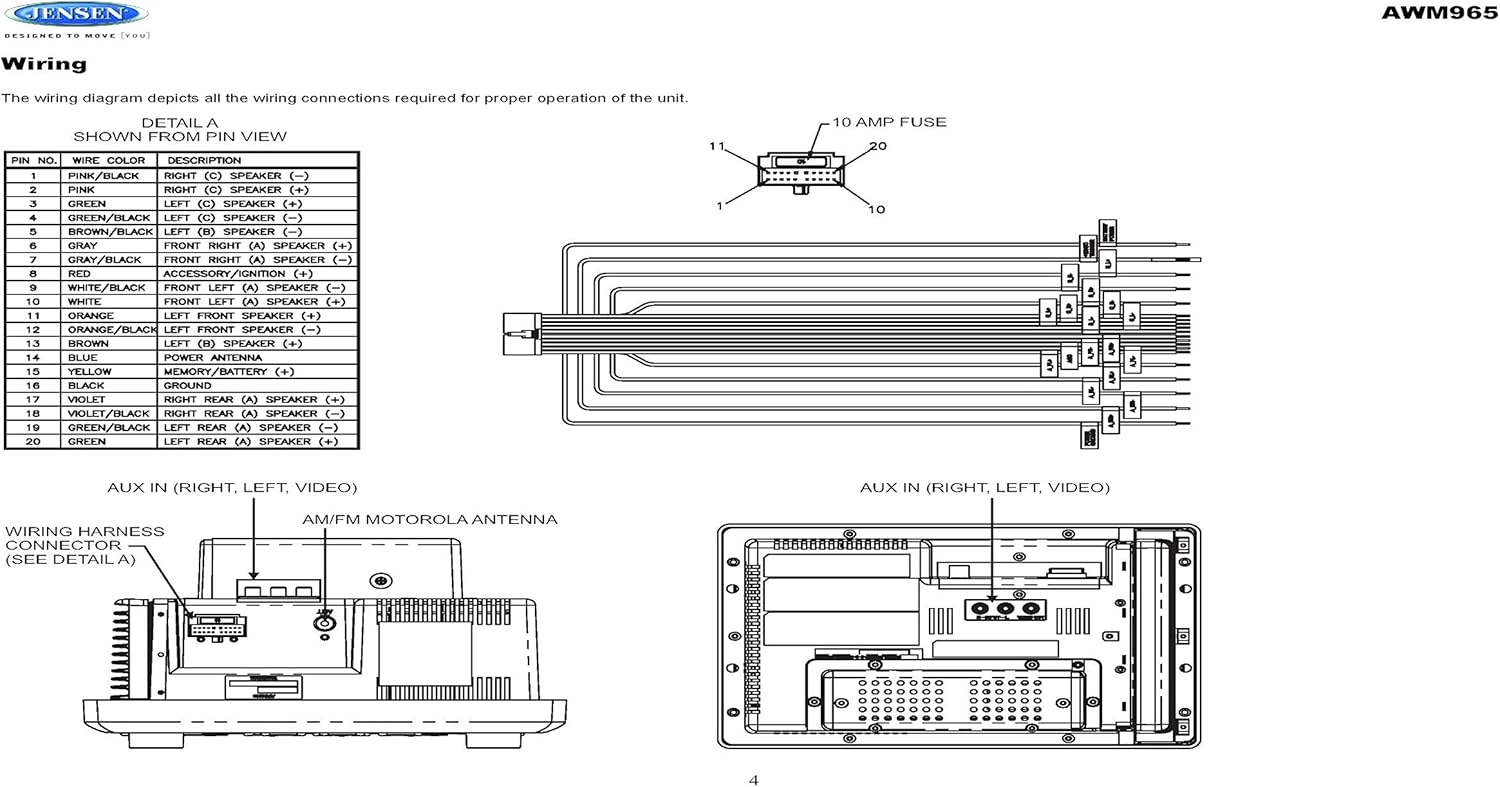
Figure 3.1: Diagram illustrating the components included in the Jensen AWM965 package, including the main unit, remote control, wiring harness, and auxiliary cables.

Figure 3.2: Image showing the included remote control, 20-pin wiring harness, and auxiliary audio/video cable.
4. Подешавање
4.1 Избор места за монтажу
It is important to select an appropriate mounting location for the AWM965 to ensure optimal performance and longevity. Consider the following:
- Avoid places exposed to heat-radiating appliances such as electric heaters.
- Do not mount adjacent to other equipment that radiates significant heat.
- Ensure the location is well-ventilated and not dusty.
- Избегавајте влажне или влажне локације.
4.2 Preparing the Opening
Use the provided mounting hole diagram to measure and cut an opening in the mounting surface. After cutting, mount the unit using four M3x20mm screws.
4.3 Монтажа радија
Route the power, speaker, and antenna cables through the hole. Connect them to the unit as outlined in the wiring diagram. After ensuring correct connections, perform a test operation.
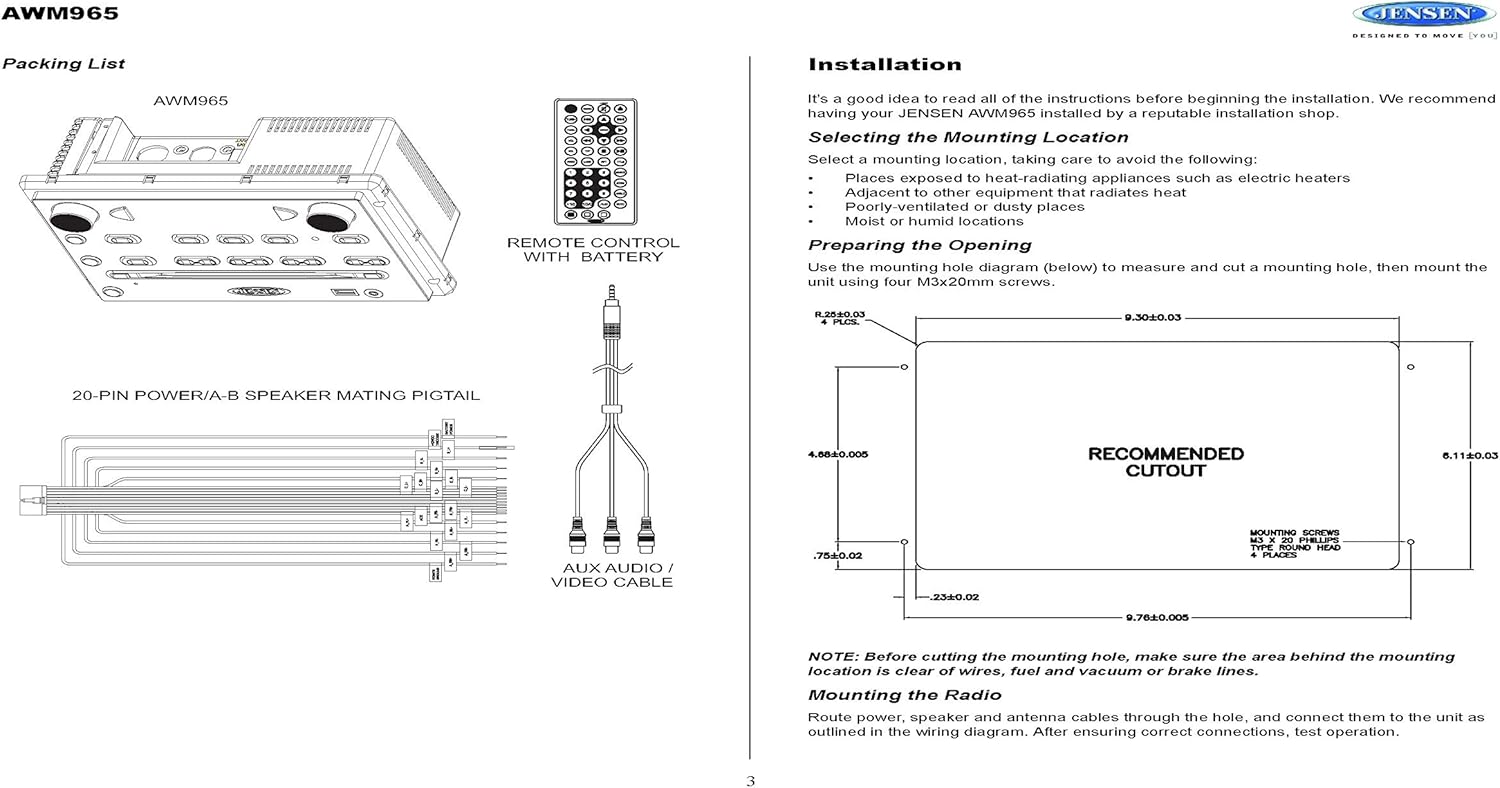
Figure 4.1: Detailed diagram showing the product dimensions (10.43"W x 7.01"H x 5"D) and the recommended cutout dimensions for installation (9.30"W x 6.11"H).
4.4 Ожичење
The wiring diagram below depicts all the connections required for proper operation of the unit. Ensure all connections are secure and correctly matched to prevent damage.
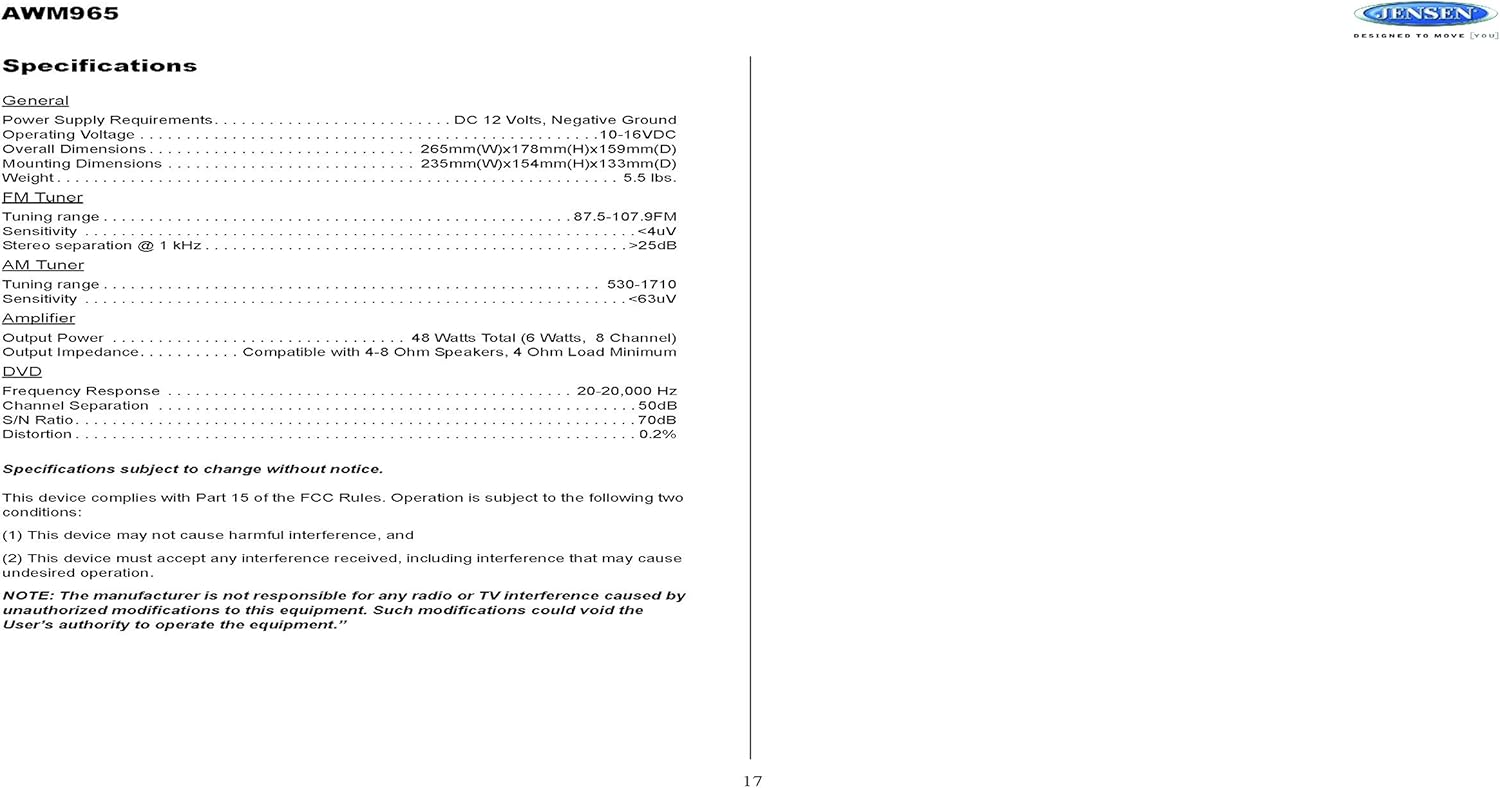
Figure 4.2: Detailed wiring diagram for the Jensen AWM965, showing the 20-pin connector pin assignments for power, ground, accessory, antenna, and speaker outputs (Right/Left, Front/Rear, A/B/C zones).
Wiring Harness Pin Details:
| Пин Но. | Боја жице | Опис |
|---|---|---|
| 1 | PINK / BLACK | ДЕСНИ (Ц) ЗВУЧНИК (-) |
| 2 | ПИНК | ДЕСНИ (Ц) ЗВУЧНИК (+) |
| 3 | ГРЕЕН | ЛИЈЕВИ (Ц) ЗВУЧНИК (+) |
| 4 | ЗЕЛЕНА / ЦРНА | ЛИЈЕВИ (Ц) ЗВУЧНИК (-) |
| 5 | БРАОН ЦРНИ | ЛИЈЕВИ (Б) ЗВУЧНИК (-) |
| 6 | БРОВН | ЛИЈЕВИ (Б) ЗВУЧНИК (+) |
| 7 | СИВА / ЦРНА | ПРЕДЊИ ДЕСНИ (А) ЗВУЧНИК (-) |
| 8 | РЕД | ACCESSORY / IGNITION (+) |
| 9 | БЕЛО ЦРНО | ПРЕДЊИ ЛИЈЕВИ (А) ЗВУЧНИК (-) |
| 10 | ВХИТЕ | ПРЕДЊИ ЛИЈЕВИ (А) ЗВУЧНИК (+) |
| 11 | ОРАНГЕ | ЛЕВИ ПРЕДЊИ ЗВУЧНИК (+) |
| 12 | НАРАНЂАСТА / ЦРНА | ЛЕВИ ПРЕДЊИ ЗВУЧНИК (-) |
| 13 | БРОВН | ДЕСНИ (Б) ЗВУЧНИК (+) |
| 14 | ПЛАВА | ПОВЕР АНТЕННА |
| 15 | ИЕЛЛОВ | MEMORY / BATTERY (+) |
| 16 | БЛАЦК | ГРОУНД |
| 17 | ВИОЛЕТ | ЗАДЊИ ДЕСНИ (А) ЗВУЧНИК (+) |
| 18 | VIOLET / BLACK | ЗАДЊИ ДЕСНИ (А) ЗВУЧНИК (-) |
| 19 | ЗЕЛЕНА / ЦРНА | ЛЕВИ ЗАДЊИ (А) ЗВУЧНИК (-) |
| 20 | ГРЕЕН | ЛЕВИ ЗАДЊИ (А) ЗВУЧНИК (+) |
5. Упутство за употребу
5.1 Контроле на предњој плочи
Familiarize yourself with the controls on the front panel for easy operation.

Слика 5.1: Крупни план view of the Jensen AWM965 front panel, highlighting the display, volume knob, power button, tuning/track buttons, and various function buttons for AUX, AS/PS, speaker zones, and media playback.
- Дугме за јачину звука (VOL): Rotate to adjust volume. Push to access audio menu.
- Дугме за укључивање: Притисните да укључите или искључите јединицу.
- T/F CLOCK Button: Press to display or set the clock.
- TUN/TRK (Tune/Track) Buttons: Use for tuning radio stations or navigating tracks on media.
- AUX dugme: Selects the auxiliary input source.
- AS/PS (Auto Store/Preset Scan) Button: Automatically stores strong radio stations or scans through presets.
- A, B, C (Speaker Zone) Buttons: Activates or deactivates speaker output zones.
- Дугме ЕНТЕР: Потврђује изборе.
- LOUD Button: Activates/deactivates loudness compensation.
- Дугме за утишавање: Mutes/unmutes audio output.
- 1-6 Дугмад: Radio station presets, track functions (RPT, RDM, G.LANG).
- ALARM SET / ON/OFF Buttons: Sets and activates/deactivates the alarm clock.
- DVD MENU Button: Приступа DVD менију.
- Disc Eject Button: Ejects a loaded disc.
- УСБ порт: Повежите УСБ уређаје за репродукцију медија и пуњење.
5.2 Основни рад
- Укључивање/искључивање: Притисните тастер ПОВЕР дугме.
- Подешавање јачине звука: Ротирајте ВОЛ дугме.
- Избор извора: Притисните тастер МОДЕ button (if available, or cycle through sources using a dedicated button or menu).
5.3 Рад радија (AM/FM)
- подешавање: Притисните тастер TUN/TRK buttons to manually tune or hold to seek.
- Унапред подешене станице: Press and hold a numbered button (1-6) to store the current station. Press briefly to recall.
- Auto Store / Preset Scan: Користите АС/ПС button for automatic station management.
5.4 CD/DVD/MP3/USB Playback
- Учитавање дискова: Insert a disc into the slot with the label side up. The unit will automatically begin playback.
- УСБ репродукција: Insert a compatible USB flash drive into the front USB port. The unit supports MP3, WMA, and JPEG formats.
- Контроле репродукције: Користите TUN/TRK buttons for track navigation (skip forward/backward). Use numbered buttons for repeat (RPT) or random (RDM) playback.
- ДВД мени: Притисните тастер ДВД МЕНУ button to access the disc's menu.
- УСБ пуњење: The front USB port supports charging of iPod and other USB-based devices.
5.5 Clock and Alarm Features
- Подешавање сата: Притисните и држите T/F CLOCK button to enter clock setting mode. Use the TUN/TRK buttons to adjust hours and minutes, and ЕНТЕР потврдити.
- Будилник: Користите АЛАРМ СЕТ button to configure the alarm time and the ОН/ОФФ button to activate or deactivate it.
- Мерач спавања: Refer to the full manual for detailed instructions on setting the sleep timer.
5.6 Помоћни улаз
Connect external audio/video devices to the front 3.5mm line-level input using the provided Aux Audio/Video Cable. Press the АУКС button to select this source.
5.7 Даљински управљач
The included wireless remote control provides convenient access to most functions. Ensure the battery is correctly installed.
Figure 5.2: Image of the Jensen AWM965 remote control, showing buttons for power, menu, tune, volume, enter, source, program, language, repeat, title, zoom, angle, and numeric keypad.
6. Одржавање
6.1 Чишћење јединице
Wipe the front panel and cabinet with a soft, dry cloth. For stubborn stains, dampen the cloth lightly with water. Never use harsh chemicals, abrasive cleaners, or solvents as they may damage the finish.
6.2 Нега диска
Држите дискове за ивице да бисте избегли отиске прстију. Држите дискове чистим и без огреботина. Чувајте дискове у њиховим кутијама када их не користите.
КСНУМКС. Решавање проблема
If you experience problems with your AWM965, consult the following common issues and solutions before contacting support.
- Нема напајања: Check the 12V DC power connection and ensure the unit's fuse (10 AMP) is not blown. Verify proper grounding.
- Нема звука: Check speaker connections and ensure speaker zones (A, B, C) are activated. Verify volume level and mute status.
- Disc Error: Ensure the disc is clean, free of scratches, and inserted correctly. Try a different disc.
- Слаб радио пријем: Check the antenna connection. Ensure the antenna is fully extended and positioned for best reception.
- USB уређај није препознат: Ensure the USB device is formatted correctly and contains compatible files (MP3, WMA, JPEG). Try a different USB device.
8. Спецификације
Detailed technical specifications for the Jensen AWM965 unit.
| Категорија | Спецификација |
|---|---|
| Повер Суппли | 12В ДЦ, негативно уземљење |
| Оператинг Волtage | 10-16ВДЦ |
| Укупне димензије | 265mm(W) x 178mm(H) x 159mm(D) / 10.4"W x 7"H x 5"D |
| Монтажне димензије | 235mm(W) x 154mm(H) x 133mm(D) / 9.25"W x 6.06"H x 5.25"D |
| Тежина | 0.9 лбс (приближно) |
| Опсег подешавања ФМ | 87.5-107.9МХз |
| ФМ осетљивост | <4уВ |
| FM Stereo Separation @ 1 kHz | >25дБ |
| АМ опсег подешавања | 530-1710кХз |
| АМ Сенситивити | <63уВ |
| Ampизлазна снага дизалице | 48 Watts Total (8 Channel) |
| Излазна импеданса | Compatible with 4-8 Ohm Speakers |
| DVD Frequency Response | 20-20,000 Хз |
| DVD Channel Separation | 50дБ |
| DVD S/N Ratio | 70дБ |
| DVD Distortion | 0.2% |
| Компатибилни формати дискова | CD, CD-R, CD-RW, MP3, DVD, DVD+/-RW |
| Посебне карактеристике | Adjustable LCD Dimmer, Front USB (MP3/WMA/JPEG, Charging), Front 3.5mm Line-Level Video/Audio Input, 1 Composite Video Out, 1 Stereo Audio Input |
Спецификације су подложне променама без претходне најаве.
8.1 Усклађеност са ФЦЦ-ом
Овај уређај је у складу са делом 15 ФЦЦ правила. Операција је подложна следећа два услова:
- Овај уређај можда неће изазвати штетне сметње.
- Овај уређај мора прихватити све примљене сметње, укључујући сметње које могу узроковати нежељени рад.
NOTE: The manufacturer is not responsible for any radio or TV interference caused by unauthorized modifications to this equipment. Such modifications could void the user's authority to operate the equipment.
9. Информације о гаранцији
Jensen products are designed and manufactured to the highest quality standards. This product is covered by a limited warranty against defects in materials and workmanship. The specific terms and duration of the warranty are typically provided with the product packaging or can be found on the manufacturer's official webсајт. Молимо вас да сачувате доказ о куповини за потребе гаранције.
10. Подршка
If you require further assistance or encounter issues not covered in this manual, please contact Jensen customer support. You can typically find contact information (phone number, email, or support portal) on the official Jensen webсајту или у паковању производа.
When contacting support, please have your product model number (AWM965) and a detailed description of the issue ready.