
1. Увод
This manual provides instructions for the installation, operation, and maintenance of your Orbit 27954 Pocket Star 4-Station Plus Indoor Sprinkler Controller. This controller is designed to manage residential 24-volt sprinkler systems, offering dual programming capabilities and a rain delay feature.
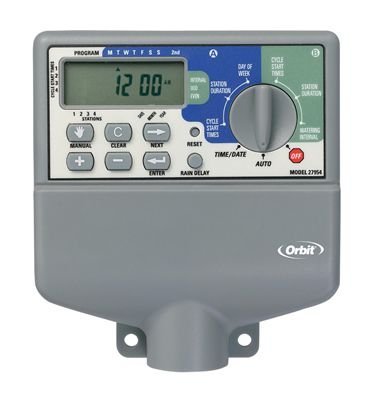
Image 1.1: The Orbit 27954 Pocket Star 4-Station Plus Indoor Sprinkler Controller. This image displays the front panel of the controller, featuring its digital display and control buttons.
2. Безбедносне информације
Пажљиво прочитајте сва упутства пре инсталације и рада. Непоштовање ових упутстава може довести до материјалне штете или повреда.
- This controller is designed for indoor use only. Do not install outdoors or in areas exposed to water.
- Уверите се да је напајање искључено пре него што извршите било какво ожичење или одржавање.
- All electrical wiring should comply with local codes and regulations. If you are unsure, consult a qualified electrician.
- Не покушавајте сами да поправите уређај. Све сервисирање препустите квалификованом особљу.
3. Подешавање
3.1 Распакивање
Carefully remove the controller from its packaging. Verify that all components are present. Retain packaging for future use or disposal.
3.2 Монтажа контролера
- Choose a suitable indoor location near a standard 120V AC outlet and away from direct sunlight or extreme temperatures.
- Use the provided mounting template (if applicable) or mark the desired screw locations on the wall.
- Install mounting screws into the wall, leaving the screw heads slightly extended.
- Hang the controller onto the screws using the keyhole slots on the back of the unit.
- Secure the controller by tightening the screws.
3.3 Ожичење
Важно: Искључите напајање пре ожичења.
- Прикључак за напајање: Plug the controller's power cord into a standard 120V AC outlet.
- Ожичење вентила: Connect one wire from each sprinkler valve to a numbered terminal (1, 2, 3, 4) on the controller. Connect the common wire from all valves to the terminal labeled 'C' (Common).
- Sensor Wiring (Optional): If using a rain sensor, connect its wires to the designated sensor terminals. Refer to your sensor's manual for specific wiring instructions.
3.4 Почетно укључивање
Once all wiring is complete and secure, connect the power cord to the electrical outlet. The controller display should illuminate, indicating it is powered on.
4. Упутство за употребу
4.1 Разумевање екрана и дугмади
The controller features a digital display and several buttons for navigation and programming. Familiarize yourself with the 'Program', 'Set', 'Arrow' (up/down), and 'Rain Delay' buttons.
4.2 Setting Current Time and Date
- Press the 'Set' button repeatedly until 'Set Time' appears on the display.
- Use the 'Arrow' buttons to adjust the hour, then press 'Set' to move to minutes.
- Repeat for minutes, AM/PM, year, month, and day.
4.3 Програмирање распореда заливања
The controller supports dual programs (A and B) for flexible scheduling.
- Изаберите програм: Press the 'Program' button to select Program A or B.
- Постави време почетка: Press 'Set' until 'Start Time' appears. Use 'Arrow' buttons to set the desired start time for the first cycle. The controller supports multiple start times per program.
- Set Run Times: Press 'Set' until 'Run Time' appears. Use 'Arrow' buttons to set the duration (in minutes) for each station (1-4).
- Set Watering Days: Press 'Set' until 'Watering Days' appears. Use 'Arrow' buttons to select specific days of the week, odd/even days, or interval watering.
4.4 Ручни рад
To manually water a station or all stations:
- Press the 'Manual' button (if available, or follow specific manual run instructions in the display menu).
- Select the desired station or 'All Stations'.
- Set the run time using the 'Arrow' buttons.
- The selected station(s) will begin watering immediately.
4.5 Функција одлагања кише
The rain delay feature allows you to pause watering for a set period without losing your programmed schedule.
- Press the 'Rain Delay' button.
- Use the 'Arrow' buttons to select the delay duration (e.g., 24, 48, or 72 hours).
- The controller will pause watering for the selected period and resume the schedule automatically afterward.
5. Одржавање
5.1 Чишћење
Wipe the controller's exterior with a soft, damp крпу. Не користите абразивна средства за чишћење или раствараче, јер могу оштетити екран илиasing.
5.2 Seasonal Considerations
As an indoor controller, the unit is not directly exposed to outdoor elements. However, ensure the indoor environment remains within recommended operating temperatures to prolong its lifespan.
КСНУМКС. Решавање проблема
| Проблем | Могући узрок | Решење |
|---|---|---|
| Екран контролера је празан. | Нема струје. | Check power outlet, ensure power cord is securely plugged in. Verify circuit breaker. |
| Sprinklers do not turn on. | Incorrect programming, wiring issue, or rain sensor activated. | Verify watering schedule. Check valve wiring connections. Ensure rain sensor is not active or bypassed. |
| Only some sprinklers turn on. | Faulty valve, wiring issue to specific station. | Check wiring for the non-working station. Test the valve manually. |
| Watering occurs at incorrect times. | Incorrect time/date setting or program schedule. | Verify current time and date. Review and adjust program start times and watering days. |
7. Спецификације
- Модел: Orbit 27954 Pocket Star 4-Station Plus Indoor Controller
- Бренд: Орбита
- Број дела: 27954
- Број станица: 4
- Волtage: 24 волти (АЦ)
- Унос људског интерфејса: Дугмад
- Потребне батерије: бр
- Инсталација: Индоор
- Карактеристике: Dual program, Rain delay
- Димензије пакета: 21.84 к 13.46 к 6.6 цм
- Тежина: 226.8 г
8. Гаранција и подршка
For warranty information or technical support, please refer to the official Orbit webсајт или контактирајте њихову службу за кориснике. Сачувајте рачун као доказ о куповини.