
Увод и вишеview
The Ozeri Ultra 42-inch Oscillating Tower Fan is designed to provide efficient air circulation with noise reduction technology. Its slim tower design complements various room decors while delivering powerful airflow. This manual provides essential information for the safe and effective use of your fan.
Кључне карактеристике укључују:
- Space-saving, stylish design.
- Engineered for high air velocity with reduced noise output.
- Three pre-programmed airflow patterns for sleep, relaxation, and comfort.
- Three whisper-quiet speed settings with 90-degree oscillation.
- LED screen with room temperature display and light-dimming night mode.
- 12-hour timer programmable in 1-hour increments.
- Includes an enhanced-range remote control with integrated storage.
- Easy, tool-free assembly.
Упутства за подешавање
The Ozeri Ultra 42-inch Tower Fan requires minimal assembly without the need for special tools. Follow these steps to set up your fan:
- Carefully unpack all components: fan unit, base, optional extension column, enhanced-range remote control, manual, and warranty card.
- Assemble the fan base. Ensure the two half-circle pieces of the base snap together properly and are flush with the floor for stability.
- Attach the optional extension column if desired to adjust the fan's height from 32 inches to 42 inches. Secure it using the included large nuts.
- Connect the fan unit to the assembled base and column.
- Укључите вентилатор у стандардну утичницу од 120 V наизменичне струје.

Figure 1: Ozeri Ultra 42-inch Tower Fan with remote control and display details.
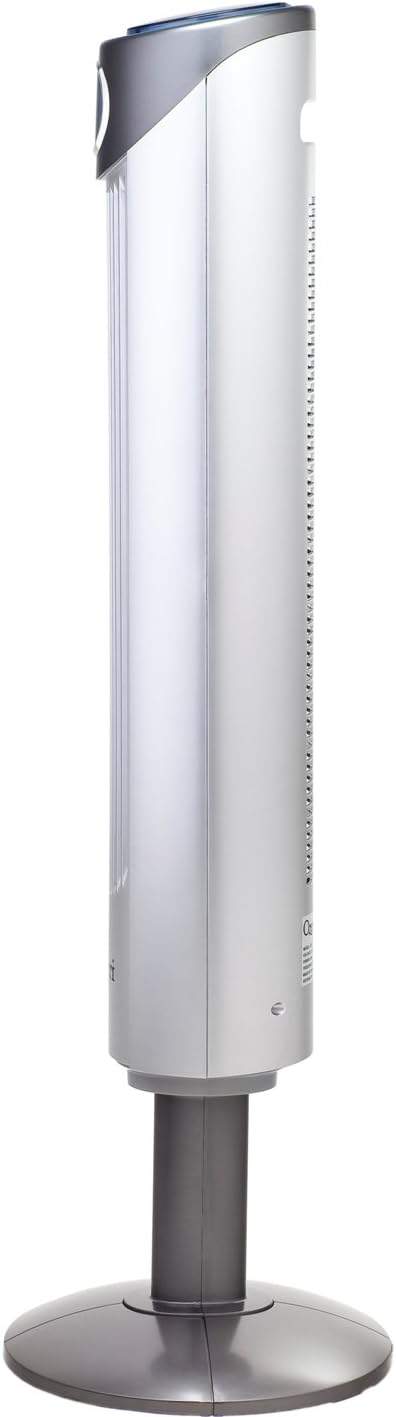
Слика 2: Бочни професионалацfile of the Ozeri Ultra 42-inch Tower Fan, illustrating its slim design.
Упутство за употребу
Your Ozeri Ultra Tower Fan can be operated using the built-in control panel on the top of the unit or the enhanced-range remote control.
Функције контролног панела и даљинског управљача:
- Укључивање/искључивање: Притисните дугме за напајање да бисте укључили или искључили вентилатор.
- Подешавања брзине: Select from 3 whisper-quiet speed settings (Low, Medium, High) to adjust airflow intensity.
- Осцилација: Activate 90-degree oscillation for optimal air circulation across a wider area. This feature can be turned on or off as needed.
- Airflow Patterns: Choose from 3 pre-programmed airflow patterns:
- нормално: Consistent airflow at the selected speed.
- Природни: Симулира природни поветарац променом брзине вентилатора.
- спавање: Gradually reduces fan speed and dims the LED display for undisturbed sleep.
- Тајмер: Program the fan to automatically turn off after a set period, from 1 to 12 hours, in 1-hour increments.
- ЛЕД дисплеј: The intelligent LED screen displays the current room temperature and selected settings. Utilize the light-dimming night mode for light-sensitive environments.

Figure 3: Top-side control panel with buttons for power, speed, oscillation, mode, and timer.

Figure 4: LED display showing room temperature, oscillation, mode, and speed indicators.

Figure 5: Remote control conveniently stored within the fan's top compartment.
Одржавање
Regular cleaning ensures optimal performance and longevity of your Ozeri Ultra Tower Fan.
- Спољно чишћење: Обришите спољашње површине меком, дamp крпу. Избегавајте абразивна средства за чишћење или раствараче.
- Унутрашње чишћење: To clean accumulated dust from the impeller, the back of the fan can be removed. This typically involves unscrewing 4 Phillips screws and gently prying open two small plastic tabs on the sides. Once open, carefully clean the interior components. Ensure the fan is unplugged before attempting any interior cleaning.
- Складиштење: Када се вентилатор не користи дуже време, чувајте га на хладном и сувом месту.
Решавање проблема
If you encounter any issues with your Ozeri Ultra Tower Fan, please refer to the following general advice:
- Вентилатор се не укључује: Ensure the power cord is securely plugged into a working 120V AC outlet. Check if the power button has been pressed.
- Смањени проток ваздуха: Check for any obstructions around the air intake or output vents. Clean the fan's interior if dust accumulation is suspected (refer to Maintenance section).
- Необична бука: Ensure the fan is placed on a flat, stable surface. Check for any loose parts or foreign objects within the fan. If the fan makes a creaking sound during oscillation, inspect the base assembly for proper alignment and ensure no cables are being stretched.
- Даљински управљач не ради: Check the remote control batteries. Ensure there are no obstructions between the remote and the fan's sensor.
For persistent issues, please contact Ozeri customer support.
Спецификације
| Феатуре | Спецификација |
|---|---|
| Бранд | Озери |
| Назив модела | Adjustable Oscillating Tower Fan with Noise Reduction Technology |
| Број модела | ОЗФ1 |
| Боја | Сребро |
| Димензије производа | 13"Д к 13"Ш к 43"В |
| Тежина артикла | 11.5 фунти |
| Извор напајања | Цордед Елецтриц |
| Волtage | 120 Волтс |
| Ватtage | 45 вати |
| Ниво буке | 45 децибела |
| Капацитет протока ваздуха | 5000 кубних стопа у минути |
| Број нивоа снаге | 3 |
| Контролни метод | Ремоте |
| Посебна карактеристика | Осцилирајуће |
| Унутрашња/спољна употреба | Индоор |
Гаранција и подршка
The Ozeri Ultra 42-inch Oscillating Tower Fan comes with a 1-year warranty. Please retain your warranty card and proof of purchase for any claims.
For technical support, troubleshooting assistance, or warranty inquiries, please refer to the contact information provided in your product manual or visit the official Ozeri webсајту.
Сатисфацтион Гуарантеед.