
Увод
The GIGABYTE GM-M7600 is a wireless precision optical mouse designed for comfortable and reliable use. This manual provides instructions for setting up, operating, maintaining, and troubleshooting your device.
Садржај пакета
Молимо вас да проверите садржај пакета како бисте били сигурни да су сви предмети присутни:
- GIGABYTE GM-M7600 Wireless Optical Mouse
- Portable Nano USB Receiver
- 2 к ААА батерије
Сетуп
1. Инсталирање батерија
The GM-M7600 mouse requires two AAA batteries for operation. The batteries are included in the package.
- Пронађите поклопац одељка за батерију на доњој страни миша.
- Пажљиво померите или подигните поклопац да бисте отворили одељак.
- Insert the two AAA batteries, ensuring the positive (+) and negative (-) terminals align correctly with the markings inside the compartment.
- Добро затворите поклопац одељка за батерије.
2. Повезивање USB пријемника
The mouse connects to your computer via a portable Nano USB receiver.
- Locate the Nano USB receiver. It may be stored inside the mouse's battery compartment or packaged separately.
- Plug the Nano USB receiver into an available USB port on your computer (Laptop or Personal Computer).
- Your operating system (e.g., Windows XP, Linux) should automatically detect and install the necessary drivers. This process may take a few moments.
- Када се драјвери инсталирају, миш је спреман за употребу.
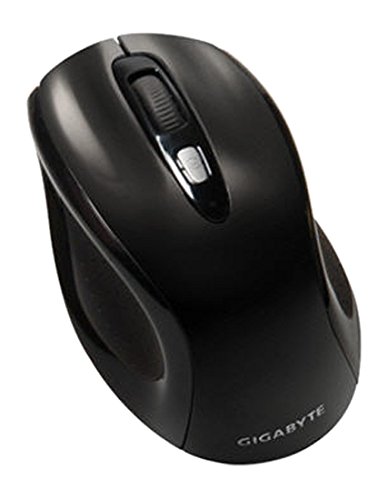
Слика 1: GIGABYTE GM-M7600 Wireless Optical Mouse. This image displays the ergonomic design of the mouse, highlighting its form factor and the location of its buttons. The Nano USB receiver is typically stored within the mouse or connected to a computer's USB port.
Упутство за употребу
1. Укључивање/искључивање
The mouse typically has a power switch on its underside. Slide the switch to the 'ON' position to activate the mouse. Slide it to 'OFF' when not in use to conserve battery life.
2. Adjusting DPI (Sensitivity)
The GM-M7600 features an adjustable DPI switch, allowing you to change the mouse sensitivity between 800 DPI and 1600 DPI. This switch is usually located near the scroll wheel. Press the DPI button to toggle between the two sensitivity settings.
3. Основне функције миша
- Леви клик: Главно дугме за избор ставки, отварање fileс, и интеракција са софтвером.
- Десни клик: Секундарно дугме за приступ контекстним менијима и додатним опцијама.
- Точак за померање: Користи се за листање кроз документе и web странице. Такође може да функционише као дугме за клик средњим тастером миша.
Одржавање
1. Чишћење
Да бисте одржали оптималне перформансе и изглед:
- Disconnect the mouse from your computer and turn off the power switch.
- Користите меку крпу која не оставља длачицеampводом или благим раствором за чишћење обришите површину миша.
- Избегавајте употребу јаких хемикалија, абразивних средстава за чишћење или директно прскање течности на миш.
- Clean the optical sensor area on the underside of the mouse with a dry cotton swab to remove any dust or debris.
2. Замена батерије
When the mouse performance degrades or it stops responding, it may be time to replace the batteries.
- Искључите миш помоћу прекидача за напајање.
- Open the battery compartment as described in the 'Installing Batteries' section.
- Уклоните старе ААА батерије.
- Insert two new AAA batteries, observing the correct polarity (+/-).
- Затворите одељак за батерију и поново укључите миш.
Решавање проблема
If you encounter issues with your GIGABYTE GM-M7600 mouse, try the following solutions:
- Миш не реагује:
- Уверите се да је миш укључен.
- Проверите да ли су батерије правилно постављене и да ли су довољно напуњене. Замените их ако је потребно.
- Ensure the Nano USB receiver is securely plugged into a working USB port on your computer. Try a different USB port.
- Поново покрените рачунар.
- Неправилно кретање курсора:
- Очистите оптички сензор на доњој страни миша.
- Уверите се да користите миш на одговарајућој површини. Избегавајте јако рефлектујуће или провидне површине.
- Check for any wireless interference. Move the mouse closer to the receiver or away from other wireless devices.
- DPI switch not working:
- Ensure the mouse is powered on and connected.
- Чврсто притисните дугме DPI.
Спецификације
| Назив модела | GM-M7600 |
| Бранд | ГИГАБИТЕ |
| Технологија повезивања | 2.4GHz Radio Frequency Wireless |
| Откривање покрета | Оптицал |
| Подесиви ДПИ | 800 / 1600 ДПИ |
| Број дугмади | 3 (леви, десни, точкић за скроловање/средњи клик) |
| Извор напајања | 2 к ААА батерије (укључене) |
| Тип пријемника | Portable Nano USB Receiver |
| Компатибилни уређаји | Лаптоп, лични рачунар |
| Подршка за оперативни систем | Linux, Windows XP |
| Материјал кућишта | Plastic with Rubberized Finish |
| Боја | Црно |
Гаранција и подршка
For warranty information and technical support, please refer to the warranty card included with your product or visit the official GIGABYTE webсајту. Сачувајте рачун о куповини за гаранције.