
Lexmark E360H11A
Упутство за употребу кертриџа са тонером великог капацитета за програм враћања Lexmark E360, E460, E462 серије
Бренд: Lexmark | Модел: Е360Х11А
Увод
This manual provides essential information for the safe and effective use of your Lexmark E360, E460, E462 Series High Yield Return Program Toner Cartridge (Part Number E360H11A). This genuine Lexmark product is designed to deliver consistent, high-quality monochrome laser prints with an estimated yield of 9,000 pages. Please read this manual thoroughly before installation and use.
Безбедносне информације
- Држите тонер кертриџе ван домашаја деце.
- Do not incinerate toner cartridges. Residual toner dust can ignite.
- Avoid inhaling toner dust. If toner gets on your skin or clothing, wash it off immediately with soap and cold water.
- Do not attempt to disassemble the toner cartridge.
- Store cartridges in their original packaging in a cool, dry place away from direct sunlight.
Шта је у кутији
Ваш пакет треба да садржи следећу ставку:
- One (1) Lexmark E360, E460, E462 Series High Yield Return Program Toner Cartridge (Part Number E360H11A)
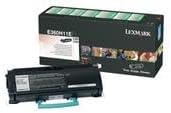
This image displays the Lexmark E360H11A High Yield Return Program Toner Cartridge alongside its retail packaging. The cartridge is black with a light blue handle, and the box features Lexmark branding and product details.
Подешавање и инсталација
Follow these steps to properly install the toner cartridge in your Lexmark E360, E460, or E462 series printer:
- Искључивање штампача: Уверите се да је штампач искључен и да је кабл искључен из утичнице пре него што започнете процес инсталације.
- Отворите предњу корицу: Open the front cover of your Lexmark printer to access the toner cartridge compartment.
- Уклоните стари кертриџ (ако је применљиво): If replacing an old cartridge, carefully pull it straight out of the printer. Place it in a protective bag for recycling.
- Распакујте нови кертриџ: Remove the new Lexmark E360H11A toner cartridge from its packaging. Avoid touching the green drum surface.
- Протрести кертриџ: Gently shake the new cartridge horizontally 5-6 times to distribute the toner evenly.
- Уклоните заштитне заптивке: Carefully remove any protective tapes or seals from the cartridge as indicated in your printer's specific manual.
- Уметните нови кертриџ: Поравнајте нови кертриџ са вођицама унутар штампача и чврсто га притисните док не кликне на своје место.
- Затвори предњу корицу: Затворите предњи поклопац штампача.
- Укључивање штампача: Plug in and turn on your printer. The printer will typically perform a self-test and recognize the new cartridge.
Refer to your specific Lexmark printer's user manual for detailed instructions and illustrations.
Упутство за употребу
Once the Lexmark E360H11A toner cartridge is installed, your printer is ready for operation. The cartridge functions automatically as part of the printing process.
- Штампање: Initiate print jobs from your computer or device as you normally would. The printer will draw toner from the cartridge to create monochrome prints.
- Праћење нивоа тонера: Most Lexmark printers provide a way to monitor toner levels through the printer's control panel or software utility. Monitor these levels to know when a replacement cartridge will be needed.
- Квалитет штампе: If print quality degrades (e.g., faded prints, streaks), it may indicate a low toner level or an issue with the cartridge. Refer to the Troubleshooting section.
Одржавање
Правилно руковање и складиштење могу продужити век трајања и перформансе вашег кертриџа са тонером:
- Складиштење: Store unused cartridges in their original sealed packaging in a cool, dry environment, away from direct sunlight and extreme temperatures.
- Руковање: Always handle the cartridge by its designated handles or edges. Avoid touching the imaging drum.
- Одлагање/Рециклажа: This is a Lexmark Return Program Toner Cartridge. Please return the empty cartridge to Lexmark for proper recycling. Instructions for return are typically included with the new cartridge or can be found on the official Lexmark website. Do not dispose of cartridges in regular waste.
Решавање проблема
Ако наиђете на проблеме са кертриџом са тонером, размотрите следећа уобичајена решења:
| Проблем | Могући узрок | Решење |
|---|---|---|
| Избледели или светли отисци | Низак ниво тонера; неравномерна расподела тонера. | Gently shake the cartridge horizontally. If problem persists, replace the cartridge. |
| Пруге или линије на отисцима | Dirty imaging drum; damaged cartridge. | Do not touch the drum. If the cartridge is new, ensure all seals are removed. If problem persists, replace the cartridge. |
| "Toner Low" or "Replace Cartridge" Message | Тонер је заиста низак; кертриџ није правилно постављен. | Reseat the cartridge firmly. If message persists, replace with a new cartridge. |
| Cartridge Not Recognized | Improper installation; faulty cartridge. | Remove and reinsert the cartridge, ensuring it clicks into place. Restart the printer. If issue continues, contact Lexmark support. |
For more complex issues, consult your printer's specific user manual or the Lexmark support webсајту.
Спецификације
| Феатуре | Детаљ |
|---|---|
| Врста производа | Тонер Цартридге |
| Бранд | Лекмарк |
| Парт Нумбер | Е360Х11А |
| Компатибилност | Lexmark E360, E460, E462 Series Monochrome Laser Printers |
| Технологија штампања | Монохромни ласер |
| Принос странице | Up to 9,000 pages (ISO/IEC 19752) |
| Посебна карактеристика | High Yield, Return Program Cartridge |
| Укључене компоненте | Тонер Цартридге |
| ASIN | B00434R3GI |
| Датум првог доступног | 15. септембра 2010. године |
Информације о гаранцији
Lexmark toner cartridges are manufactured to high quality standards. For specific warranty terms and conditions applicable to your Lexmark E360H11A toner cartridge, please refer to the documentation included with your printer or visit the official Lexmark webсајт. Гаранција се обично односи на недостатке у материјалу и изради при нормалној употреби.
Подршка
If you require further assistance or have questions regarding your Lexmark E360, E460, E462 Series High Yield Return Program Toner Cartridge, please contact Lexmark Customer Support:
- Lexmark Official Webсајт: www.lexmark.com/support
- Онлине ресурси: Access FAQs, drivers, and troubleshooting guides.
- Контакт информације: Find phone numbers or chat options for direct support on the Lexmark support webсајту.
When contacting support, please have your printer model and toner cartridge part number (E360H11A) ready.
Ask a question about this manual
Ask about setup, troubleshooting, compatibility, parts, safety, or missing instructions. Manuals+ will review the question and use this page’s manual context to help answer it.