
1. Увод
This manual provides detailed instructions for the installation, operation, and maintenance of your Foxconn TSAA725 ATX Tower Case. Please read this manual thoroughly before beginning installation to ensure proper setup and safe use of the product. Keep this manual for future reference.
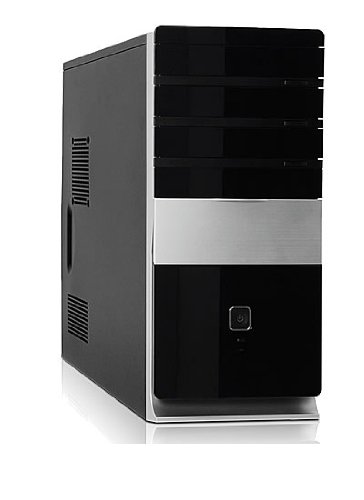
Слика: Фронт view of the Foxconn TSAA725 ATX Tower Case, showcasing its design and front panel ports.
2. Безбедносне информације
Придржавајте се следећих мера предострожности како бисте спречили оштећење производа или повреде себе:
- Always disconnect the power supply from the wall outlet before opening the computer case or performing any installation/maintenance.
- Handle internal components with care to avoid electrostatic discharge (ESD) damage. Use an anti-static wrist strap if available.
- Обезбедите одговарајућу вентилацију око кућишта како бисте спречили прегревање.
- Do not expose the case to moisture or extreme temperatures.
- Држите мале делове даље од деце.
3. Садржај пакета
Проверите да ли су све ставке присутне у пакету:
- Foxconn TSAA725 ATX Tower Case
- 350W Power Supply (pre-installed)
- Комплет додатне опреме (шрафови, одстојници, кабловске везице)
- Ово упутство за употребу
4. Кључне карактеристике
The Foxconn TSAA725 ATX Tower Case offers the following features:
- Материјал: 0.5mm SGCC Alloy Steel construction for durability.
- Подршка за матичну плочу: Compatible with ATX and Micro ATX motherboards.
- Дриве Баис:
- 3x 5.25" External Bays
- 2x 3.5" External Bays
- 4x 3.5" Internal Bays
- Систем за хлађење:
- 1x 80/92/120mm rear fan support (fan not included)
- Optional 1x 80/92/120mm front fan support (fan not included)
- 80mm Air Duct for CPU cooling.
- Предњи И/О панел:
- 2к УСБ 2.0 порта
- 1x прикључак за слушалице
- 1x Microphone jack
- Напајање: Integrated 350W Power Supply.
5. Подешавање и инсталација компоненти
Follow these steps to install your computer components into the Foxconn TSAA725 case:
- Припремите случај:
Place the case on a flat, stable surface. Remove the side panel(s) by unscrewing the thumbscrews at the rear of the case and sliding the panel backward.
- Инсталирајте матичну плочу:
Install the necessary standoffs onto the motherboard tray according to your motherboard's form factor (ATX or Micro ATX). Carefully place the motherboard onto the standoffs, aligning the screw holes. Secure the motherboard with screws provided in the accessory kit.
- Install Drives (HDD/SSD):
For 3.5" internal drives, slide the drive into an available 3.5" internal bay and secure it with screws from the side. For 5.25" external drives (e.g., optical drives), remove the front panel bay cover, slide the drive in from the front, and secure it with screws.
- Инсталирајте картице за проширење:
Remove the appropriate expansion slot covers at the rear of the case. Insert your graphics card or other expansion cards into the PCIe/PCI slots on the motherboard and secure them with screws.
- Повежите каблове:
Connect the power supply cables to the motherboard (24-pin ATX, 4/8-pin CPU), graphics card (if applicable), and drives (SATA power). Connect the front panel cables (USB, audio, power switch, reset switch, LED indicators) to the corresponding headers on the motherboard. Refer to your motherboard manual for header locations.
- Управљање кабловима:
Route cables neatly to improve airflow and aesthetics. Use cable ties from the accessory kit if needed.
- Затворите случај:
Once all components are installed and cables are connected, reattach the side panel(s) and secure them with the thumbscrews.
6. Упутство за употребу
After successful assembly, connect your peripherals (monitor, keyboard, mouse) and power cable to the case. Press the power button on the front panel to start your computer.
Front Panel I/O Ports:
- УСБ 2.0 портови: For connecting USB devices such as keyboards, mice, and external storage.
- Слушалице: За повезивање слушалица или звучника.
- Утичница за микрофон: За повезивање микрофона.
- Дугме за напајање: To turn the computer on or off.
- Дугме за ресетовање: To restart the computer.
7. Одржавање
Regular maintenance helps ensure optimal performance and longevity of your computer case:
- Чишћење прашине: Periodically clean dust from inside the case, especially from fans and heatsinks, using compressed air. Ensure the computer is powered off and unplugged before cleaning.
- Спољно чишћење: Обришите спољашњост кућишта меком,amp крпу. Избегавајте абразивна средства за чишћење или раствараче.
- Управљање кабловима: Periodically check cable routing to ensure no cables are obstructing airflow or fan operation.
КСНУМКС. Решавање проблема
Ако наиђете на проблеме, погледајте следећа уобичајена решења:
- Computer does not power on:
- Ensure the power cable is securely connected to both the case's power supply and the wall outlet.
- Check if the power supply switch (if present) is in the 'ON' position.
- Проверите да ли је кабл дугмета за напајање на предњој плочи правилно повезан са матичном плочом.
- No display on monitor:
- Ensure the monitor is powered on and connected to the correct video output on your graphics card or motherboard.
- Поново инсталирајте графичку картицу и РАМ модуле.
- USB портови не раде:
- Verify that the front panel USB cables are correctly connected to the motherboard's USB headers.
- Try connecting the device to a different USB port.
9. Спецификације
| Феатуре | Детаљ |
|---|---|
| Бранд | ФОКСЦОНН |
| Модел | TSAA725-ISO450 |
| Материјал | 0.5mm SGCC Alloy Steel |
| Компатибилност матичне плоче | АТКС, Мицро АТКС |
| Drive Bays (External) | 3x 5.25", 2x 3.5" |
| Drive Bays (Internal) | 4x 3.5" |
| Подршка за систем хлађења | 1x 80/92/120mm rear fan, 1x 80/92/120mm front fan (optional), 80mm Air Duct |
| Предњи И / О портови | 2x USB 2.0, 1x слушалице, 1x микрофон |
| Повер Суппли | 350W (Integrated) |
| Димензије производа (ДкШкВ) | 50.17 к 24.13 к 54.61 цм |
| Тежина артикла | 6.96 кг |
10. Гаранција и подршка
For warranty information and technical support, please refer to the official Foxconn webсајт или контактирајте локалног продавца. Сачувајте доказ о куповини за потребе гаранције.
Онлине ресурси: For additional support and updated drivers, visit the official Foxconn support page.
Напомена: Гарантни услови могу се разликовати у зависности од региона.