
1. Увод
Thank you for choosing the LTC 3-Channel 60W Public Address Amplifier with USB/SD-MP3. This manual provides essential information for the safe and efficient operation of your new amplifier. Please read it thoroughly before use and keep it for future reference. This amplifier is designed for public address applications, offering versatile input options including microphones, auxiliary devices, and integrated USB/SD card playback.
2. Безбедносна упутства
Да бисте осигурали безбедан рад и спречили оштећења, молимо вас да се придржавате следећих мера безбедности:
- Извор напајања: Повежите amplifier only to the specified power sources (12V DC or 220V AC) as indicated on the unit. Ensure the voltagе одговара вашем локалном извору напајања.
- вентилација: Не блокирајте вентилационе отворе. Обезбедите адекватан проток ваздуха око уређаја како бисте спречили прегревање.
- Влага: Немојте излагати amplifier to rain, moisture, or excessive humidity. Keep it away from liquids.
- Чишћење: Disconnect the power before cleaning. Use a dry, soft cloth. Do not use liquid cleaners or aerosols.
- Сервисирање: Не покушавајте сами да сервисирате овај производ. Сво сервисирање препустите квалификованом сервисеру. Отварање уређаја може вас изложити опасном испаравању.tagес или друге опасности.
- Пласман: Поставите amplifier on a stable, flat surface. Avoid placing it near heat sources or in direct sunlight.
- Преоптерећење: Немојте преоптеретити amplifier. Ensure connected speakers match the amplifier's impedance and power ratings.
3. Производ је готовview
The LTC 3-Channel 60W Public Address Amplifier is a versatile audio solution designed for various PA applications. It features multiple input options and an integrated MP3 player for convenience.
3.1 Контроле и везе на предњој плочи
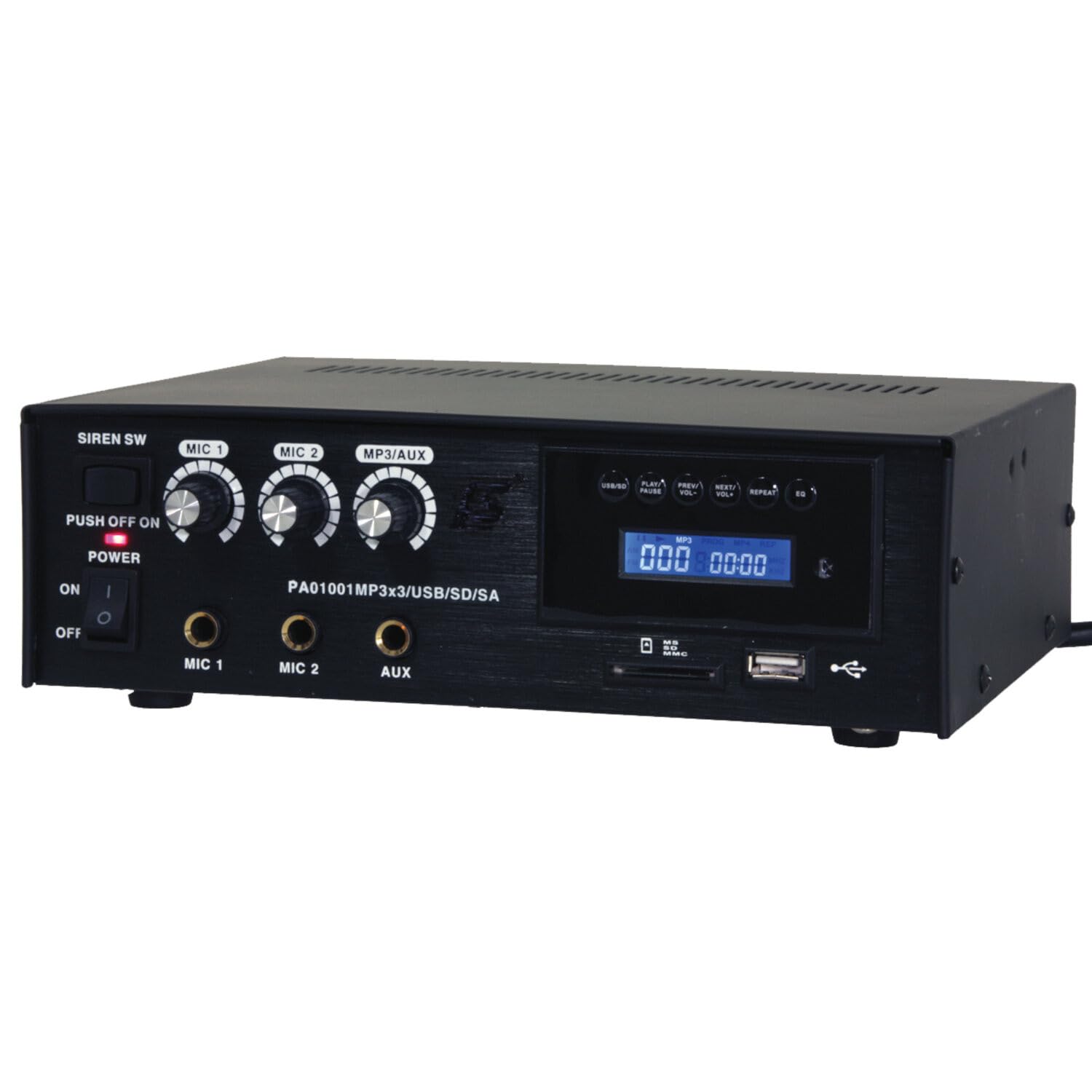
Image: Front panel of the LTC 3-Channel 60W Public Address Amplifier. Visible controls include volume knobs for MIC1, MIC2, and MP3/AUX, a Master volume knob, a Power switch, a Siren switch, and input jacks for MIC1, MIC2, and AUX. The MP3 player section features a display, USB port, and SD card slot.
- SIREN SW: Switch to activate the built-in siren sound.
- PUSH OFF / ON / OF Power Switch: Главни прекидач за напајање ampлифиер.
- MIC 1 Volume: Rotary knob to adjust the volume level for Microphone Input 1.
- MIC 2 Volume: Rotary knob to adjust the volume level for Microphone Input 2.
- MP3/AUX Volume: Rotary knob to adjust the volume level for the MP3 player and Auxiliary input.
- ГЛАВНА јачина звука: Rotary knob to control the overall output volume of the ampлифиер.
- МИЦ 1 улаз: 6.3mm jack for connecting Microphone 1.
- МИЦ 2 улаз: 6.3mm jack for connecting Microphone 2.
- АУКС улаз: 6.3mm jack for connecting external audio sources (e.g., CD player, smartphone).
- USB/SD MP3 Player: Integrated player with USB port and SD card slot for direct playback of audio files. Includes control buttons (Play/Pause, Prev/Vol-, Next/Vol+, Repeat, EQ) and an LCD display.
3.2 Кључне карактеристике
- Mobile or fixed amplifier with 12V battery (car, boat) or 220V mains power supply.
- Integrated MP3 player with USB and SD ports for music playback.
- Includes a siren for powerful sound and an MP3 control screen with a blue LCD display.
4. Подешавање
Follow these steps to set up your ampдизалица:
4.1 Прикључак за напајање
- For 220V AC Operation: Connect the supplied power cord to the AC input on the rear panel of the amplifier and then to a standard 220V AC wall outlet.
- За 12В ДЦ рад: Connect a 12V DC power source (e.g., car battery) to the 12V DC input terminals on the rear panel. Ensure correct polarity (+ to + and - to -).
- Осигурајте amplifier's power switch is in the 'OFF' position before connecting to power.
4.2 Повезивање звучника
- Locate the speaker output terminals on the rear panel of the ampлифиер.
- Connect your speakers to these terminals, ensuring correct polarity (positive to positive, negative to negative).
- Verify that the total impedance of the connected speakers is compatible with the amplifier's output specifications to prevent damage.
4.3 Повезивање аудио улаза
- микрофони: Insert your microphones into the MIC 1 and/or MIC 2 input jacks on the front panel.
- Auxiliary Devices: Connect external audio sources (e.g., smartphone, laptop, CD player) to the AUX input jack on the front panel using an appropriate 6.3mm audio cable.
- УСБ/СД медији: Insert a USB flash drive into the USB port or an SD card into the SD card slot on the front panel for MP3 playback.
5. Упутство за употребу
Једном ampКада је спасилац подешен, пратите ове кораке за рад:
5.1 Укључивање/искључивање
- Уверите се да су све везе безбедне.
- Turn the MASTER volume knob to its minimum position.
- Flip the POWER switch to the 'ON' position. The power indicator light will illuminate.
- To power off, turn the MASTER volume to minimum and then flip the POWER switch to 'OFF'.
5.2 Употреба микрофона
- Connect your microphone(s) to the MIC 1 and/or MIC 2 inputs.
- Slowly increase the MIC 1 and/or MIC 2 volume knob(s) to the desired level.
- Adjust the MASTER volume for overall output.
- Avoid pointing microphones directly at speakers to prevent feedback (howling).
5.3 Употреба AUX улаза
- Connect your external audio device to the AUX input.
- Ensure the volume on your external device is set to a moderate level.
- Slowly increase the MP3/AUX volume knob to the desired level.
- Adjust the MASTER volume for overall output.
5.4 MP3/USB/SD Playback
- Insert a USB flash drive into the USB port or an SD card into the SD card slot. The amplifier will automatically detect the media and begin playback.
- Use the 'PLAY/PAUSE' button to start or pause playback.
- Use the 'PREV/VOL-' button to go to the previous track or press and hold to decrease volume.
- Use the 'NEXT/VOL+' button to go to the next track or press and hold to increase volume.
- Use the 'REPEAT' button to cycle through repeat modes (e.g., repeat one, repeat all).
- Use the 'EQ' button to cycle through equalizer presets.
- Adjust the MP3/AUX volume knob and MASTER volume for desired output.
5.5 Siren Function
- To activate the siren, flip the SIREN SW to the 'ON' position.
- To deactivate, flip the SIREN SW back to the 'OFF' position.
- Use the MASTER volume to control the siren's output level.
6. Одржавање
Proper maintenance ensures the longevity of your ampдизалица:
- Чишћење: Regularly wipe the unit with a soft, dry cloth. Do not use abrasive cleaners, waxes, or solvents.
- вентилација: Ensure that the ventilation grilles are free from dust and debris. Use a soft brush or vacuum cleaner to clear them if necessary.
- Складиштење: Ако чувате ampАко уређај користите дуже време, искључите га из струје и чувајте га на хладном и сувом месту, даље од директне сунчеве светлости и екстремних температура.
- Везе: Periodically check all cable connections for tightness and signs of wear.
КСНУМКС. Решавање проблема
Ако наиђете на проблеме са својим amplifier, refer to the table below for common problems and solutions:
| Проблем | Могући узрок | Решење |
|---|---|---|
| Нема струје | Power cable not connected; Power outlet faulty; Power switch off; 12V DC battery depleted or incorrectly connected. | Check power cable connection; Try a different outlet; Ensure power switch is ON; Check 12V DC battery charge and polarity. |
| Нема излаза звука | Master volume too low; Input volume too low; Speakers not connected or faulty; Incorrect input selected (for MP3/AUX); Mute activated. | Increase Master and input volumes; Check speaker connections and functionality; Ensure correct input source is active; Check if any mute function is engaged. |
| Изобличен звук | Volume too high (clipping); Speaker impedance mismatch; Faulty cables or connections. | Reduce volume; Verify speaker impedance compatibility; Check and replace faulty cables. |
| MP3/USB/SD not playing | Нетачно file format; USB drive/SD card faulty or not inserted correctly; MP3/AUX volume too low. | Осигурати files are MP3 format; Reinsert USB/SD card; Try a different USB/SD card; Increase MP3/AUX volume. |
| Feedback (howling) from microphones | Microphone too close to speakers; Microphone volume too high. | Reposition microphones away from speakers; Reduce microphone volume. |
Ако проблем и даље постоји након што сте испробали ова решења, обратите се корисничкој подршци.
8. Спецификације
Technical specifications for the LTC 3-Channel 60W Public Address Ampдизалица:
| Феатуре | Спецификација |
|---|---|
| Број модела | LTCAUDIO95-1000 |
| Output Power (12V) | RMS 35W, Max. 45W |
| Output Power (220V) | RMS 45W, Max. 60W |
| Број канала | 3 (MIC1, MIC2, AUX/MP3) |
| Волtage | 220 волти (AC), 12 волти (DC) |
| Макимум Суппли Волtage | 240 Волтс |
| Минимум Суппли Волtage | 220 волти (АЦ) |
| Димензије производа (Д к Ш к В) | КСНУМКС к КСНУМКС к КСНУМКС цм (КСНУМКС к КСНУМКС к КСНУМКС инча) |
| Тежина производа | 3.26 килограма (7.19 лбс) |
| Тип монтаже | Табле Моунт |
| Интегрисане карактеристике | USB/SD MP3 Player, Siren |
9. Гаранција и подршка
This product is manufactured by Ibiza and sold under the LTC brand. Spare parts availability is indicated for 2 years from the date of purchase. For technical support, troubleshooting assistance beyond what is provided in this manual, or warranty claims, please contact your retailer or the authorized service center. Keep your proof of purchase for warranty validation.