
Coby CAM3002
Coby SNAPP CAM3002 Mini Camcorder User Manual
Model: CAM3002
1. Увод
Thank you for choosing the Coby SNAPP CAM3002 Mini Camcorder. This compact device is designed for easy video recording and photo capture, offering portability and user-friendly operation. This manual provides detailed instructions to help you set up, operate, and maintain your camcorder effectively.
2. Садржај пакета
Молимо вас да проверите пакет за следеће ставке:
- Coby SNAPP CAM3002 Mini Camcorder
- 2 к АА алкалне батерије
- TV Connection Cable (RCA/Composite Video Cable)
- Muvee Software (on CD or via download link)
- Кориснички приручник (овај документ)
3. Camcorder Overview
Familiarize yourself with the main components of your Coby SNAPP CAM3002 Mini Camcorder:
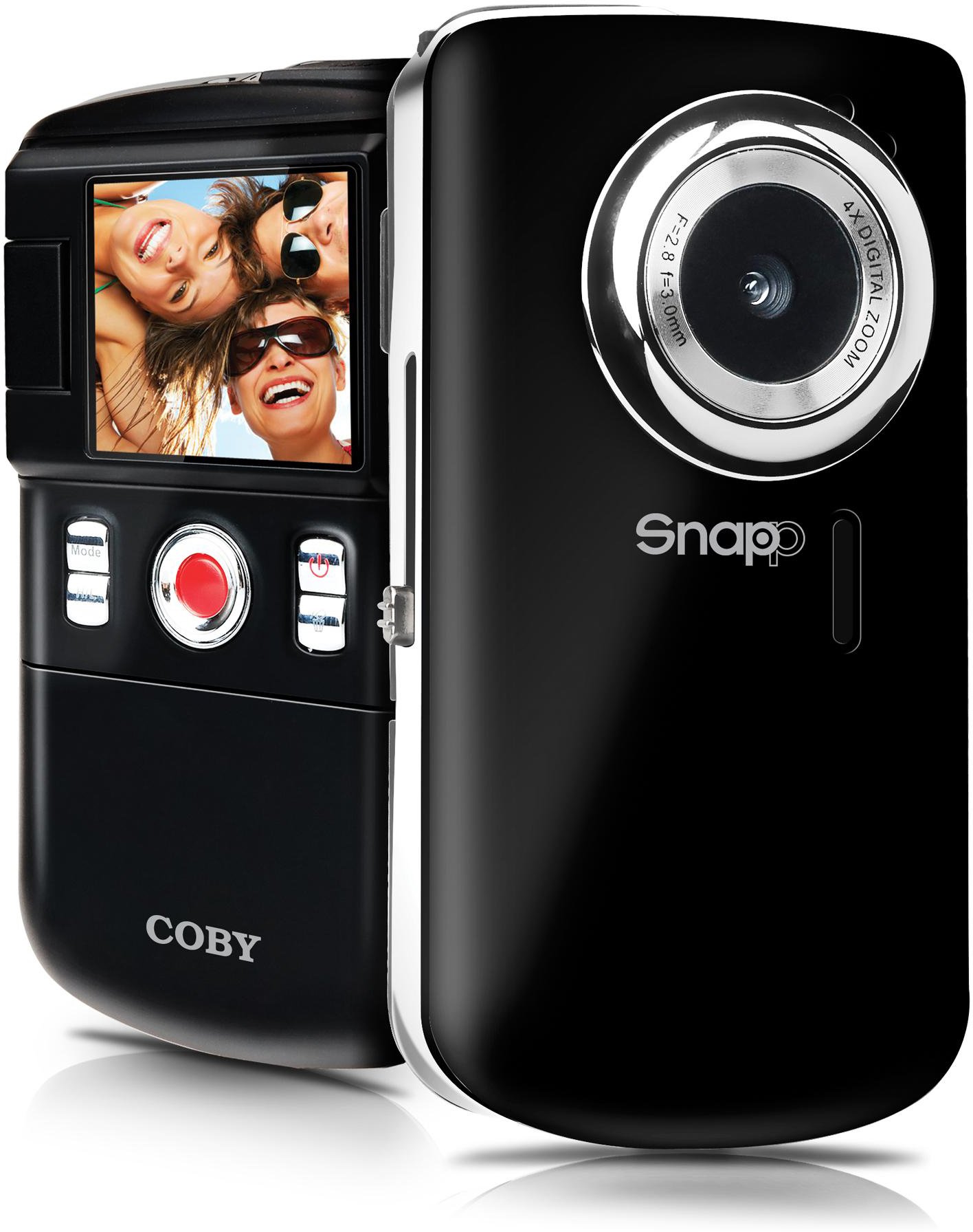
This image displays the front of the Coby SNAPP CAM3002 Mini Camcorder. Visible features include the camera lens, a small microphone opening, and several control buttons on the side, indicating its compact and portable design.
- Објектив камере: Снима видео записе и фотографије.
- микрофон: Снима звук током снимања видеа.
- 1.8-инчни ЛЦД екран: Displays menus, live view, and playback. This screen can flip out for self-portraits.
- Контролна дугмад: For power, mode selection, recording, photo capture, and navigation.
- Одељак за батерије: Holds 2 AA alkaline batteries.
- Утор за СД/СДХЦ картицу: For inserting a memory card (up to 16GB).
- Integrated USB Plug: For direct connection to a computer for file transfer and charging (if rechargeable batteries are used).
- TV Out Port: For connecting to a television using the included cable.
4. Подешавање
4.1. Инсталирање батерија
- Locate the battery compartment cover on the camcorder.
- Slide or lift the cover to open it.
- Insert two (2) AA alkaline batteries, ensuring correct polarity (+/-) as indicated inside the compartment.
- Добро затворите поклопац одељка за батерије.
4.2. Убацивање меморијске картице
The camcorder requires an SD or SDHC memory card (up to 16GB) to store videos and photos.
- Locate the SD/SDHC card slot on the camcorder.
- Insert the memory card with the metal contacts facing down (or as indicated by a diagram near the slot) until it clicks into place.
- To remove the card, gently push it in until it clicks, then release, and it will eject slightly.
4.3. Укључивање/искључивање
- To power on, press and hold the Power button until the LCD screen illuminates.
- To power off, press and hold the Power button again until the screen turns off. The camcorder may also power off automatically after a period of inactivity to conserve battery life.
5. Управљање камкордером
5.1. Избор режима
Use the Mode button to switch between the following functions:
- Режим снимања видео записа: For capturing moving images with sound.
- Still Photo Mode: For taking single photographs.
- Режим репродукције: За реviewing recorded videos and photos.
5.2. Снимање видеа
- Switch to Video Recording Mode.
- Frame your subject using the 1.8-inch LCD screen. The screen can be flipped out for self-recording.
- Press the Record/Capture button to start recording. A red indicator or timer will appear on the screen.
- Press the Record/Capture button again to stop recording.
5.3. Снимање фотографија
- Switch to Still Photo Mode.
- Кадрирајте објекат помоћу ЛЦД екрана.
- Press the Record/Capture button to take a photo. The image will be saved to the memory card.
5.4. Репродукција
- Switch to Playback Mode.
- Use the navigation buttons to browse through your recorded videos and photos.
- Press the Record/Capture button to play a video or view фотографија преко целог екрана.
5.5. Повезивање са телевизором
Можеш view your recorded content on a larger screen using the included TV connection cable.
- Ensure both the camcorder and the television are powered off.
- Connect one end of the TV connection cable to the TV Out port on the camcorder.
- Connect the other end of the cable to the corresponding video (yellow) and audio (white) input jacks on your television.
- Power on the television and select the correct AV input source.
- Power on the camcorder and switch to Playback Mode to view ваши медији.
5.6. Преношење Fileс на рачунар
The camcorder features an integrated USB plug for easy file пренос.
- Уверите се да је камкордер укључен.
- Extend the integrated USB plug from the camcorder.
- Plug the camcorder directly into an available USB port on your computer (Mac or PC).
- Your computer should recognize the camcorder as a removable storage device. You can then access the files (videos and photos) and copy them to your computer.
5.7. Using Muvee Software
The included Muvee software is designed to help you edit your videos and photos, and facilitate uploading them to online platforms.
- Install the Muvee software on your computer using the provided CD or download link.
- Follow the software's on-screen instructions for editing and sharing your media.
6. Одржавање
6.1. Чишћење
- Користите меку, суву крпу за чишћење спољашњости камкордера.
- For the lens and LCD screen, use a specialized lens cleaning cloth and solution to avoid scratches.
- Не користите јаке хемикалије или абразивна средства за чишћење.
6.2. Складиштење
- Када се не користи дуже време, извадите батерије да бисте спречили цурење.
- Store the camcorder in a cool, dry place, away from direct sunlight and extreme temperatures.
КСНУМКС. Решавање проблема
Ако наиђете на проблеме са камкордером, погледајте следеће уобичајене проблеме и решења:
| Проблем | Могуће решење |
|---|---|
| Камкордер се не укључује. | Check if batteries are correctly inserted and fully charged. Replace with fresh AA alkaline batteries if necessary. |
| Poor video or photo quality. | Ensure sufficient lighting in the environment. Hold the camcorder steady during recording/capture. Clean the lens if it appears smudged. |
| Није могуће пренети fileс на рачунар. | Ensure the camcorder is powered on and correctly connected via the integrated USB plug. Try a different USB port on your computer. Verify your computer's operating system recognizes the device. |
| Кратко трајање батерије. | Use fresh, high-quality AA alkaline batteries. Reduce screen brightness if possible (check settings). |
| Грешка меморијске картице. | Ensure the memory card is correctly inserted. Try reformatting the card (this will erase all data). Try a different compatible SD/SDHC card. |
8. Спецификације
| Феатуре | Спецификација |
|---|---|
| Назив модела | ЦАМКСНУМКС |
| Дисплаи | 1.8-inch Full-color LCD Electronic Viewfinder (flips out) |
| Видео Ресолутион | 480p (640x480) |
| Still Photo Resolution | 0.3 МП |
| Дигитални зум | 4x |
| Медији за складиштење | SD/SDHC Memory Card (up to 16GB) |
| Повезивање | Integrated Hi-speed USB 2.0 plug, TV Out (RCA) |
| Извор напајања | 2 к АА алкалне батерије |
| Подржано File Форматс | Video: MP4, Photo: JPEG |
| Посебне карактеристике | Built-in speaker, Muvee software included |
9. Гаранција и подршка
Coby products are manufactured to high-quality standards. This product is covered by a limited warranty against defects in materials and workmanship. Please refer to the warranty card included with your purchase for specific terms and conditions.
For technical support or customer service inquiries, please visit the official Coby webсајт или контактирајте њихову линију за корисничку подршку. Сачувајте рачун као доказ о куповини за потребе гаранције.
Ask a question about this manual
Ask about setup, troubleshooting, compatibility, parts, safety, or missing instructions. Manuals+ will review the question and use this page’s manual context to help answer it.