
1. Увод
This manual provides detailed instructions for the operation and maintenance of your AudioSonic CL-1486 Alarm Clock Radio. Please read this manual thoroughly before use to ensure proper function and safety. Keep this manual for future reference.
2. Важна безбедносна упутства
- Пре употребе уређаја прочитајте сва упутства.
- Do not expose this appliance to rain or moisture to reduce the risk of fire or electric shock.
- Do not expose the appliance to dripping or splashing. No objects filled with liquids, such as vases, shall be placed on the appliance.
- Не блокирајте отворе за вентилацију. Инсталирајте у складу са упутствима произвођача.
- Не постављајте у близини извора топлоте као што су радијатори, грејни регистри, пећи или други уређаји (укључујући ampлифиерс) који производе топлоту.
- Заштитите кабл за напајање од налета или стезања, посебно на утикачима, практичним утичницама и месту на којем излазе из уређаја.
- Користите само додатке/прибор које је навео произвођач.
- Искључите овај уређај из струје током олуја са грмљавином или када га не користите дуже време.
- Refer all servicing to qualified service personnel. Servicing is required when the appliance has been damaged in any way, such as power-supply cord or plug is damaged, liquid has been spilled or objects have fallen into the appliance, the appliance has been exposed to rain or moisture, does not operate normally, or has been dropped.
3. Производ је готовview
The AudioSonic CL-1486 is a versatile alarm clock radio with a large display and projection feature. Familiarize yourself with the main components and controls:
3.1 Фронт View

Слика 1: Предња страна view of the AudioSonic CL-1486, highlighting the 1.8-inch jumbo display.
The front panel features a large, clear 1.8-inch digital display for time, date, and radio frequency. It also shows indicators for alarm status, temperature, and day of the week.
3.2 Врх View - Control Buttons
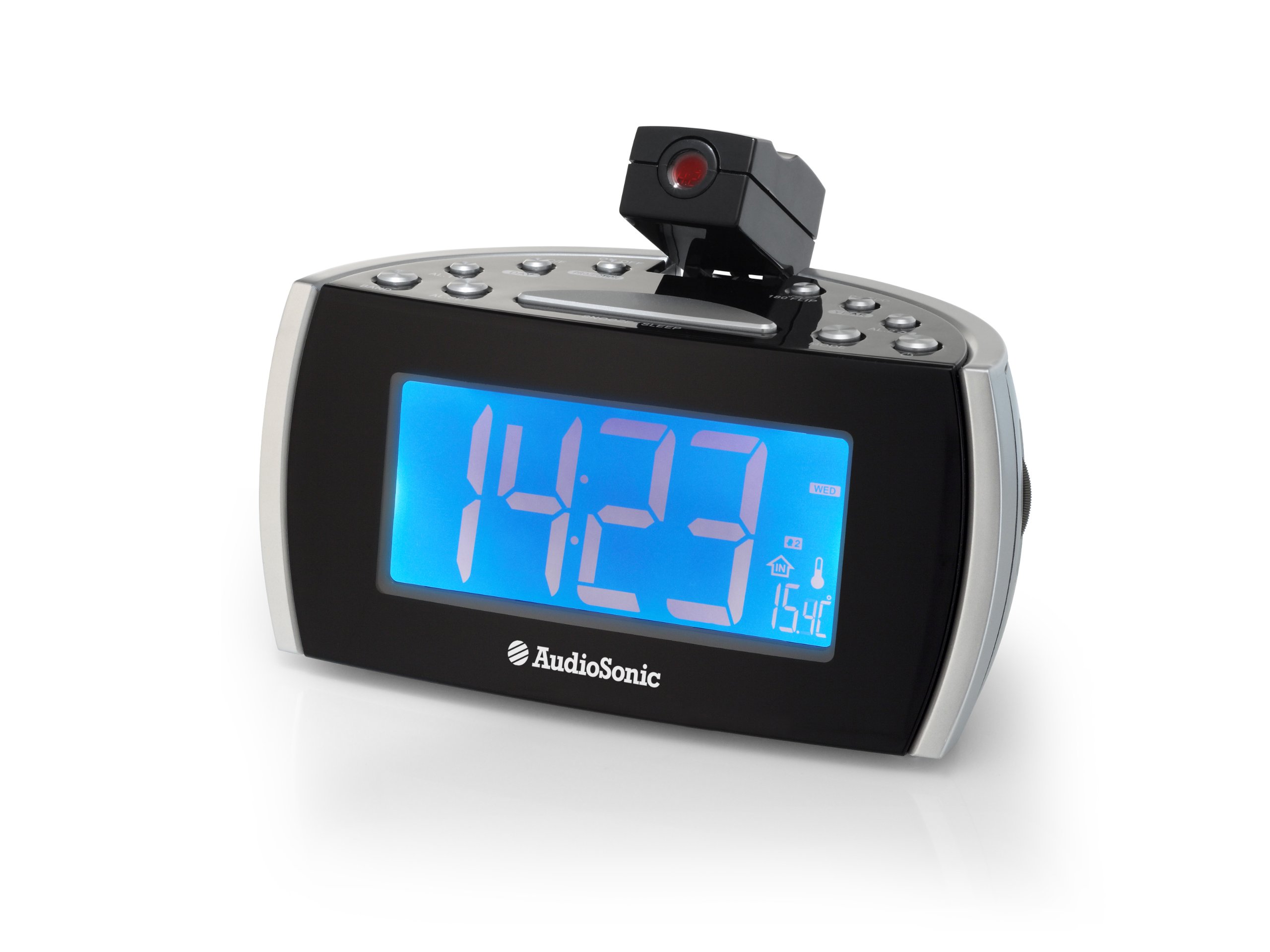
Слика 2: Врх view of the control panel and projection unit.
The top panel houses all functional buttons and the adjustable projection lens. Refer to the table below for button functions:
| Дугме | Функција |
|---|---|
| ОН/ОФФ | Powers the unit on or off (standby). |
| Ц / Ф | Switches temperature display between Celsius and Fahrenheit. |
| ПРОЈЕКЦИЈА | Activates or deactivates the time projection. |
| 180 FLIP | Rotates the projected image by 180 degrees. |
| ДСТ | Прилагођава се летњем рачунању времена. |
| ГОДИНА | Used for setting the year in time/date setting mode. |
| АЛ.1 | Activates/deactivates or selects Alarm 1. |
| ДАН | Used for setting the day in time/date setting mode. |
| АЛ.2 | Activates/deactivates or selects Alarm 2. |
| БАНД | Selects between FM and MW (AM) radio bands. |
| АЛ.СЕТ | Enters alarm setting mode or confirms settings. |
| СНООЗЕ/СЛЕЕП | Press for snooze function; hold for sleep timer. |
| МОДЕ | Cycles through display modes (time, date, temperature) or enters setting modes. |
3.3 Функција пројекције

Figure 3: Time projection in action.
The integrated projector allows you to display the time onto a wall or ceiling. The projection angle can be adjusted manually, and the 180 FLIP button allows for orientation correction.
4. Подешавање
4.1 Прикључак за напајање
- Uncoil the FM antenna wire completely for optimal radio reception.
- Укључите адаптер за наизменичну струју у стандардну зидну утичницу.
- Уређај ће се укључити и екран ће се осветлити.
4.2 Почетно подешавање времена
- Притисните и држите МОДЕ дугме док приказ времена не почне да трепери.
- Користите ГОДИНА и ДАН дугмад за подешавање сата и минута. Притисните МОДЕ to cycle between setting hours, minutes, year, and day.
- Притисните МОДЕ again to confirm the settings and exit time setting mode.
5. Упутство за употребу
5.1 Setting the Alarm (AL.1 / AL.2)
The CL-1486 features two independent alarms with a weekend mode function.
- Притисните тастер АЛ.СЕТ button once to enter Alarm 1 setting mode. The AL.1 indicator will flash.
- Користите ГОДИНА и ДАН buttons to set the desired alarm time (hour and minute).
- Притисните АЛ.СЕТ again to select the alarm source (Buzzer or Radio). Use ГОДИНА or ДАН бирати.
- Притисните АЛ.СЕТ a third time to set the weekend mode (on/off). When active, the alarm will not sound on Saturdays and Sundays.
- Притисните АЛ.СЕТ a fourth time to confirm Alarm 1 settings.
- Repeat steps 1-5 for Alarm 2 by pressing АЛ.СЕТ twice initially to enter Alarm 2 setting mode.
- To activate or deactivate an alarm, press the respective АЛ.1 or АЛ.2 button. The alarm indicator will appear/disappear on the display.
5.2 Радио операције
- Притисните тастер ОН/ОФФ дугме за укључивање радија.
- Притисните тастер БАНД button to switch between FM and MW (AM) bands.
- To tune to a station, press and hold the ГОДИНА or ДАН button for automatic scanning to the next available station. For manual tuning, short press the ГОДИНА or ДАН дугме.
- Adjust the volume using the volume control knob, typically located on the side of the unit.
- Да бисте искључили радио, притисните ОН/ОФФ дугме.
5.3 Time Projection
- Притисните тастер ПРОЈЕКЦИЈА button to turn the time projection on or off.
- Adjust the angle of the projection lens manually to direct the time onto a wall or ceiling.
- If the projected image is upside down, press the 180 FLIP button to rotate it.
- To adjust the clarity of the projected image, rotate the focus ring around the projection lens (if available).
5.4 Функције одлагања и спавања
- Одгода: Када се огласи аларм, притисните велико СНООЗЕ/СЛЕЕП bar to temporarily silence the alarm. The alarm will sound again after a few minutes (default snooze time).
- Мерач спавања: Док радио свира, притисните и држите СНООЗЕ/СЛЕЕП bar to activate the sleep timer. Repeated presses will cycle through available sleep times (e.g., 90, 60, 30, 15 minutes, OFF). The radio will automatically turn off after the selected duration.
6. Одржавање
To ensure the longevity and proper functioning of your AudioSonic CL-1486, follow these simple maintenance guidelines:
- Чишћење: Wipe the unit with a soft, dry cloth. Do not use abrasive cleaners, waxes, or solvents as they may damage the cabinet.
- прашина: Keep the unit free from dust, especially the projection lens, to maintain clear projection.
- Окружење: Избегавајте постављање уређаја на директну сунчеву светлост, близу извора топлоте или у просторијама са високом влажношћу.
КСНУМКС. Решавање проблема
| Проблем | Могући узрок | Решење |
|---|---|---|
| Нема напајања / Екран је искључен | Кабл за напајање није правилно повезан. | Ensure the AC power adapter is securely plugged into the unit and a working wall outlet. |
| Аларм се не оглашава | Аларм није активиран или је погрешно подешен. | Check that the AL.1 or AL.2 indicator is visible on the display. Verify alarm time and source settings. Ensure volume is not set to minimum if radio alarm is selected. |
| Лош радио пријем | Antenna not extended or unit is in a poor reception area. | Fully extend the FM antenna wire. Reposition the unit for better reception. |
| Projection is unclear or distorted | Projection lens is out of focus or dirty. | Adjust the focus ring around the projection lens. Clean the lens with a soft, dry cloth. Ensure the projection surface is flat and clear. |
| Време/датум је нетачан | Time/Date not set or power interruption. | Reset the time and date following the instructions in section 4.2. |
8. Спецификације
- Број модела: ЦЛ-1486
- Бренд: АудиоСониц
- Тип приказа: Дигитал
- Величина екрана: 1.8 инча
- Боја: Црно
- Извор напајања: Цордед Елецтриц
- Димензије производа: 18.5 к 9.5 к 9 цм
- Тежина: 630 г
- Посебне карактеристике: Projection, Two Alarm Times, Weekend Mode, Digital Frequency Display
- Тип монтаже: Таблетоп
- Унутрашња/спољашња употреба: Индоор
9. Гаранција и подршка
За информације о гаранцији и корисничку подршку, погледајте документацију коју сте добили приликом куповине или контактирајте продавца. Сачувајте доказ о куповини за евентуалне рекламације у вези са гаранцијом.