
1. Увод
This manual provides essential instructions for the safe and efficient operation of your Sharp CD-DH950P 240W Mini-Component System. This system features a 5-disc CD changer, a cassette deck, an iPod/iPhone docking station, a USB host for digital audio playback, and an AM/FM tuner. Please read this manual thoroughly before using the system and retain it for future reference.
2. Безбедносне информације
- Извор напајања: Уређај повежите само на наизменичну утичницу наведене јачинеtage.
- вентилација: Обезбедите одговарајућу вентилацију. Не блокирајте вентилационе отворе.
- Вода и влага: Do not expose the unit to rain, moisture, or dripping/splashing liquids.
- топлота: Држите уређај даље од извора топлоте као што су радијатори, грејни уређаји, шпорети или други уређаји који производе топлоту.
- Чишћење: Unplug the unit from the wall outlet before cleaning. Use a soft, dry cloth.
- Сервисирање: Не покушавајте сами да сервисирате овај производ. Све сервисирање препустите квалификованом сервисном особљу.
3. Садржај пакета
Проверите да ли ваш пакет садржи следеће ставке:
- Main Unit (CD-DH950P)
- Леви звучник
- Десни звучник
- Даљински управљач са батеријама
- АМ кружна антена
- ФМ жичана антена
- Повер Цорд
4. Подешавање
4.1 Повезивање звучника
Connect the speaker wires from the main unit to the corresponding terminals on the back of each speaker. Ensure correct polarity (red to red, black to black) for optimal sound quality. The left speaker connects to the left speaker output, and the right speaker to the right speaker output.
4.2 Connecting the Antennas
- ФМ антена: Connect the supplied FM wire antenna to the FM antenna terminal on the rear of the main unit. Extend the wire for better reception.
- АМ антена: Connect the supplied AM loop antenna to the AM antenna terminals on the rear of the main unit. Position the antenna for best reception.
4.3 Прикључак за напајање
Plug the power cord into the AC IN jack on the rear of the main unit, then plug the other end into a standard AC wall outlet.
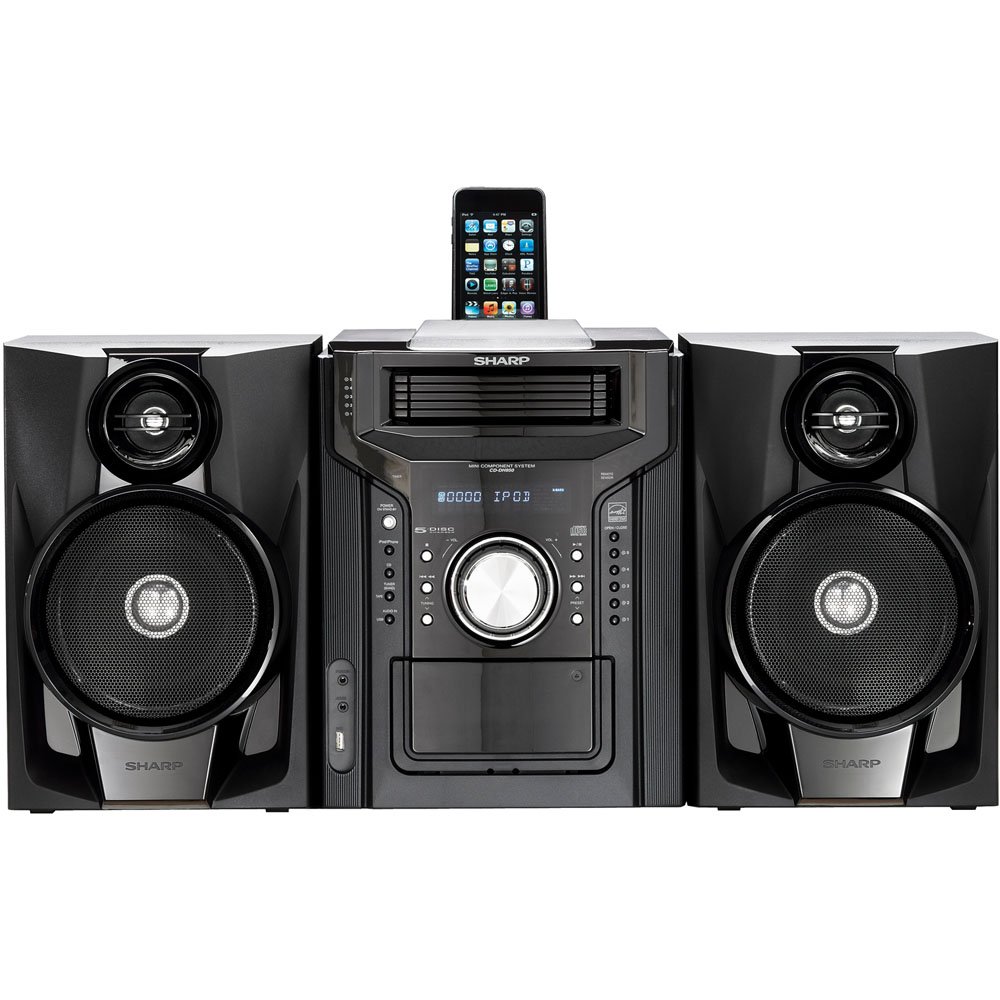
Слика 4.3.1: Свеукупно view of the Sharp CD-DH950P Mini-Component System, showing the main unit flanked by two speakers, with an iPhone docked on top of the main unit.
5. Упутство за употребу
5.1 Укључивање/искључивање и контрола јачине звука
- Притисните тастер ПОВЕР дугме на предњој плочи или даљинском управљачу да бисте укључили или искључили уређај.
- Ротирајте ВОЛУМЕ дугме на предњој плочи или користите ВОЛ +/- дугмад на даљинском управљачу да бисте подесили ниво звука.
5.2 Репродукција ЦД-а
This system features a 5-disc CD changer.
- Притисните тастер ОПЕН/ЦЛОСЕ дугме да бисте отворили лежиште за ЦД.
- Place up to five CDs on the disc trays, label side up.
- Притисните ОПЕН/ЦЛОСЕ поново да затворите послужавник.
- Притисните тастер CD button to select the CD function.
- Притисните тастер ПЛАИ/ПАУСЕ дугме за почетак репродукције.
- Користите СКИП buttons to navigate between tracks or discs.
5.3 Cassette Deck Operation
- Притисните тастер TAPE OPEN/CLOSE button to open the cassette deck.
- Убаците касету.
- Притисните тастер ТАПЕ button to select the cassette function.
- Притисните ПЛАИ да бисте започели репродукцију.
- To record, ensure the source is selected (e.g., CD, Tuner) and press the РЕЦОРД button on the cassette deck.
5.4 iPod/iPhone Docking
The system includes a top-mounted docking slot for compatible iPod and iPhone devices (30-pin connector).
- Carefully place your iPod or iPhone into the docking slot.
- The system will automatically switch to iPod/iPhone mode or you may need to press the иПод/иПхоне дугме.
- Use the system's controls or your device's controls to play music. The device will also charge while docked.
5.5 USB Host Playback
Connect a USB storage device containing MP3 or WMA audio files to the USB port on the front panel.
- Уметните УСБ уређај у УСБ порт.
- Притисните тастер УСБ button to select the USB function.
- Use the playback controls to navigate and play files.
5.6 AM/FM Tuner
- Притисните тастер ТЈУНЕР дугме да бисте изабрали АМ или ФМ радио.
- Користите ТУНИНГ +/- дугмад за ручно подешавање станице.
- To auto-scan, press and hold the ТУНИНГ +/- дугмад.
- To store a preset, tune to the desired station, then press МЕМОРИ након чега следи унапред подешени број.
5.7 Аудио улаз
Connect an external audio device (e.g., MP3 player, smartphone) to the AUDIO IN jack on the front panel using a 3.5mm stereo cable.
- Connect your device to the AUDIO IN jack.
- Притисните тастер АУДИО УЛАЗ button to select this source.
- Контролишите репродукцију са повезаног уређаја.
6. Одржавање
6.1 Чишћење јединице
Wipe the exterior of the unit with a soft, dry cloth. Do not use abrasive cleaners, waxes, or solvents. Ensure the unit is unplugged before cleaning.
6.2 CD and Cassette Care
- Handle CDs by their edges to avoid fingerprints and scratches. Clean discs with a soft, lint-free cloth from the center outwards.
- Store cassette tapes away from strong magnetic fields and direct sunlight.
КСНУМКС. Решавање проблема
| Проблем | Могући узрок | Решење |
|---|---|---|
| Нема струје | Кабл за напајање није повезан; утичница је неисправна | Уверите се да је кабл за напајање добро прикључен; покушајте са другом утичницом |
| Нема звука | Volume too low; Speakers not connected; Incorrect source selected | Increase volume; Check speaker connections; Select correct input source |
| CD се не репродукује | Disc inserted incorrectly; Disc is dirty or scratched | Insert disc correctly (label side up); Clean or replace disc |
| Лош радио пријем | Antenna not positioned correctly; Weak signal | Adjust position of AM/FM antennas; Try auto-tuning or manual fine-tuning |
| iPod/iPhone not charging/playing | Device not properly docked; Device not compatible (e.g., newer connector) | Re-dock the device; Note that this system uses a 30-pin connector, newer devices may require an adapter (not included) |
8. Спецификације
- Бренд: Схарп
- Модел: CD-DH950P
- Укупна излазна снага: 240 Watts RMS (85W/ch FTC)
- Конфигурација звучника: 2.1 Цханнел
- Подржани аудио формати: ЦД, МП3, ВМА
- Однос сигнала и шума: 100 дБ
- Компатибилни уређаји: MP3 Player, Smartphone (via 30-pin dock or USB/Audio In)
- Димензије (Д к Ш к В): 27.6 к 13.6 к 13.5 инча
- Тежина артикла: 24.4 фунти
- УПЦ: 074000369863, 074000369290
9. Информације о гаранцији
This product is covered by a 1-year limited warranty from the date of purchase. Please refer to the warranty card included with your product for full terms and conditions, or contact Sharp customer service for details.
10. Подршка
For further assistance, technical support, or service inquiries, please contact Sharp customer service. Contact information can typically be found on the Sharp official webсајту или у документацији која се испоручује уз ваш производ.