
Увод
This manual provides detailed instructions for the installation, operation, and maintenance of your BOSS Audio Systems 637UA Single-DIN CD MP3 Player Receiver. Please read this manual thoroughly before using the product to ensure proper function and to prevent damage.
The 637UA is designed to provide high-quality audio playback from various sources, including CDs, USB devices, MP3 players, and AM/FM radio. It features a detachable front panel for security.
Кључне карактеристике
- 60 Watts x 4 Max Power, with Balance/Fader/Bass/Treble controls and Preset built-in EQ.
- Supports playback of CD/USB, MP3 files, FM/AM radio, and smartphones.
- Compatible with audio output from smartphones and MP3 players via USB and Auxiliary Inputs.
- Features Front Pre Amp Излази.
- Equipped with a Detachable Front Panel for enhanced security.
Шта је у кутији
- BOSS Audio Systems 637UA Single-DIN In-dash CD Receiver with Detachable Front Panel
- Електрична инсталација
- Монтажни хардвер
- Кориснички приручник (овај документ)
Подешавање и инсталација
Proper installation is crucial for optimal performance and safety. If you are unsure about any steps, consult a qualified professional.
Ожичење
The receiver requires three main power connections to function correctly:
- жута жица: Connect to a constant +12 VDC power source, such as the positive (+) post of the vehicle's battery. This provides continuous power for memory retention.
- Црвена жица: Connect to a switched +12 VDC power source, typically the Accessory (ACC) line of the ignition key. This allows the unit to turn on and off with the vehicle's ignition.
- Црна жица: Connect to a chassis ground (-). This provides the necessary ground connection for the unit.
Важно: All three wires (Yellow, Red, and Black) must be correctly connected to their respective terminals for the radio to power on. If only one of the +12VDC wires (Yellow or Red) is connected along with the Black ground wire, the unit will not turn on.
For testing the unit outside of a vehicle, ensure both the Red and Yellow wires receive +12VDC, and the Black wire is connected to a reliable ground source.

Слика: Позади view of the receiver with the wiring harness. This image illustrates the various color-coded wires for power, ground, and speaker connections.
Одвојиви предњи панел
The front panel of the 637UA is detachable for security purposes. To detach, press the release button (usually located on the left side of the panel) and gently pull the panel away from the main unit. To reattach, align the panel with the main unit and push until it clicks into place.
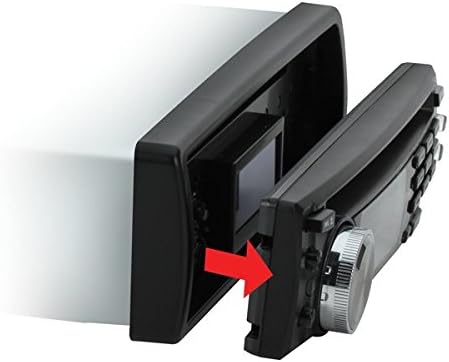
Image: Detaching the front panel. An arrow indicates the direction to pull the panel for removal.
Упутство за употребу
This section covers the basic operation of your 637UA receiver.

Слика: Фронт view of the 637UA receiver. This image highlights the display, control knob, and various buttons for operation.
Укључивање/искључивање
Притисните тастер ПОВЕР button (usually the volume knob) to turn the unit on or off. When connected correctly, the unit will also power on/off with the vehicle's ignition.
Одабир извора
Притисните тастер МОДЕ button to cycle through available audio sources: FM/AM Radio, CD, USB, and Auxiliary Input.
Рад радија (FM/AM)
- подешавање: Користите ТУНЕ buttons (usually forward/backward arrows) to manually tune to a station or press and hold for automatic seek tuning.
- Унапред подешене станице: Save your favorite stations by tuning to the desired frequency, then pressing and holding one of the numbered preset buttons (1-6). To recall a preset, simply press the corresponding button.
- Избор опсега: Притисните тастер БАНД button to switch between FM1, FM2, FM3, AM1, and AM2 bands.
CD/USB/MP3 Playback
- ЦД: Insert a CD into the disc slot. Playback will begin automatically.
- УСБ: Insert a USB flash drive into the USB port. The unit will automatically switch to USB mode and begin playing compatible audio files (e.g., MP3, WMA).
- Помоћни улаз: Connect your smartphone or MP3 player to the 3.5mm AUX input jack using an audio cable. Select AUX mode using the МОДЕ дугме.
- Контрола стазе: Користите СКИП buttons (forward/backward arrows) to change tracks. Press and hold for fast forward/rewind.
- Пусти/паузирај: Притисните тастер ПЛАИ/ПАУСЕ дугме за паузирање или наставак репродукције.
Аудио подешавања
Притисните тастер АУДИО or МЕНУ button (often the volume knob press) to access audio settings such as Bass, Treble, Balance, and Fader. Rotate the volume knob to adjust values. The unit also features a Preset Built-in EQ; press the EQ button to cycle through different equalization modes (e.g., Pop, Rock, Classic, Flat).
Одржавање
- Чишћење јединице: Use a soft, dry cloth to clean the unit's surface. Do not use abrasive cleaners or solvents.
- Detachable Panel Care: When the front panel is detached, store it in a protective case to prevent scratches or damage. Avoid touching the electrical contacts on the back of the panel.
- ЦД Царе: Држите ЦД-ове за ивице. Држите их чистим и без огреботина. Користите меку крпу која не оставља влакна да бисте обрисали ЦД-ове од средине ка споља.
- УСБ порт: Држите УСБ порт чистим од прашине и прљавштине.
Решавање проблема
If you encounter issues with your 637UA receiver, refer to the following common problems and solutions:
| Проблем | Могући узрок | Решење |
|---|---|---|
| Јединица се не укључује. | Incorrect wiring connections (Yellow, Red, or Black wires). | Verify that the Yellow wire has constant +12VDC, the Red wire has switched +12VDC, and the Black wire is connected to ground. All three must be correctly connected. |
| Нема звука. | Volume too low, mute activated, or speaker wiring issues. | Increase volume. Check if mute is active. Inspect speaker wiring for proper connection and shorts. |
| CD/USB playback skips or stops. | Damaged CD, incompatible file format, or unstable USB connection. | Clean or replace CD. Ensure USB files are MP3/WMA format. Reinsert USB drive securely. |
| Радио пријем је лош. | Antenna not connected or damaged, or weak signal area. | Проверите везу антене. Покушајте да подесите јачу станицу. |
| Front panel does not attach securely. | Препрека или неусклађеност. | Ensure no debris is blocking the connection. Align the panel carefully and push firmly until it clicks. |
Спецификације
| Феатуре | Детаљ |
|---|---|
| Бранд | БОСС Аудио системи |
| Број модела | 637УА |
| Технологија повезивања | Помоћни, УСБ |
| Компатибилни уређаји | Паметни телефон, звучник |
| Тип конектора | 3.5 мм прикључак, УСБ |
| Боја | Црно |
| Тежина артикла | 3.25 фунти |
| Излазна снага (макс.) | 60 вати к 4 канала |
| Тотал Оутпут Ватtage | 240 Ваттс |
| Тип аудио излаза | Унутрашње |
| Подржани аудио формат | WMA (and MP3 via USB/CD) |
| Уграђени медији | Single-DIN In-dash CD Receiver with Detachable Front Panel |
Гаранција и подршка
Овај производ је покривен а 3 Year BOSS Audio Platinum Online Dealer WarrantyМолимо вас да сачувате доказ о куповини за потребе гаранције.
For technical support, troubleshooting assistance beyond this manual, or warranty inquiries, please contact BOSS Audio Systems customer service. Refer to the official BOSS Audio Systems webсајт за најновије контакт информације.
You can visit the official BOSS Audio Systems store for more information: BOSS Audio Systems Store