
1. Увод
This manual provides detailed instructions for the safe and effective operation of the UNI-T UT360 Series Anemometers, including models UT361 and UT362. These devices are designed for precise measurement of wind speed, wind count (CMM/CFM), and temperature. Please read this manual thoroughly before using the instrument and keep it for future reference.

Image 1.1: The UNI-T UT361 Anemometer being used in an industrial environment to measure airflow.
2. Безбедносне информације
To ensure safe operation, observe the following precautions:
- Do not operate the device in explosive atmospheres or near flammable gases.
- Избегавајте излагање уређаја екстремним температурама, влажности или директној сунчевој светлости.
- Држите уређај сувим. Не урањајте га у воду или друге течности.
- Use only the specified battery type (9V battery).
- Не покушавајте да поправљате или модификујете уређај. Све сервисирање препустите квалификованом особљу.
- Извадите батерију ако уређај неће бити коришћен дуже време како бисте спречили цурење.
3. Садржај пакета
Приликом распакивања, проверите да ли су све доле наведене ставке присутне и да нису оштећене:
- UNI-T UT360 Series Anemometer (Main Unit)
- Wind Speed Sensor (Vane Probe)
- УСБ интерфејс кабл
- PC Software CD (for UT362 model)
- Торба за ношење
- 9V Battery (GF22)
- Упутство за употребу на енглеском језику (овај документ)
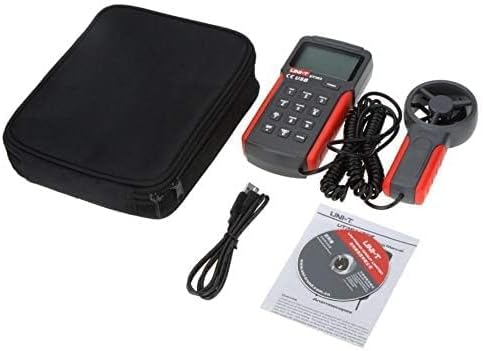
Image 3.1: Contents of the UNI-T UT360 Series Anemometer package, including the main unit, vane probe, USB cable, software CD, carrying bag, and user manual.
4. Производ је готовview
The UNI-T UT360 Series Anemometers feature a clear LCD display and a user-friendly keypad for various measurement functions. The device includes a separate vane probe for accurate wind speed and temperature readings.
4.1 Предња плоча и екран
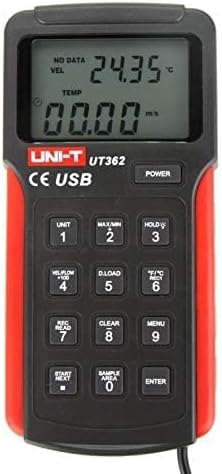
Слика 4.1: Предња страна view of the UT362 Anemometer, highlighting the LCD display and control buttons.
The LCD displays measurement values for wind velocity (VEL), temperature (TEMP), and wind count (FLOW). Indicators for data storage, MAX/MIN mode, and low battery are also present. The keypad includes buttons for power, unit selection, data hold, data loading, recording, clearing, menu access, and navigation.
4.2 Rear Panel and Stand

Слика 4.2: Позади view of the anemometer, showing the integrated kickstand for desktop use.
The rear of the device features a battery compartment and an integrated kickstand for convenient hands-free operation on a flat surface.
5. Подешавање
5.1 Инсталација батерије
- Пронађите поклопац одељка за батерију на задњој страни уређаја.
- Slide the cover open or remove it as indicated.
- Insert a new 9V battery (GF22) into the compartment, observing the correct polarity (+/-).
- Вратите поклопац одељка за батерије безбедно.
5.2 Connecting the Vane Probe
Connect the cable from the wind speed sensor (vane probe) to the designated port on the main unit. Ensure the connection is firm to prevent intermittent readings.
6. Упутство за употребу
6.1 Укључивање/искључивање
Притисните тастер ПОВЕР button to turn the device on. Press and hold the ПОВЕР button again to turn it off. The device features an auto power-off function after approximately 10 minutes of inactivity to conserve battery life.
6.2 Measurement Modes and Units
- Wind Speed Units: Притисните тастер УНИТ button to cycle through available wind speed units (e.g., m/s, ft/min, knots, km/h, mph).
- Јединице температуре: Притисните тастер °Ф/°Ц дугме за пребацивање између приказа температуре у Целзијусима и Фаренхајтима.
- Wind Count (CMM/CFM): Притисните тастер VEL/FLOW x 100 button to switch between wind velocity and wind count measurements.
6.3 Data Hold, MAX/MIN Measurement
- Задржавање података: Притисните тастер ХОЛД дугме да замрзнете тренутно очитавање на екрану. Притисните поново да бисте отпустили.
- МАКС/МИН: Притисните тастер МАКС/МИН button to display the maximum or minimum recorded values during a measurement session. Cycle through MAX, MIN, and current readings by pressing the button repeatedly.
6.4 Data Storage and Recall (UT362 Model)
The UT362 model supports data storage of up to 2044 sets. Refer to the specific instructions below for data logging and recall:
- Постављање Сample Area: Користите SAMPLE AREA button to define the area for wind count calculations.
- Подаци о снимању: Притисните REC/READ to enter recording mode. Use START/NEXT и ЕНТЕР to manage data recording.
- Призивање података: Притисните REC/READ to enter recall mode. Use START/NEXT да прегледате сачуване податке.
- Clearing Data: Притисните тастер ЦЛЕАР button to delete stored data.
- Преузимање података: Connect the device to a PC using the USB cable and the provided software (for UT362) to download stored data. Press D.LOAD to initiate data transfer.

Image 6.1: The UNI-T UT361 Anemometer displayed on a laboratory bench, demonstrating its professional application.
7. Одржавање
7.1 Чишћење
Wipe the device casinг са меким, дamp cloth. Do not use abrasive cleaners or solvents. Ensure the vane probe is free from dust and debris for accurate readings.
7.2 Замена батерије
When the low battery indicator appears on the display, replace the 9V battery as described in Section 5.1. Dispose of used batteries responsibly.
7.3 Складиштење
If the device is not used for an extended period, remove the battery and store the anemometer in its carrying bag in a cool, dry place, away from direct sunlight and extreme temperatures.
КСНУМКС. Решавање проблема
| Проблем | Могући узрок | Решење |
|---|---|---|
| Уређај се не укључује. | Мртва или неправилно инсталирана батерија. | Replace the 9V battery, ensuring correct polarity. |
| Нетачна очитавања брзине ветра. | Vane probe obstructed or damaged; incorrect unit selected. | Check the vane for obstructions. Ensure the correct unit is selected using the УНИТ дугме. |
| Display shows "Lo Batt". | Ниска запремина батеријеtage. | Одмах замените батерију од 9V. |
| Data download fails (UT362). | USB connection issue; software not installed or running. | Ensure USB cable is securely connected. Verify PC software installation and operation. |
9. Спецификације
The UNI-T UT360 Series Anemometers offer robust performance for various environmental measurements. Key specifications are detailed below:
9.1 Опште спецификације
- Бренд: УНИ-Т
- Материјал: Пластика
- Снага: 9V battery (as indicated by "Voltage: 9 Volts" in specifications)
- Нето тежина производа: 375 грама
- Димензије артикла (Д к Ш к В): 3.07 к 1.18 к 6.38 инча
- Укључене компоненте: English user manual, USB cable, carrying bag, software CD (for UT362)
9.2 Могућности мерења
- Функције мерења: Wind Speed (Velocity), Wind Count (CMM/CFM), Temperature
- Wind Count Measurement Range: 0.001 ~ 9999 x 100
- Data Features: MAX/MIN/Real-time measurement, Data Hold
- Складиштење података: 2044 sets (UT362 model)
- Повезивање: USB interface (UT362 model)
- Приказ: LCD with backlight, showing VEL, TEMP, FLOW indicators
- Аутоматско искључивање: Да
- Индикација слабе батерије: Да
Note: Specific measurement ranges and accuracies may vary between models (UT361 and UT362). Refer to the product packaging or official UNI-T documentation for precise model-specific details.
10. Гаранција и подршка
UNI-T products are manufactured to high quality standards. For warranty information, technical support, or service, please refer to the warranty card included with your product or visit the official UNI-T website. Do not attempt to open or repair the device yourself, as this may void the warranty.
For further assistance, please contact UNI-T customer service through their official channels.